I've been playing with LibraryThing a bit. It's a web app for cataloging your books. It seems pretty good.
I had written a small library application with Suneido but it was a lot of working entering books. So I decided I should be scanning the barcodes and looking them up. Buying a scanner was tough because there are too many kinds and I didn't know what would be best. I ended up buying an AS8155 from Custom Sensors Inc. It's a CCD scanner with a USB interface. I have no idea if this was the right choice but so far it's been working well.
I started to add barcode lookup to my Suneido application, using isbndb.com and got it more or less working. But then I thought it would be nice to have cover images from Amazon. So I started looking at Amazon's web services.
Then I realized that, interesting as it might be, this wasn't actually getting my books cataloged! So I thought I should look for an existing application, which led me to LibraryThing. There are quite a few choices in this area but it looked reasonable.
You can sign up for free and enter up to 200 books. I set up an account for work and scanned a bunch of books that happened to be handy (some recent, some not). You can see the results at: http://www.librarything.com/catalog.php?view=apmckinlay (at least I think you'll be able to see them since I made it public).
The barcode lookup works 95% of the time. I had a few older books with no barcode, a few books I bought in Asia it didn't find, and a few I had to use amazon.co.uk to find. And a few novels at home where the UPC code on the barcode instead of the ISBN (confused me for a bit since they print the ISBN number as well).
But even when the barcode lookup fails it's pretty good at finding books from title and/or author, even partial.
So far the only complaint is that I can't figure out how to search for C++. It keeps wanting to strip out the "++", even if I enter it in quotes (it seems to take the quotes literally).
I like the ability to "tag" the books (although I haven't used it yet). From del.icio.us and gmail I've gotten to like tagging stuff.
LibraryThing has other features that I may use - like recommendations - and some that I probably won't - like social stuff. But so far it looks good. If you're looking for this kind of thing, I'd recommend it.
For a discussion of alternatives see this discussion from Joel Spolsky's blog
Thursday, October 26, 2006
Wednesday, October 18, 2006
iTunes + iPod Annoyances
I started up iTunes to copy some new music to my 30gb Video iPod. It told me an update to iTunes 7.0.1 was available. I downloaded and installed it. So far no problems. Then it told me an update to iPod 1.2 was available. I said OK and it displayed a message box saying it was updating. The problem is it never finished so I killed iTunes (the only way out, as far as I could tell). Maybe I didn't wait long enough but it didn't seem like it should take that long.
I restart iTunes but now it doesn't recognize my iPod at all!!! Now what? I google for relevant information. It looks like other people have had the problem but there doesn't seem to be a good solution. Finally Google points me to a post in an Apple RSS feed that says you have to have Terminal Services running in order for iTunes to recognize your iPod. (I had to subscribe to the feed and dig through old posts to find it.) Sure enough I had Terminal Services disabled via msconfig. (In a vain attempt to reduce the crap that's running all the time.)
When iTunes recognized my iPod it again offered to update. I said no and finally managed to achieve my original goal - to get some new music onto my iPod.
Why does iTunes need Terminal Services? And if if needs it, why doesn't it check for it and tell you what the problem is instead of silently ignoring your iPod? And why doesn't Apple have this information posted more prominently?
iPod + iTunes is supposed to be for everyone. You wonder how the non-techie is supposed to cope with these kinds of problems. Of course, a non-techie wouldn't have terminal services disabled. Unless their techie friend had done it for them...
I see the new version of iTunes will get cover images for you, finally. But you have to have an iTunes account! So if I don't want an iTunes account I still have to get covers manually!
PS. On the positive side, next time I tried the iPod update it worked.
I restart iTunes but now it doesn't recognize my iPod at all!!! Now what? I google for relevant information. It looks like other people have had the problem but there doesn't seem to be a good solution. Finally Google points me to a post in an Apple RSS feed that says you have to have Terminal Services running in order for iTunes to recognize your iPod. (I had to subscribe to the feed and dig through old posts to find it.) Sure enough I had Terminal Services disabled via msconfig. (In a vain attempt to reduce the crap that's running all the time.)
When iTunes recognized my iPod it again offered to update. I said no and finally managed to achieve my original goal - to get some new music onto my iPod.
Why does iTunes need Terminal Services? And if if needs it, why doesn't it check for it and tell you what the problem is instead of silently ignoring your iPod? And why doesn't Apple have this information posted more prominently?
iPod + iTunes is supposed to be for everyone. You wonder how the non-techie is supposed to cope with these kinds of problems. Of course, a non-techie wouldn't have terminal services disabled. Unless their techie friend had done it for them...
I see the new version of iTunes will get cover images for you, finally. But you have to have an iTunes account! So if I don't want an iTunes account I still have to get covers manually!
PS. On the positive side, next time I tried the iPod update it worked.

Monday, August 28, 2006
Cool gadgets += Chumby
Chumby Industries
I want one! (or two or three)
It would make a good build/test monitor. Or an electronic picture display for my mother. Or any number of other things.
I want one! (or two or three)
It would make a good build/test monitor. Or an electronic picture display for my mother. Or any number of other things.
Labels:
chumby
Friday, August 25, 2006
Internet Explorer in Firefox !
Check out this Firefox add on that lets you use IE to access Firefox unfriendly sites within a tab in Firefox!
https://addons.mozilla.org/firefox/1419/
https://addons.mozilla.org/firefox/1419/
Friday, August 11, 2006
Keeping Up
I continue to be disappointed with how little most technical people do to "keep up". To me this is a profession that changes fast and you need to work to keep your skills and knowledge current.
(Actually, that's not totally true. I'm just addicted to learning (and hopefully applying) new stuff and I can't understand why other people don't feel the same!)
I understand that people are busy at work and have lives outside of work. But it's like not having time to service your car - sooner or later it's going to get you in trouble (or cost you money).
Here are my suggestions for keeping up:
Also, I think it's important not to have too narrow a focus. Regardless of what you actually work on, you can get valuable ideas from other fields. If you develop in Windows, take a look at Linux. If you use J2EE, take a look at Rails. Learn from biology and sociology. Have you read Godel Escher Bach?
Try to get a mix of specific technologies (like .Net) and general concepts (like Refactoring) Unless you have a specific need for it for your job, my personal opinion would be not to bother with "certifications".
Keeping up doesn't always mean the bleeding edge either. You can learn a lot from the "classics" like Mythical Man Month or Structure and Interpretation of Computer Programs.
Books can be expensive, but if your employer has any sense they'll be happy to pay.
Personal projects are a little different from reading, but equally important. After all, in the end, it's not what you know that counts, it's what you do with it. Google encourages their engineers to spend 20% of their time (1 day a week) on their own projects. Whether or not your employer does this, working on your own projects is a great way to learn. And maybe even produce something useful! (A lot of Google's products started out as personal projects.)
(Actually, that's not totally true. I'm just addicted to learning (and hopefully applying) new stuff and I can't understand why other people don't feel the same!)
I understand that people are busy at work and have lives outside of work. But it's like not having time to service your car - sooner or later it's going to get you in trouble (or cost you money).
Here are my suggestions for keeping up:
- read technical books (e.g. one per month)
- read technical magazines (even the ads can tell you things)
- subscribe to a few blogs (but not 100!)
- listen to technical podcasts (e.g. during commutes or walks)
- work on a personal project (something you choose)
- write your own blog (writing is an important skill that requires practice)
- learn new software (language, tool, framework, os)
- read code (something different than you work on all day)
Also, I think it's important not to have too narrow a focus. Regardless of what you actually work on, you can get valuable ideas from other fields. If you develop in Windows, take a look at Linux. If you use J2EE, take a look at Rails. Learn from biology and sociology. Have you read Godel Escher Bach?
Try to get a mix of specific technologies (like .Net) and general concepts (like Refactoring) Unless you have a specific need for it for your job, my personal opinion would be not to bother with "certifications".
Keeping up doesn't always mean the bleeding edge either. You can learn a lot from the "classics" like Mythical Man Month or Structure and Interpretation of Computer Programs.
Books can be expensive, but if your employer has any sense they'll be happy to pay.
Personal projects are a little different from reading, but equally important. After all, in the end, it's not what you know that counts, it's what you do with it. Google encourages their engineers to spend 20% of their time (1 day a week) on their own projects. Whether or not your employer does this, working on your own projects is a great way to learn. And maybe even produce something useful! (A lot of Google's products started out as personal projects.)
You are not the user
I recently read Ambient Findability. Despite the uninformative title, I found it quite an interesting book. One of the items I like was this: (summarized)
You are not the user.
You are not the user.
A programmer designing a system is usually very different from the end user.The experience is the brand.
The "brand" isn't just the pretty logo, it's the user's experience with the product.You can't control the experience.
Whether you like it or not, the user is in control. You can't predict (let alone control) what they'll do.Of course, we all "know" these things, but it doesn't hurt to be reminded!
Thursday, August 10, 2006
A Web Annoyance
One thing that really annoys me for some reason is web sites that insist (require) that you enter credit card numbers without spaces! Even O'Reilly, who pride themselves on their web site, do this.
Doesn't anyone consider that it's much easier to read and verify a 16 digit number when it's broken into groups of digits by spaces? And that maybe they do that on the card for a reason?
How hard can it be for the order processing software to strip out spaces? I've got to think that's a one liner in any mainstream language.
Considering they're trying to get our money, you'd think they'd want to make it as easy as possible! It's yet another example of why such a high percentage of on-line orders are abandoned.
I understand ending up with usability issues. I'm sure my company's software has lots. But this seems like such a basic thing and so easy to fix that I can't understand why it's so common.
Doesn't anyone consider that it's much easier to read and verify a 16 digit number when it's broken into groups of digits by spaces? And that maybe they do that on the card for a reason?
How hard can it be for the order processing software to strip out spaces? I've got to think that's a one liner in any mainstream language.
Considering they're trying to get our money, you'd think they'd want to make it as easy as possible! It's yet another example of why such a high percentage of on-line orders are abandoned.
I understand ending up with usability issues. I'm sure my company's software has lots. But this seems like such a basic thing and so easy to fix that I can't understand why it's so common.
Saturday, July 29, 2006
OSCON 2006 Day 5
The best part of this morning's keynotes was a hilarious talk by Damian Conway. He had everyone laughing till they cried - making fun of Microsoft, Google, Apple and others.
Things starting to wind down, not quite as many sessions to choose from this morning (only 10 instead of 15!) The first one I went to was 10 Tools Developers Need Today by Karl Fogel, formerly with CollabNet, now with Google. (Google's hiring of all the best talent was a noticeable trend.) He described one tool that analyzes Subversion logs to find major contributors. Apart from that he mostly talked about tools that would be nice to have. There were a few interesting ideas.
Next I went to Highly Technical Management of Software Projects by Alex Martelli, also with Google. One of the theories that's commonly voiced is that programmers don't make good managers. This talk argued that programmers can make good leaders of teams. Alex was a good speaker and a lot of what he said resonated with me because the style he described had similiarities with how I work with my programmers. For example, he recommended getting down in the trenches and pitching in when needed.
The final keynote was from Eben Moglen, a lawyer heavily involved in open source issues, especially licensing. He is working with Stallmen on GPL 3. He was a good speaker (although he sounded like a lawyer).
BTW For pictures from OSCON see: http://flickr.com/search/?q=oscon2006
And that's it for OSCON. Saturday I fly home to Saskatoon. Monday I'm back at work and Tuesday I have a new programmer starting. I'm looking forward to getting back to some actual programming instead of just hearing people talk about it!
Things starting to wind down, not quite as many sessions to choose from this morning (only 10 instead of 15!) The first one I went to was 10 Tools Developers Need Today by Karl Fogel, formerly with CollabNet, now with Google. (Google's hiring of all the best talent was a noticeable trend.) He described one tool that analyzes Subversion logs to find major contributors. Apart from that he mostly talked about tools that would be nice to have. There were a few interesting ideas.
Next I went to Highly Technical Management of Software Projects by Alex Martelli, also with Google. One of the theories that's commonly voiced is that programmers don't make good managers. This talk argued that programmers can make good leaders of teams. Alex was a good speaker and a lot of what he said resonated with me because the style he described had similiarities with how I work with my programmers. For example, he recommended getting down in the trenches and pitching in when needed.
The final keynote was from Eben Moglen, a lawyer heavily involved in open source issues, especially licensing. He is working with Stallmen on GPL 3. He was a good speaker (although he sounded like a lawyer).
BTW For pictures from OSCON see: http://flickr.com/search/?q=oscon2006
And that's it for OSCON. Saturday I fly home to Saskatoon. Monday I'm back at work and Tuesday I have a new programmer starting. I'm looking forward to getting back to some actual programming instead of just hearing people talk about it!
Thursday, July 27, 2006
OSCON 2006 Day 4
The keynotes were better this morning, especially Robert Lefkowitz (always entertaining) and Stephen O'Grady (of RedMonk).
First session of the day for me was How Database Engines Work by D. Richard Hipp who developed SQLite. I'd hoped for some ideas to improve Suneido's database, but it was pretty basic. Actually, one of the more interesting aspects of the session was that there were developers from MySQL and PostgreSQL in the audience who contributed. In fact, the only idea for an improvement came from a question from the audience. It sounds like SQLite's query optimization is fairly basic, Suneido seemed to compare quite well - it does everything that was talked about. It did make me think that I should probably document the query optimization that Suneido does.
Next I went to Building Successful Commercial Open Source Projects by Jorg Janke of Compiere - an open source ERP system. Like my company's vertical software, Compiere has integrated accounting. Also like our software, they support only a single version, requiring users to update if they want fixes and improvements. Unlike Compiere, we haven't open sourced our software (only Suneido, the underlying development tools). I had to laugh/groan when he recommended staying away from risky, regulated areas like payroll. (We have payroll, since our customers want it, but it is scary and a hassle.)
After lunch I went to Building Domain-specific Languages in Ruby by Neal Ford of Thoughtworks. I really admire Martin Fowler's work and he's with Thoughworks so I decided to check out this session. It was ok, but nothing really new to me. One nice thing about using Ruby for DSL's is that it doesn't require parenthesis around function call arguments. e.g. you can write "print 123" instead of having to write "print(123)". I wonder how hard it would be to allow this in Suneido? We normally do DSL's in Suneido as object constants or class constants but the drawback to this is that it doesn't allow variables or control structures. Ruby's approach of using executable expressions is more flexible in this respect.
My next choice was User Experience, Pain Free by Amy Hoy, a pretty good talk. One of her recommendations, which I hadn't heard before, was to avoid saying "this will let the user do ..." and instead say "this will help the user do ...". At first this seemed like nit-picking, but the more I thought about it, the more it made sense. When we add a feature that "lets" the user do something it's like we're doing them a favor, and whatever we give them they better appreciate it. On the other hand, if we say we're going to "help" them do something, then suddenly it's up to us to do a good job or else we've failed.
I was tempted to go to Amy's next talk on user interface design but I decided to aim for variety (it's the spice of life, after all!) and went to Concurrency Control in Relational Databases by Arjen Lentz of MySQL. The actual material didn't contain much new to me, but it was interesting to hear how different databases (MySQL, PostgreSQL, Oracle, etc.) handle concurrency. Again, I think Suneido compares quite well with the big guys. It always shocks me to hear that most databases default to an isolation level of read commited or repeatable read - levels 2 and 3 (out of 4). The bottom line is that transactions are only partly isolated (you only get some problems!). The reason given for this is performance. But isn't this premature optimization? Is it really too slow otherwise? Wouldn't it be better to default to the highest level and then if it turns out to be too slow, then you could consider "compromises"? Suneido is always level 4 - serializable i.e. totally isolated. So far, for our uses, this isn't "too slow". After all, as the saying goes, if it doesn't have to be "correct", you can make it as fast as you want!
First session of the day for me was How Database Engines Work by D. Richard Hipp who developed SQLite. I'd hoped for some ideas to improve Suneido's database, but it was pretty basic. Actually, one of the more interesting aspects of the session was that there were developers from MySQL and PostgreSQL in the audience who contributed. In fact, the only idea for an improvement came from a question from the audience. It sounds like SQLite's query optimization is fairly basic, Suneido seemed to compare quite well - it does everything that was talked about. It did make me think that I should probably document the query optimization that Suneido does.
Next I went to Building Successful Commercial Open Source Projects by Jorg Janke of Compiere - an open source ERP system. Like my company's vertical software, Compiere has integrated accounting. Also like our software, they support only a single version, requiring users to update if they want fixes and improvements. Unlike Compiere, we haven't open sourced our software (only Suneido, the underlying development tools). I had to laugh/groan when he recommended staying away from risky, regulated areas like payroll. (We have payroll, since our customers want it, but it is scary and a hassle.)
After lunch I went to Building Domain-specific Languages in Ruby by Neal Ford of Thoughtworks. I really admire Martin Fowler's work and he's with Thoughworks so I decided to check out this session. It was ok, but nothing really new to me. One nice thing about using Ruby for DSL's is that it doesn't require parenthesis around function call arguments. e.g. you can write "print 123" instead of having to write "print(123)". I wonder how hard it would be to allow this in Suneido? We normally do DSL's in Suneido as object constants or class constants but the drawback to this is that it doesn't allow variables or control structures. Ruby's approach of using executable expressions is more flexible in this respect.
My next choice was User Experience, Pain Free by Amy Hoy, a pretty good talk. One of her recommendations, which I hadn't heard before, was to avoid saying "this will let the user do ..." and instead say "this will help the user do ...". At first this seemed like nit-picking, but the more I thought about it, the more it made sense. When we add a feature that "lets" the user do something it's like we're doing them a favor, and whatever we give them they better appreciate it. On the other hand, if we say we're going to "help" them do something, then suddenly it's up to us to do a good job or else we've failed.
I was tempted to go to Amy's next talk on user interface design but I decided to aim for variety (it's the spice of life, after all!) and went to Concurrency Control in Relational Databases by Arjen Lentz of MySQL. The actual material didn't contain much new to me, but it was interesting to hear how different databases (MySQL, PostgreSQL, Oracle, etc.) handle concurrency. Again, I think Suneido compares quite well with the big guys. It always shocks me to hear that most databases default to an isolation level of read commited or repeatable read - levels 2 and 3 (out of 4). The bottom line is that transactions are only partly isolated (you only get some problems!). The reason given for this is performance. But isn't this premature optimization? Is it really too slow otherwise? Wouldn't it be better to default to the highest level and then if it turns out to be too slow, then you could consider "compromises"? Suneido is always level 4 - serializable i.e. totally isolated. So far, for our uses, this isn't "too slow". After all, as the saying goes, if it doesn't have to be "correct", you can make it as fast as you want!
Apple Rules
I expected to see a lot of laptops at OSCON. (Including the strange and rude practice of emailing and chatting on your laptop during sessions that you've paid a lot of money to go to.)
I also expected to see Linux running on most of them. After all, this is OSCON. I was a little embarassed about running Windows on my laptop. (I dual boot with Linux, but Windows is my primary environment.)
What surprised me was the number of Apple Mac laptops. These were definitely the machine of choice with both attendees and speakers. Although there were lots of other brands around, I'd guess about half the machines were Macs. That's way more than their overall market share. Although Macs do run a version of unix, they also run a lot of proprietary software. Something must be attractive enough with these machines to overcome open source fans' resistance to non-open software.
I discovered the Apple store downtown in Portland so I got a chance to fondle the toys. I have to admit these are very sexy machines. I especially like the looks of the new black or white 13" Mac laptops. (I think the silver ones look too much like every other machine.) They are very sexy pieces of hardware with a very sexy gui. I want one! I also love the Mac Mini - such a contrast to big clunky desktop boxes.
I also expected to see Linux running on most of them. After all, this is OSCON. I was a little embarassed about running Windows on my laptop. (I dual boot with Linux, but Windows is my primary environment.)
What surprised me was the number of Apple Mac laptops. These were definitely the machine of choice with both attendees and speakers. Although there were lots of other brands around, I'd guess about half the machines were Macs. That's way more than their overall market share. Although Macs do run a version of unix, they also run a lot of proprietary software. Something must be attractive enough with these machines to overcome open source fans' resistance to non-open software.
I discovered the Apple store downtown in Portland so I got a chance to fondle the toys. I have to admit these are very sexy machines. I especially like the looks of the new black or white 13" Mac laptops. (I think the silver ones look too much like every other machine.) They are very sexy pieces of hardware with a very sexy gui. I want one! I also love the Mac Mini - such a contrast to big clunky desktop boxes.
Wednesday, July 26, 2006
OSCON 2006 Day 3
The day started off with a few keynotes from various people - nothing too exciting.
The first session I went to was about building an online game with Ruby on Rails (llor.nu - unroll spelled backwards). It was quite interesting and entertaining but I didn't learn too much.
The next session was on using Capistrano to deploy Rails applications. It was a good overview of a tool that I think we'll want to use on our Rails project.
After lunch was a session on a new way to build query interfaces. It wasn't anything earth shaking, but there were a few interesting ideas on how to give users more feedback as they enter into a search form and support doing it incrementally.
Next was another presentation by Stuart Holloway on Streamlined. This was mentioned in his Ajax on Rails tutorial, but he went into more details in this session. This is brand new software, barely released, but it promises to make building simple database apps with Rails almost trivial.
For something different I went to a session on Xen - open source virtualization software for Linux, similiar to VMware.
My last session of the day was on wxPython. I'm not that interested in Python, but I am interested in wxWidgets since it seems like the best bet for a cross platform gui for Suneido.
The first session I went to was about building an online game with Ruby on Rails (llor.nu - unroll spelled backwards). It was quite interesting and entertaining but I didn't learn too much.
The next session was on using Capistrano to deploy Rails applications. It was a good overview of a tool that I think we'll want to use on our Rails project.
After lunch was a session on a new way to build query interfaces. It wasn't anything earth shaking, but there were a few interesting ideas on how to give users more feedback as they enter into a search form and support doing it incrementally.
Next was another presentation by Stuart Holloway on Streamlined. This was mentioned in his Ajax on Rails tutorial, but he went into more details in this session. This is brand new software, barely released, but it promises to make building simple database apps with Rails almost trivial.
For something different I went to a session on Xen - open source virtualization software for Linux, similiar to VMware.
My last session of the day was on wxPython. I'm not that interested in Python, but I am interested in wxWidgets since it seems like the best bet for a cross platform gui for Suneido.
Tuesday, July 25, 2006
OSCON 2006 Day 2
This morning's tutorial was about Ajax on Rails by Stuart Holloway. He talked about the Prototype and Scriptaculous Ajax libraries and about Rails RJS templates. I haven't actually done any Ajax development - just read about it and used Ajax web sites. It's pretty cool stuff and with these tools it looks like it's getting a lot easier to do. And it didn't hurt that Stuart was an entertaining speaker.
For the afternoon I had signed up for a tutorial on the RT (Request Tracker) ticketing system. I recently bought their book although I haven't read it yet. My company has a homebrew ticketing system that works pretty well, but if nothing else, I figured I might get some ideas. One negative (for me) is that it's written in Perl which I'm not very familiar with. I wasn't as excited by this talk but it was still interesting. One of the things I was curious about was what techniques they used to make RT customizable and extensible but, unfortunately, I didn't get too many good ideas on this front.
There were a number of people speaking in the evening. I skipped most of them but snuck in and out for Kathy Sierra's talk on Passionate Users. I knew of her from the Head First series of books. If you haven't seen these books, they're worth checking out. She gave a talk that was entertaining and inspiring (if you care about users).
For the afternoon I had signed up for a tutorial on the RT (Request Tracker) ticketing system. I recently bought their book although I haven't read it yet. My company has a homebrew ticketing system that works pretty well, but if nothing else, I figured I might get some ideas. One negative (for me) is that it's written in Perl which I'm not very familiar with. I wasn't as excited by this talk but it was still interesting. One of the things I was curious about was what techniques they used to make RT customizable and extensible but, unfortunately, I didn't get too many good ideas on this front.
There were a number of people speaking in the evening. I skipped most of them but snuck in and out for Kathy Sierra's talk on Passionate Users. I knew of her from the Head First series of books. If you haven't seen these books, they're worth checking out. She gave a talk that was entertaining and inspiring (if you care about users).
Monday, July 24, 2006
OSCON 2006 Day 1
Today was my first day at OSCON. This is the first time I've signed up for the tutorials at a conference. Monday and Tuesday are tutorials and then the actual conference sessions start on Wednesday.
This morning I went to a tutorial on Subversion API's. I had an idea that we might be able to use Subversion for Suneido's version control. Suneido currently has its own version control but it has a few limitations and there would be some advantages to using Subversion. The big hurdle, I realized during the session, was that Subversion assumes the working copy is stored in files in the file system. But Suneido stores the working copy in libraries in the database. One option would be to modify/extend Subversion to access working copies differently, but it doesn't sound like that would be easy. Another option would be to use the repository interface directly and ignore the existing client/working copy stuff. This would probably be the way to go, but still not easy.
In the afternoon I went to the Rails Guidebook tutorial by Dave Thomas (of Pragmatic Programmers fame) and Mike Clark. The big problem in this session was that so many people had their laptops plugged in that the breaker blew several times! Eventually they asked everyone to unplug. Most of the material I was already familiar with, but there was some newer Rails stuff and some explanations and background that were useful. It really got me thinking about implementing some of these things in Suneido. For example, ActiveRecord (or at least a simple version), migrations, scaffolding generation, rxml, etc.
For me, the best part of conferences is getting ideas. If I just wanted to learn some software I'd rather get a book and try it out. Of course, ideas are one thing, actually implementing them is a whole different story. Not that good ideas are easy and a great idea can be worth a lot. But unless you can implement them, they're not worth much!
PS. The other "downside" to my ideas is it tends to make my programmers groan and roll their eyes and say "oh no, not another epiphany!". This is, of course, because one of my ways to get ideas implemented is to get them to do it :-)
This morning I went to a tutorial on Subversion API's. I had an idea that we might be able to use Subversion for Suneido's version control. Suneido currently has its own version control but it has a few limitations and there would be some advantages to using Subversion. The big hurdle, I realized during the session, was that Subversion assumes the working copy is stored in files in the file system. But Suneido stores the working copy in libraries in the database. One option would be to modify/extend Subversion to access working copies differently, but it doesn't sound like that would be easy. Another option would be to use the repository interface directly and ignore the existing client/working copy stuff. This would probably be the way to go, but still not easy.
In the afternoon I went to the Rails Guidebook tutorial by Dave Thomas (of Pragmatic Programmers fame) and Mike Clark. The big problem in this session was that so many people had their laptops plugged in that the breaker blew several times! Eventually they asked everyone to unplug. Most of the material I was already familiar with, but there was some newer Rails stuff and some explanations and background that were useful. It really got me thinking about implementing some of these things in Suneido. For example, ActiveRecord (or at least a simple version), migrations, scaffolding generation, rxml, etc.
For me, the best part of conferences is getting ideas. If I just wanted to learn some software I'd rather get a book and try it out. Of course, ideas are one thing, actually implementing them is a whole different story. Not that good ideas are easy and a great idea can be worth a lot. But unless you can implement them, they're not worth much!
PS. The other "downside" to my ideas is it tends to make my programmers groan and roll their eyes and say "oh no, not another epiphany!". This is, of course, because one of my ways to get ideas implemented is to get them to do it :-)
Wednesday, July 12, 2006
Burning CD's from Windows XP
Recently I saw a tip on how to burn CD's from Windows XP. I was surprised because I didn't realize Windows XP had this capability - I thought you had to use Nero or some other software.
The other strange thing was that the options they were talking about didn't show up on my desktop machine (although when I checked I could see them on my laptop).
The problem was that in the Properties of my drive, "Enable CD recording" wasn't turned on. Maybe because I installed the drive myself, although you'd think it would be enabled by default. Once I turned this on the options appeared.
http://www.microsoft.com/...
And you can even use Send To (the topic of my previous post)
I also found there's a Power Toy (although it's "unauthorized") to let you burn ISO images, which was actually what I wanted to do. (I was making Ubuntu 6 cd's.)
http://isorecorder.alexfeinman.com/isorecorder.htm
These new options require a lot less steps than using Nero, so I'm happy :-)
The other strange thing was that the options they were talking about didn't show up on my desktop machine (although when I checked I could see them on my laptop).
The problem was that in the Properties of my drive, "Enable CD recording" wasn't turned on. Maybe because I installed the drive myself, although you'd think it would be enabled by default. Once I turned this on the options appeared.
http://www.microsoft.com/...
And you can even use Send To (the topic of my previous post)
I also found there's a Power Toy (although it's "unauthorized") to let you burn ISO images, which was actually what I wanted to do. (I was making Ubuntu 6 cd's.)
http://isorecorder.alexfeinman.com/isorecorder.htm
These new options require a lot less steps than using Nero, so I'm happy :-)
Adding to Send To menu on Windows
The Send To context menu option can be a handy feature. Occasionally it's nice to add to the choices e.g. a network folder you commonly copy files to.
But I can never remember how to add items. The trick is Start > Run > sendto
http://support.microsoft.com/default.aspx?scid=kb;en-us;310270
But I can never remember how to add items. The trick is Start > Run > sendto
http://support.microsoft.com/default.aspx?scid=kb;en-us;310270
Monday, July 10, 2006
O'Reilly Open Source Convention - July, 24-28, 2006 - Portland, OR
I'm going to be in Portland for OSCON from July 19 to 29. If anyone is interested in getting together email me at mckinlay at axonsoft.com
Read more at conferences.oreillynet....
Friday, July 07, 2006
Stardock: ThinkDesk - Multiplicity
Here's a cool utility that lets you use multiple computers (I'm thinking my desktop and my laptop) with a single mouse and keyboard, but without "remote access" software (each computer still needs it's own monitor).
Read more at www.stardock.com/produc...
Update: Although it worked well, this seemed to mess up my laptop keyboard - the special "FN" shift key was "stuck" on. Exiting from the software didn't help, nor did uninstalling it. I ended up doing a system restore to the day before and that solved the problem. It's possible it wasn't this programs fault but it's awfully suspicious.
Tuesday, June 20, 2006
Tabblo.beta photo site
Another photo site like Flickr, but with a little different approach. Includes on-line editing tools. So far completely free with no storage or bandwidth limits.
Read more at www.tabblo.com
Sunday, June 18, 2006
Test Live CD's with free VMPlayer
Here is a neat use of the free VMPlayer:
http://www.vmware.com/vmtn/appliances/directory/374
It lets you boot Live CD's (e.g. different versions of Linux) from within Windows - cool.
NOTE: I haven't tried it yet so I can't comment on how well it works.
http://www.vmware.com/vmtn/appliances/directory/374
It lets you boot Live CD's (e.g. different versions of Linux) from within Windows - cool.
NOTE: I haven't tried it yet so I can't comment on how well it works.
Saturday, June 17, 2006
Google Tools
I've been gradually using more and more Google tools.
I started with Desktop Search. I find I use this as much to run programs as to search for files. My Start menu has grown so big that it's a lot faster and easier to type a few letters into the search box. I don't use much of the Desktop other than the search feature. The "sidebar" and "gadgets" are nifty but I find them more distracting than useful.
Next I switched my primary email to Gmail. I've talked about that previously. I'm still pretty happy with it. I like having my email available wherever I am. I use the POP access to backup my email to a copy of Thunderbird on my desktop. My wife recently got fed up with spam on her email account and I set her up with Gmail, forwarding her old email to it so she didn't have to change addresses.
I use Picasa for organizing, viewing, and tweaking photos. I have other more "powerful" tools, but I find I use Picasa a lot of the time. It makes posting a picture to my blog quick and easy.
Recently I've started to use:
Here's my customized homepage:
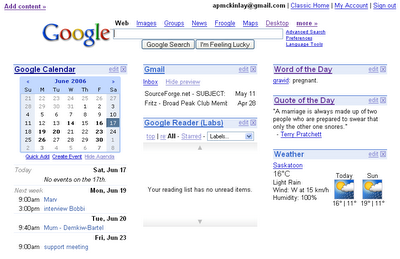 I'm still using my Palm calendar as well so I'd like to find a way to sync it with Google Calendar.
And of course, I'm using Blogger, another Google tool. And Google Maps and Google Earth and Google Toolbar for Firefox.
With more of my tools in the browser, Google Browser Sync is a very handy Firefox extension. It keeps my bookmarks, passwords, and cookies in sync between all the machines I use.
Wow, until I started writing this entry, I didn't realize just how many Google tools I was using!
I am using a few Yahoo tools as well - del.icio.us for my bookmark collection and I've played a bit with Flickr for photos.
Someday, I'd like to move to Linux and/or Mac as my primary desktop (instead of Windows) so I like using web tools that are available (almost) anywhere there's a browser. (I did have some trouble using Gmail from some older machines when travelling. I learnt to ask for a Windows XP machine at internet cafes.) It's too bad that some of the Google tools are Windows only, but they are porting some stuff to Linux, like Picassa and Earth.
I started with Desktop Search. I find I use this as much to run programs as to search for files. My Start menu has grown so big that it's a lot faster and easier to type a few letters into the search box. I don't use much of the Desktop other than the search feature. The "sidebar" and "gadgets" are nifty but I find them more distracting than useful.
Next I switched my primary email to Gmail. I've talked about that previously. I'm still pretty happy with it. I like having my email available wherever I am. I use the POP access to backup my email to a copy of Thunderbird on my desktop. My wife recently got fed up with spam on her email account and I set her up with Gmail, forwarding her old email to it so she didn't have to change addresses.
I use Picasa for organizing, viewing, and tweaking photos. I have other more "powerful" tools, but I find I use Picasa a lot of the time. It makes posting a picture to my blog quick and easy.
Recently I've started to use:
Here's my customized homepage:
 I'm still using my Palm calendar as well so I'd like to find a way to sync it with Google Calendar.
And of course, I'm using Blogger, another Google tool. And Google Maps and Google Earth and Google Toolbar for Firefox.
With more of my tools in the browser, Google Browser Sync is a very handy Firefox extension. It keeps my bookmarks, passwords, and cookies in sync between all the machines I use.
Wow, until I started writing this entry, I didn't realize just how many Google tools I was using!
I am using a few Yahoo tools as well - del.icio.us for my bookmark collection and I've played a bit with Flickr for photos.
Someday, I'd like to move to Linux and/or Mac as my primary desktop (instead of Windows) so I like using web tools that are available (almost) anywhere there's a browser. (I did have some trouble using Gmail from some older machines when travelling. I learnt to ask for a Windows XP machine at internet cafes.) It's too bad that some of the Google tools are Windows only, but they are porting some stuff to Linux, like Picassa and Earth.
Subscribe to:
Posts (Atom)