More often than I'd like lately, when I import photos into Lightroom (from an SD card in a USB reader) it hangs my whole Mac.
I can understand how Lightroom could crash, but I'm a little baffled that it manages to freeze the whole operating system. You get the spinning beachball and you can't to anything - can't switch apps, can't pull down menus, can't do Ctrl + Eject to shutdown.
At first I thought it was because I would start to view photos while it was still downloading, so I quit doing that, but it's still happening.
The strange thing is that Lightroom is normally very stable. It doesn't crash or hang when I'm working in it, no matter what I do. I suspect this is more of an OS bug, or at least a bad interaction between the app and the OS.
This seems to have become a problem recently, perhaps related to either Lightroom updates, or OS X updates, or both. (That's one of the downsides of all these automatic updates.)
I wonder whether it has someting to do with importing directly from the SD card through USB. Not that that is an excuse for the OS to die, but I could see where there would be some low level device stuff going on. Maybe I should copy the files to the Mac and then import from there. Although that's quite a bit more hassle since Lightroom auto-detects memory cards and goes straight to Import. However, I think you can set up Lightroom to "watch" a directory, so maybe I could do that and copy to that directory.
Showing posts with label lightroom. Show all posts
Showing posts with label lightroom. Show all posts
Wednesday, June 17, 2009
Monday, February 16, 2009
Computer Frustrations
Sometimes computers really piss me off.
I thought I was finally figuring out Antlr. Then my grammar worked in AntlrWorks, but not in Eclipse. AntlrWorks is using Antlr 3.1 but Eclipse was using Antlr 3.0. In the Eclipse preferences I see I can choose 3.1 but when I do, Antlr quits working. Ok, I guess I need to upgrade. But I expected this would be a problem because I haven't been able to update in Eclipse for quite a while. I try to update anyway, but it just tells me I can't, for some cryptic reason that doesn't help me at all.
This roadblock makes me think about whether I should be using Antlr. I've already spent quite a few days struggling with it and progress is very slow. I'm pretty sure I could have ported the C++ code to Java by now. One of the big reasons to use a tool like Antlr is to work at a higher level that's easier to modify. But the more I add to my grammar, the more brittle it seems to get. Small changes tend to break the whole thing with a cascade of vague messages.
In a way, it's understandable. I'm trying to port a grammar from a hand written recursive descent parser. In a hand written parser you can do all kinds of things that aren't possible in a more structured system like Antlr. And things like optional semicolons are not the easiest to handle with tools like Antlr.
The ironic part is that Antlr works great to do simple stuff (like Suneido's query language) but for more complex stuff it becomes increasingly difficult, at least if you're not an expert with it. Of course, that makes it almost useless - complex stuff is where you need it. If you were developing a little language from scratch it would be fine because you could just tailor the language to what Antlr handled easily.
I hate to give up, especially on an interesting challenge like this, but I have to remind myself that the goal is to port Suneido, not to spend endless hours struggling to learn and use some tool. And even if I got it to work, I'm then stuck with a dependency on Antlr. Which is already causing me problems and will just make it harder for anyone else who might want to build or modify jSuneido. And heaven forbid if they want to change the grammar - if they touch it, they're more than likely to break it, with no idea how to fix it.
To make a long story short, I'm giving up on Antlr and I'm going to have to start over with a fresh install of Eclipse in order to be able to update.
But that's just the beginning of my current computer frustrations. My irritation level is already quite high because of way too much obligatory family stuff this weekend. But before I started back on jSuneido I figured I'd better fulfil one last duty and download the photos Shelley took during the family stuff. Easy, just fire up Lightroom, import the photos, and copy them over to the file server so Shelley can look at them.
Wrong. Lightroom hangs up part way through the import. And not only hangs up Lightroom, but the whole of OS X. I end up having to force the power off and reboot. I thought it was because I was messing around while I was waiting for the import to finish. So I try again, this time not touching anything while it's working. It gets a little farther, but again it locks up the whole computer. WTF! I force the power off again and reboot. But this time it corrupted the Lightroom catalog and it can't repair it. Grrrrrr.
I have backups, but they don't include my last session in Lightroom because Lightroom backs up at the beginning of a session. That seems totally backwards to me. First, I want to backup what I do in a session. I may go weeks before I use it again, during which time my last session hasn't been backed up. Second, checking the catalog and backing up takes quite a while. Having to wait for that when I go to do something with Lightroom is really annoying, which means half the time I skip it, meaning my backups are liable to be even more out of date. I'd much rather it did the backup when I quit, since it wouldn't be holding me up and I wouldn't be so tempted to skip it.
And there's yet another frustration in this. My first instinct was to recover the file with Time Machine, since it's saved me a few times. I don't use it very often so I thought I was doing something wrong when I couldn't get it to work. Then I realized the Lightroom folder is inside the Pictures folder, and I don't back up the Pictures folder since it's so big. And I keep a mirror of it on the file server anyway so Shelley can access it from her Windows machine.
There also used to be problems with Time Machine having trouble backing up the Lightroom catalog when it was open, but I think/hope that's fixed. (???)
I start a Time Machine backup to get the Lightroom folder backed up. It takes forever to "prepare the backup" and then it says it's backing 16 gb. WTF again. There's no friggin way I have added / modified 16 gb of stuff since the last Time Machine backup. Then I realize that the Lightroom folder also contains the preview cache, which I see has grown to be 13 gb! Ok, stop the backup (which also takes forever, for some reason), exclude the previews, restart the backup, wait for it to "prepare",
So I move my Lightroom folder out of the Pictures folder so it will get backed up. I start up Lightroom, point it at the new catalog location, and ... it crashes. Now I'm getting really pissed off. I mess around with various ways of starting Lightroom, with various catalogs and eventually I get it running.
Meanwhile, half my morning is gone and I haven't accomplished a damn thing other than to raise my blood pressure. Sometimes you have to wonder about these "time saving" machines.
I still need to import the photos but I'm a little gun shy - I don't really want to crash my whole computer again. I was trying to import directly from the memory cards (the way I always do). Maybe something in the low level memory card reader drivers was the problem, so I copy the files on to the hard drive and try importing from there. Success!
Then I notice that a bunch of the file names have "-1" on the end. Argh! That's because I already imported a bunch of them. They weren't in the Lightroom catalog because I restored to an old version, but the actual files were still there. So now I have a bunch of duplicate files. (Lightroom normally prevents this, but only if they're in the catalog.)
Lightroom has a function to synchronize the catalog with a folder, so I use that. And ... it hangs. This is not my day. Lightroom normally runs very smoothly. Of course, I'm off the "happy path", and I'm thrashing around, which is always dangerous.
Maybe the Time Machine backup I've got running is interfering with Lightroom. It still hasn't finshed "preparing" but at least it stops fairly promptly when I tell it to.
I go to force quit Lightroom and a dialog shows up. ARGH! again. It wasn't hung up, it was just asking what I wanted to do with the file differences. Being reminded of my own stupidity doesn't help my mood. Besides, I need to synch after I clean up the duplicate files, not before.
I use a shell to rm *-1*. No easy way to do that from the Finder or from Lightroom. If you didn't know how to use the shell you'd be stuck with dragging files to the trash can one by one. GUI's aren't always so great.
I synch again, this time waiting for the dialog to pop up. Finally, I have the photos imported.
I start up ChronoSync and update the mirror of my photos on the file server. (I don't use its scheduler to do this automatically because it always seemed to want to run at the worst possible times and most of the runs did nothing because I hadn't imported anything new.)
Time for coffee. Then maybe I can actually do something productive. If you can call it "productive" to abandon multiple days of work with a sophisticated tool and go back to implementing by hand.
I thought I was finally figuring out Antlr. Then my grammar worked in AntlrWorks, but not in Eclipse. AntlrWorks is using Antlr 3.1 but Eclipse was using Antlr 3.0. In the Eclipse preferences I see I can choose 3.1 but when I do, Antlr quits working. Ok, I guess I need to upgrade. But I expected this would be a problem because I haven't been able to update in Eclipse for quite a while. I try to update anyway, but it just tells me I can't, for some cryptic reason that doesn't help me at all.
This roadblock makes me think about whether I should be using Antlr. I've already spent quite a few days struggling with it and progress is very slow. I'm pretty sure I could have ported the C++ code to Java by now. One of the big reasons to use a tool like Antlr is to work at a higher level that's easier to modify. But the more I add to my grammar, the more brittle it seems to get. Small changes tend to break the whole thing with a cascade of vague messages.
In a way, it's understandable. I'm trying to port a grammar from a hand written recursive descent parser. In a hand written parser you can do all kinds of things that aren't possible in a more structured system like Antlr. And things like optional semicolons are not the easiest to handle with tools like Antlr.
The ironic part is that Antlr works great to do simple stuff (like Suneido's query language) but for more complex stuff it becomes increasingly difficult, at least if you're not an expert with it. Of course, that makes it almost useless - complex stuff is where you need it. If you were developing a little language from scratch it would be fine because you could just tailor the language to what Antlr handled easily.
I hate to give up, especially on an interesting challenge like this, but I have to remind myself that the goal is to port Suneido, not to spend endless hours struggling to learn and use some tool. And even if I got it to work, I'm then stuck with a dependency on Antlr. Which is already causing me problems and will just make it harder for anyone else who might want to build or modify jSuneido. And heaven forbid if they want to change the grammar - if they touch it, they're more than likely to break it, with no idea how to fix it.
To make a long story short, I'm giving up on Antlr and I'm going to have to start over with a fresh install of Eclipse in order to be able to update.
But that's just the beginning of my current computer frustrations. My irritation level is already quite high because of way too much obligatory family stuff this weekend. But before I started back on jSuneido I figured I'd better fulfil one last duty and download the photos Shelley took during the family stuff. Easy, just fire up Lightroom, import the photos, and copy them over to the file server so Shelley can look at them.
Wrong. Lightroom hangs up part way through the import. And not only hangs up Lightroom, but the whole of OS X. I end up having to force the power off and reboot. I thought it was because I was messing around while I was waiting for the import to finish. So I try again, this time not touching anything while it's working. It gets a little farther, but again it locks up the whole computer. WTF! I force the power off again and reboot. But this time it corrupted the Lightroom catalog and it can't repair it. Grrrrrr.
I have backups, but they don't include my last session in Lightroom because Lightroom backs up at the beginning of a session. That seems totally backwards to me. First, I want to backup what I do in a session. I may go weeks before I use it again, during which time my last session hasn't been backed up. Second, checking the catalog and backing up takes quite a while. Having to wait for that when I go to do something with Lightroom is really annoying, which means half the time I skip it, meaning my backups are liable to be even more out of date. I'd much rather it did the backup when I quit, since it wouldn't be holding me up and I wouldn't be so tempted to skip it.
And there's yet another frustration in this. My first instinct was to recover the file with Time Machine, since it's saved me a few times. I don't use it very often so I thought I was doing something wrong when I couldn't get it to work. Then I realized the Lightroom folder is inside the Pictures folder, and I don't back up the Pictures folder since it's so big. And I keep a mirror of it on the file server anyway so Shelley can access it from her Windows machine.
There also used to be problems with Time Machine having trouble backing up the Lightroom catalog when it was open, but I think/hope that's fixed. (???)
I start a Time Machine backup to get the Lightroom folder backed up. It takes forever to "prepare the backup" and then it says it's backing 16 gb. WTF again. There's no friggin way I have added / modified 16 gb of stuff since the last Time Machine backup. Then I realize that the Lightroom folder also contains the preview cache, which I see has grown to be 13 gb! Ok, stop the backup (which also takes forever, for some reason), exclude the previews, restart the backup, wait for it to "prepare",
So I move my Lightroom folder out of the Pictures folder so it will get backed up. I start up Lightroom, point it at the new catalog location, and ... it crashes. Now I'm getting really pissed off. I mess around with various ways of starting Lightroom, with various catalogs and eventually I get it running.
Meanwhile, half my morning is gone and I haven't accomplished a damn thing other than to raise my blood pressure. Sometimes you have to wonder about these "time saving" machines.
I still need to import the photos but I'm a little gun shy - I don't really want to crash my whole computer again. I was trying to import directly from the memory cards (the way I always do). Maybe something in the low level memory card reader drivers was the problem, so I copy the files on to the hard drive and try importing from there. Success!
Then I notice that a bunch of the file names have "-1" on the end. Argh! That's because I already imported a bunch of them. They weren't in the Lightroom catalog because I restored to an old version, but the actual files were still there. So now I have a bunch of duplicate files. (Lightroom normally prevents this, but only if they're in the catalog.)
Lightroom has a function to synchronize the catalog with a folder, so I use that. And ... it hangs. This is not my day. Lightroom normally runs very smoothly. Of course, I'm off the "happy path", and I'm thrashing around, which is always dangerous.
Maybe the Time Machine backup I've got running is interfering with Lightroom. It still hasn't finshed "preparing" but at least it stops fairly promptly when I tell it to.
I go to force quit Lightroom and a dialog shows up. ARGH! again. It wasn't hung up, it was just asking what I wanted to do with the file differences. Being reminded of my own stupidity doesn't help my mood. Besides, I need to synch after I clean up the duplicate files, not before.
I use a shell to rm *-1*. No easy way to do that from the Finder or from Lightroom. If you didn't know how to use the shell you'd be stuck with dragging files to the trash can one by one. GUI's aren't always so great.
I synch again, this time waiting for the dialog to pop up. Finally, I have the photos imported.
I start up ChronoSync and update the mirror of my photos on the file server. (I don't use its scheduler to do this automatically because it always seemed to want to run at the worst possible times and most of the runs did nothing because I hadn't imported anything new.)
Time for coffee. Then maybe I can actually do something productive. If you can call it "productive" to abandon multiple days of work with a sophisticated tool and go back to implementing by hand.
Saturday, December 27, 2008
Nice UI Feature
Here's a screen shot of part of the Adobe Lightroom Export dialog:
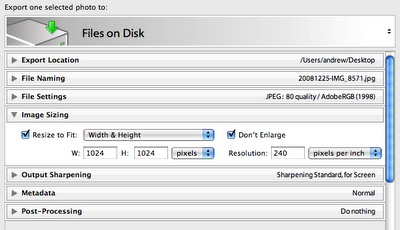 It consists of a bunch of sections that you can open and close. The part I like is that when they are closed they show a summary of the settings from that section. So you can leave sections closed but still see what you have chosen. Very nice. I haven't noticed this in any programs.
One minor criticism is that the "mode", in this case "Files on Disk" is chosen with the small, easily missed up/down arrow at the top right. I didn't figure this out for a while - I thought the only way to change it was to choose different presets (not shown in the screenshot)
The other thing I have trouble with when exporting is that I forget to select all the pictures. It does tell you at the top that it is only exporting one selected photo, but I always seem to miss this. But when it completes way faster than I expect, then I realize I forgot to select all the photos. Doh! It might be nice if the export dialog had a way to choose "All photos in collection" like the Slideshow module has.
Another nice part of Lightroom's export is that they have a facility for "plugins". I use Jeffrey Friedl's plugin for exporting to Google Picasa Web albums. There are also plugins for other things like Flickr.
 It consists of a bunch of sections that you can open and close. The part I like is that when they are closed they show a summary of the settings from that section. So you can leave sections closed but still see what you have chosen. Very nice. I haven't noticed this in any programs.
One minor criticism is that the "mode", in this case "Files on Disk" is chosen with the small, easily missed up/down arrow at the top right. I didn't figure this out for a while - I thought the only way to change it was to choose different presets (not shown in the screenshot)
The other thing I have trouble with when exporting is that I forget to select all the pictures. It does tell you at the top that it is only exporting one selected photo, but I always seem to miss this. But when it completes way faster than I expect, then I realize I forgot to select all the photos. Doh! It might be nice if the export dialog had a way to choose "All photos in collection" like the Slideshow module has.
Another nice part of Lightroom's export is that they have a facility for "plugins". I use Jeffrey Friedl's plugin for exporting to Google Picasa Web albums. There are also plugins for other things like Flickr.
Labels:
lightroom,
user experience

Wednesday, November 12, 2008
Lightroom and Lua
I'm a fan of Adobe Lightroom. It has a great user interface - understated elegance and smooth user experience. And it does a great job, it's fast, and it's relatively small.
I knew Lightroom used Lua, for example in plugins. But I was surprised when I came across a presentation that said 63% of Lightroom specific code is written in Lua (with the remainder in C, Objective C, and C++).
That's impressive. Many people would assume that a program written in a "scripting" language would be slow and ugly. That might be true of many programs (scripting language or not!) but I think this proves otherwise.
I also find it reassuring because, in a sense, it validates the approach we took in writing our trucking software. We wrote it in Suneido (comparable to a scripting language) for many of the same reasons Adobe wrote Lightroom in Lua.
Of course, the difference is that they chose an existing language, whereas I wrote Suneido. I would not have been as impressed if Adobe had chosen to write their own scripting language. Of course, that raises the question whether we should have used an existing language to write our trucking software. If I was starting today, I might say yes, but given the situation when we started (years ago) I'm not sure I'd do it any differently.
I knew Lightroom used Lua, for example in plugins. But I was surprised when I came across a presentation that said 63% of Lightroom specific code is written in Lua (with the remainder in C, Objective C, and C++).
That's impressive. Many people would assume that a program written in a "scripting" language would be slow and ugly. That might be true of many programs (scripting language or not!) but I think this proves otherwise.
I also find it reassuring because, in a sense, it validates the approach we took in writing our trucking software. We wrote it in Suneido (comparable to a scripting language) for many of the same reasons Adobe wrote Lightroom in Lua.
Of course, the difference is that they chose an existing language, whereas I wrote Suneido. I would not have been as impressed if Adobe had chosen to write their own scripting language. Of course, that raises the question whether we should have used an existing language to write our trucking software. If I was starting today, I might say yes, but given the situation when we started (years ago) I'm not sure I'd do it any differently.
Subscribe to:
Posts (Atom)