Monday, August 27, 2007

Holding a Program in One's Head

Another good essay by Paul Graham:

Holding a Program in One's Head

I'm not sure I totally agree with this part:
Don't have multiple people editing the same piece of code. You never understand other people's code as well as your own. No matter how thoroughly you've read it, you've only read it, not written it. So if a piece of code is written by multiple authors, none of them understand it as well as a single author would.
...
If you want to put several people to work on a project, divide it into components and give each to one person.
I agree you can never understand someone else's code as well as your own. Initially, this is probably good advice, although, even initially, pair programming can be worthwhile. But in the long run, multiple people are going to need to work on the same code. Of course, by this stage it's not in anyone's head anymore anyway.

Monday, August 20, 2007

Web Mail

I'm surprised that so many people put up with the annoying ads inserted into their email by Yahoo Mail and Microsoft Hotmail. When I started using Gmail I never really thought about this issue, but now I'm very thankful that Google doesn't do this kind of advertising.

I guess if you're just using your email for unimportant stuff it's not a big deal. But when you're using it to apply for jobs, or for your work, do you really want stuff like this on your messages?
Moody friends. Drama queens. Your life? Nope! - their life, your story. Play Sims Stories at Yahoo! Games.
or:
Windows Live Hotmail. Even hotter than before. Get a better look now.
I would guess one reason people don't object is that they don't see it when they're sending a message.

I realize this kind of "viral" marketing can be effective, and when Hotmail first did it, it was a clever thing to do. But nowadays, I just find it offensive. Of course, I find TV commercials offensive too and that won't stop them doing it.

In any case, I'm glad Google doesn't do it. They do some "viral" marketing by suggesting you invite people to join Gmail, but it's fairly unobtrusive. And the ads they show beside Gmail are easy to ignore as well. (And fairly easy to block if you really want to.) And these things are only shown to me, the person getting the free service, rather than to people I'm sending messages to, who shouldn't have to "pay" for my service by viewing ads!

Interestingly, Google, who made a big splash by offering 1 gb of Gmail storage when most people were offering measly amounts like 10mb, is now offering the least amount of storage - "only" 2.8 gb compared to unlimited for Yahoo and AOL, and 5 gb for Hotmail. more...

Tuesday, August 14, 2007

Jing

This looks interesting:

Jing Project: Visual conversation starts here. Mac or Windows.

Watch the video tour for a quick introduction.

It's from Techsmith who make Snagit and Camtasia - products we use.

Wednesday, August 08, 2007

Parallels Annoyance

I went to print from Windows running under Parallels on my Mac and it didn't work, although it had in the past. I tried the usual highly intelligent :-) problem solving technique of rebooting (in this case both Windows and the Mac) but it didn't help.

Eventually I remembered that I had switched the printer from USB to Firewire, since the printer (Epson R1800) had come with a Firewire cable and it freed up a USB port.

But ... Parallels doesn't virtualize Firewire, only USB. There are several workarounds but none of them are great since they don't let me use the specific features of the printer.

Now something else made sense. I had wondered why I had an HP postscript printer set up in Windows. I hadn't set it up myself so I assumed some application I had installed had done it, although that didn't make much sense. Now I realize Parallels must have created it as a way to print to Mac printers.

Another workaround is to print to PDF on Windows and then print the PDF from OS X - a bit tedious, but it works.

I may end up moving the printer back to USB, but that'll mean messing with the setup on OS X which I'd rather not have to do.

The reason I wanted to print from Windows was because I was using Canvas, a program that combines many of the capabilities of Photoshop and Illustrator (i.e. both vector and bitmap at the same time). I really like Canvas but it's been somewhat abandoned. The product was bought by ACD who haven't done much with it. There was/is a Mac version but not for Intel, so I'm still using the Windows version. There are rumors of a new Windows version but not Mac. Too bad.

Windows Live Writer

 I'm writing this using the Windows Live Writer beta. Tim Bray has mentioned it a few times in his ongoing blog.

I haven't really felt the need for a separate tool to write blog posts - doing it in the browser seems to work well enough, especially with the real-time spell check in Firefox. But I can't resist trying out new free software :-)

I added this screen shot to test inserting images. That's one area where Blogger can be a bit awkward.

[screenshot removed to allow publishing]

It also looks like you can add tables which I don't think Blogger allows (unless you edit the HTML directly).

Humorously, Live Writer shows "Firefox" as a spelling mistake. (but "Blogger" is ok)

So much for images. When I tried to publish it said "the weblog does not support image publishing". Blogger certainly allows images, so I would interpret that to mean that Live Writer's interface to Blogger doesn't handle images. It did offer to let me configure an FTP site but I wonder how "user friendly" that is for most people. I assume if you use Microsoft Live Spaces for your blog then you can publish images.

Friday, August 03, 2007

Alarming Development : Beautiful Code

Sadly, I would have to agree with this:

Alarming Development : Beautiful Code

But that won't stop me from reading the book, we can still dream of beautiful code :-)

Thursday, July 12, 2007

Tagging

I find tagging really attractive as an alternative to strictly hierarchical categories. My main uses of tagging are in del.icio.us, LibraryThing, and Lightroom. Picasa, that I used to use before Lightroom, also has a form of tagging, but it never seemed very "natural" to use it there, probably because it's not very well implemented. Flickr is another big user of tagging, but for some reason I've never gotten into using Flickr much.

Tagging, especially in sites like del.icio.us and Flickr, is often promoted as a "social" tool. I've never really used it that way, maybe because I'm not much of a "social" person :-) Of course, I've benefited to some extent from other people's tagging, but that's never been my main benefit. I primarily use del.icio.us to maintain my personal bookmarks.

As far as implementation, del.icio.us has a nice system, especially for web based software. It shows you all your tags, auto-suggests as you type, shows recommended tags, and popular tags. I have wondered why they "hide" the popular tags (ones other people have used) down at the bottom of the page. I guess this is to avoid the problem of people just applying the same tags as everyone else, which would somewhat defeat the purpose of having a wide variety of people applying tags.

LibraryThing's tagging could definitely be improved. You often have to type tags just from memory, with no auto-completion or suggestions. A system more like del.icio.us would be a lot nicer.

Lightroom has auto-completion and lets you drag and drop tags, but its unique feature (at least, I haven't seen it anywhere else) is its "implied tags". A common issue with tagging is what level of detail to tag at, and how many tags to apply. For example, do I tag with "Saskatoon", or "Saskatchewan", or "Canada", or "North America" or several of these. Similarly, do I tag with "pelican", "birds", or "animals". Ideally (for searching) you'd apply all the relevant tags, but that would make tagging a tedious process. Lightroom lets you create tags as children of other tags, so "Saskatoon" is a child of "Saskatchewan" which is a child of "Canada". You manually apply the most specific tag, e.g. "Saskatoon" and the parent tags are automatically "implied". So if I search for "Saskatchewan", I'll automatically get anything I tagged with "Saskatoon". Very nice. I would like the same feature in del.icio.us and LibraryThing.

On this same topic, I listened to a Long Now talk by Clay Shirky on my run this morning. He was talking about the problems of hierarchical categorization, how it is mainly a result of having to organize physical materials, and that tagging is better suited for digital information.

Also on basically the same topic, I am currently reading Everything is Miscellaneous by David Weinberger (who also co-wrote The Cluetrain Manifesto). It makes many of the same points.

So it seems a little incongruous that a hierarchical system can make tagging better. Of course, in a way it's just a shortcut for entering tags, it doesn't really alter the tagging. And I wonder if the hierarchical part is really essential. At first when I saw "implied tags" in Lightroom, I wasn't thinking of a hierarchy, I just thought that one tag could imply others. But that could be tricky to handle since it would allow loops and if not used "properly" could end up with a mess. But it would be interesting to try.

I keep thinking there should be some way to apply tagging to our business software, but so far I haven't come up with anything really appealing. We could allow tagging things like equipment, but I'm not sure whether that would be a big benefit. Maybe we should try it and see whether people like it. Maybe we could replace things like "Type" and "Role" with more general tagging.

Wednesday, July 11, 2007

Font Rendering!

Here's more than you probably wanted to know about font rendering and why Windows, Mac, Linux, and Adobe Reader are different.

Texts Rasterization Exposures

I found this via Joel Spolsky in connection with his earlier post:

Font smoothing, anti-aliasing, and sub-pixel rendering

I'm afraid most of the time I don't even notice these fine details. But I have struggled with text sizes and layout issues in Windows. And really bad rendering can be quite annoying - Open Office (on Windows) used to be pretty bad.

Tuesday, July 10, 2007

New MacBook


My new MacBook arrived today. I tried to buy one locally, but no one had the model I wanted (a black 13" with 2gb ram and 160gb drive). I decided I might as well order it from Apple myself rather than get a store to order it. I ordered Thursday afternoon and it arrived Tuesday morning. Pretty fast. I also ordered a spare battery and it arrived at the same time.

I've been thinking about getting a MacBook for quite a while. Working on my old Windows laptop the other day and finding it quite slow tipped me over the edge to order the Mac.

As I would expect from Apple, the experience of opening the box and setting it up was a delight. I really like the little touches like the charge indicator on the batteries and the magnetic power connector.

The only (minor) problem I had was that I couldn't enter the key for my wireless connection from the setup process. I had to choose "no network" and then configure it later. No big deal.

I still have some setup to do to get things the way I want (e.g. installing Parallels) but so far, so good.

Thursday, July 05, 2007

New Network Hard Drive

With both Mac and Windows machines on my home network I decided I wanted some shared storage that they could all access equally. I can access shared directories on the Windows machine from the Mac (haven't tried the reverse). But that means I have to turn on the Windows machine. And it doesn't give the Windows machine any backup storage.

I looked at various possibilities but looking for something that explicitly supported Mac narrowed the choices. I ended up with a 320gb Lacie ethernet disk mini ordered through Frontier PC. I hadn't dealt with them before but they looked like a reasonable choice for a Canadian supplier. There were no problems dealing with them and shortly I had my drive.

I plugged it into my wireless router and it "just worked". It even came with a network cable.

I had no problem accessing it from Windows and it wasn't much harder from the Mac. The problem with the Mac was trying to get it to connect at start-up. On Windows this is a simple matter of a checkbox, and from the web I understand Mac OS 9 was the same. But not anymore. I found various suggested solutions, none of them simple or easy. One problem was how to supply the user and password for accessing the drive. In the end I used Automator. The funny part was that for all it's fancy drag-and-drop graphical workflow, it all came down to getting the right cryptic url. In other words, Automator ended up being window dressing on a command line.

In case any one is tackling a similar problem, what I ended up with was a "Get Specified Servers" action followed by a "Connect to Servers" action. The url for the "Get Specified Servers" needed to be "afp://user:password@ipaddress/sharename" with the appropriate user, password, and numeric ip address.

The other trick is actually getting it to run when you log in. Again, Windows seems simpler (but maybe just because it's more familiar), you just put stuff in the Startup folder. On OS X you do it through System Preferences > Accounts > Login Items - not exactly easily discoverable.

Originally I had thought I would keep the master copies of my music and photo libraries on the shared drive so I could access it from any of my computers. But this didn't work too well. For example, if the network drive was disconnected for any reason (as it often was when I was first struggling to get the connect at log in to work) then Adobe Lightroom would recognize (rightly) that the files were not available. The problem was when the network drive was reconnected, Lightroom would start checking the availability of the files - roughly 10,000 of them, one at a time - not a speedy process!

So now I'm mainly using the network drive as a backup. My next plan is to come up with a way to sync my music and photos between the Mac and the network drive, possibly using ChronoSync which I saw recommended.

One feature that I don't have on the Lacie drive is the ability to run the SlimServer for my SqueezeBox. Currently I am running the server software on my Windows machine - but that means it has to be turned on if I want to play music. Theoretically it should be possible since the Lacie runs Linux and there is a Linux version of SlimServer, but I couldn't find anything on the web about how to do it. It does support UPnP A/V but unfortunately the SqueezeBox won't accept that. It's the usual trials and tribulations of trying to get things to work together.

Friday, June 08, 2007

Slow Code Again

Although I agree with Larry's view, at the same time I continue to be horrified by some of the code I come across. There's no question premature optimization is bad, but I have to think so is code that blatantly disregards and abuses speed issues.

For some time I have been meaning to look at the start up process for our application. There was no particular reason for this - no one had been complaining. But speed of start up is one of the first things people encounter and first impressions can be important. And we had had some complaints and found some problems with opening the help being slow, and some of the code is similar.

The first thing I looked at was database queries since they often dominate speed issues. I turned on the query tracing during startup and to my horror, ended up with 1800 lines of query trace! At first I thought that was 1800 queries, but there are multiple lines per query so it was actually only about 600 queries. It's a testament to the speed of computers and networks these days, that this doesn't even result in a noticeable slowdown. Although I think we did have one customer complain that after restarting their server, when all the users tried to log back in all at once, it was slow. I can understand why! Of course, we discounted it, thinking that, of course it'll be slow.

I have various ideas for reducing these startup queries, but I was able to cut them in half within a few minutes. Most of these queries are reading the menu tree for the application. At the same time it is checking for any menu options that are "hidden" (e.g. not purchased by that customer). To do this, the code was calling a general purpose permissions function which did queries on the permission table. But in this case all we needed to know was whether an option was hidden, which depended only on some configuration data in the code. We had a more specific function that only checked the configuration so switching to call this (didn't even need to change the arguments!) instantly eliminated almost half (about 300) of the queries.

I don't give this as an example of someone "screwing up". We all make mistakes or overlook things. The lesson that I take from it is that it's not enough to write some code and have it appear to work. You have to assume that there are always hidden problems and that you need to constantly be on the lookout for them. And constantly fighting entropy by fixing and refactoring.

See also my previous post on Slow Code

Bad Documentation

The easiest way to write software documentation is:
Date Field
Enter the date.

Rate Field
Enter the rate.
Needless to say this is very obviously useless. And it's actually worse than useless because any useful information is buried deeply in masses of this garbage. No one would actually write this kind of stuff, would they? Yes, they would and do. And in an amazing example of how we can justify justify anything to ourselves, writers of this kind of documentation actually appear to believe they have produced something useful. (Of course, if someone else had written it, that same person would have no problem recognizing it as useless.)

Of course, it's often thinly disguised. Here are some examples (from real documentation I was given yesterday):
In the Type field, choose the Type this record applies to.

Tab to the Fleet field. Choose the correct Fleet.

Tab to the Abbreviation field and enter the Abbreviation.
I'm sure you get the idea.

The problem is that to write useful documentation is orders of magnitude harder. It requires you to think. You need to decide who the documentation is for, what you hope to achieve with it, what things people need to be told, and just as importantly, what things they do not need to be told.

I think another factor is that people hate to leave "gaps". Rather than just describe the few fields that you actually have something worthwhile to say about, they feel they have to say something about every single field. And this is not just obsessive-compulsive people - almost everyone seems to feel uncomfortable about "leaving out" some fields.

Google Desktop versus Mac Spotlight versus Vista

One thing that frustrated me when I started using Google Desktop Search was that I would type my search, it would correctly identify and highlight the top result, but when I hit Enter it would open my browser and show me the search results there (instead of just running/opening the top result). Eventually I discovered you could change this in the Preferences "Launch Programs by Default" (instead of "Search by Default").

I guess I should mention that I use Desktop Search as much or more to launch programs rather than find files. My Windows Start menu has so many programs on it that it is a hassle to use.

Now I have the same hassle on my Mac. Spotlight finds the right result, but when I hit Enter it brings up a search window instead of running the top result. Unfortunately, so far I have not found a setting to change this. It hasn't been too annoying yet because I don't have as much software installed on my Mac so I don't need to use it as much.

As much as I like to dislike Microsoft, they appear to have got this right in Vista. The new search box defaults to running the top result when you hit Enter.

I wonder how Beagle on Linux works in this respect?

PS. I normally have my Google Desktop set to show on my Windows task bar, but today it was missing. I thought it must have crashed or something so I rebooted. But still no search box. I checked whether it was still set to run on startup but that looked ok. When I tried running it manually from the Start menu it displayed in "pop up" mode, but came up so fast it must have already been running. When I checked my preferences I found it was set to not show up. I'm pretty sure I never changed this, so I'm not sure what happened. Maybe some automatic update turned this off?

Tuesday, June 05, 2007

Chapters web site annoyance

Lately I've been ordering from Chapters more often than Amazon because they seem to have more books in stock and deliver them more quickly. (This is in Canada i.e. amazon.ca)

But one part of ordering from Chapters really bugs me. Their web site does not understand that billing address belongs to the credit card. I order books both for work and personally. The billing address for my work credit card is different from the billing address for my personal credit card. Amazon handles this automatically. But Chapters not only doesn't handle this automatically, it makes me type in the address every time I switch between business/personal. They store multiple shipping addresses and multiple credit cards and let me pick from them rather than type them in, but apparently they only store a single billing address.

I guess I could set up a second account but I've got enough different accounts to keep track of!

It scares me to wonder how many similar annoyances our applications have that we're either unaware of or are ignoring.

Stevey's Blog Rants: The Next Big Language

An interesting (and cynically humorous) article about programming languages:

Stevey's Blog Rants: The Next Big Language

Sunday, June 03, 2007

Adobe Lightroom

I continue to be impressed with Adobe Lightroom. Like Tim Bray, although I prefer open source software, I can't help but like Lightroom.

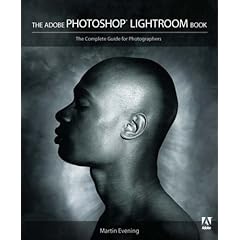
I was also impressed by The Adobe Photoshop Lightroom Book by Martin English. Usually I'm not that impressed with books on how to use software. They're either reference manuals or beginner's guides. This book is neither. It gives helpful advice, covers both basics and more advanced features, and is full of examples and annotated screen-shots. Lightroom was designed to be "simple to use". But it still has a ton of features, so "simple to use" means lots of non-obvious features - like things you can click on or drag. The book helped me discover these a lot faster than I would have on my own.

One of the reasons I like Lightroom is that there are lots of innovative user interface features. It's not "eye candy" - the UI is very subdued black and grey (after all what's important is your pictures, not the software) Even if you're not interested in digital photography, I'd recommend spending some time with the trial version just to see how the UI works, although you may not discover all the features in a short test. The UI has already inspired some improvements in Suneido.

Thursday, May 31, 2007

Windows GetSaveFileName Frustration

GetSaveFileName is a Windows API call that displays a standard save file dialog. It has an option to specify a default file name extension that will be added if the user doesn't type one. (lpstrDefExt in the OPENFILENAME struct)

For some reason, this wasn't working. I wasted a bunch of time checking all my code and searching for known problems on the internet with no success.

Then I tried it again and suddenly it worked! But I hadn't changed anything!

Aha! I had changed something - I had typed a different file name. The problem is that if the name you type (with no extension) exists, then it doesn't add the extension. (e.g. I was typing "test" and I had an existing file called "test", with no extension) I guess it assumes that you are "picking" the existing file, even though I was typing it, not picking it from a list.

MSDN contains a huge amount of documentation, but all it takes is one little missing detail and you're in trouble.

Monday, May 28, 2007

LINA portable applications

It's not released yet, but LINA looks like a really interesting project that enables you to run the same binaries on Linux, Windows, and Mac with native look and feel.

Sunday, May 13, 2007

Inside the Machine

I've been reading Inside the Machine by Jon Stokes - An Illustrated Introduction to Microprocessors and Computer Architecture. It looks at Intel, IBM Power PC, and Motorola chips (i.e the ones used in PC's and Mac's), including the latest Core 2 Duo chips.

I'm not much of a hardware person these days, but it was pretty interesting to read about the techniques used to push performance. Apart from bigger caches, I had wondered how modern CPU's used the 100's of millions of transistors they now contain. (A Core 2 Duo has 291 million transistors as compared to the original Pentium's 3 million.)

Considering the subject, the book is well written and easy to read. If you're at all interested in this area, I'd recommend it.