Both Windows and Mac OS X let you "minimize" windows to the task bar / dock.
Both let you bring a window back by clicking on the task bar / dock.
But on Windows you can click on the task bar icon a second time to minimize the window again. I've got in the habit of using this to take a quick look at a window and then hide it again. I keep trying to do that on the Mac but it doesn't work.
I can see one argument against this feature would be that people often get confused and double-click instead of single-clicking. If implemented naively, a double-click would show and then hide the window immediately, frustrating the user. But Windows solves this problem by treated a double-click the same as a single click.
If anyone knows a way to make this work on the Mac, leave me a comment and I'll owe you one.
One part of this that is nicer on the Mac is that "Hide" minimizes all of an application's windows, and clicking on the dock brings them all back, whereas on Windows it's one window at a time. I have a vague memory that Windows 7 might improve this.
Tuesday, June 30, 2009
Thursday, June 25, 2009
The iPhone Software Revolution
Coding Horror: The iPhone Software Revolution
Someone else who finally took the plunge and bought an iPhone.
And this rave review is from someone who isn't an Apple or Mac fan.
Someone else who finally took the plunge and bought an iPhone.
And this rave review is from someone who isn't an Apple or Mac fan.

Monday, June 22, 2009
Apple Sells Over One Million iPhone 3GS Models
Apple Sells Over One Million iPhone 3GS Models in the first three days.
And one of those was me - I finally broke down and bought an iPhone, surprising some people, because although I love gadgets, I don't like cell phones. I could have bought an iPod Touch, but although I didn't really care about the phone, I wanted all the other features like 3G, GPS, compass, camera, etc. that don't come with the Touch. And I'm sure I'll end up using the phone occasionally now I have it.
I'm already loading up on iPhone apps. With over 50,000 available they're one of the best parts of the iPhone/Touch.
And one of those was me - I finally broke down and bought an iPhone, surprising some people, because although I love gadgets, I don't like cell phones. I could have bought an iPod Touch, but although I didn't really care about the phone, I wanted all the other features like 3G, GPS, compass, camera, etc. that don't come with the Touch. And I'm sure I'll end up using the phone occasionally now I have it.
I'm already loading up on iPhone apps. With over 50,000 available they're one of the best parts of the iPhone/Touch.
Friday, June 19, 2009
Ultra High Speed Photography
kurzzeit.com - Kameras
1 million frames per second - amazing!
(I couldn't get the videos to play in Firefox but Internet Explorer worked.)
1 million frames per second - amazing!
(I couldn't get the videos to play in Firefox but Internet Explorer worked.)
Labels:
photography
Wednesday, June 17, 2009
Mac OS X Hangs from Lightroom
More often than I'd like lately, when I import photos into Lightroom (from an SD card in a USB reader) it hangs my whole Mac.
I can understand how Lightroom could crash, but I'm a little baffled that it manages to freeze the whole operating system. You get the spinning beachball and you can't to anything - can't switch apps, can't pull down menus, can't do Ctrl + Eject to shutdown.
At first I thought it was because I would start to view photos while it was still downloading, so I quit doing that, but it's still happening.
The strange thing is that Lightroom is normally very stable. It doesn't crash or hang when I'm working in it, no matter what I do. I suspect this is more of an OS bug, or at least a bad interaction between the app and the OS.
This seems to have become a problem recently, perhaps related to either Lightroom updates, or OS X updates, or both. (That's one of the downsides of all these automatic updates.)
I wonder whether it has someting to do with importing directly from the SD card through USB. Not that that is an excuse for the OS to die, but I could see where there would be some low level device stuff going on. Maybe I should copy the files to the Mac and then import from there. Although that's quite a bit more hassle since Lightroom auto-detects memory cards and goes straight to Import. However, I think you can set up Lightroom to "watch" a directory, so maybe I could do that and copy to that directory.
I can understand how Lightroom could crash, but I'm a little baffled that it manages to freeze the whole operating system. You get the spinning beachball and you can't to anything - can't switch apps, can't pull down menus, can't do Ctrl + Eject to shutdown.
At first I thought it was because I would start to view photos while it was still downloading, so I quit doing that, but it's still happening.
The strange thing is that Lightroom is normally very stable. It doesn't crash or hang when I'm working in it, no matter what I do. I suspect this is more of an OS bug, or at least a bad interaction between the app and the OS.
This seems to have become a problem recently, perhaps related to either Lightroom updates, or OS X updates, or both. (That's one of the downsides of all these automatic updates.)
I wonder whether it has someting to do with importing directly from the SD card through USB. Not that that is an excuse for the OS to die, but I could see where there would be some low level device stuff going on. Maybe I should copy the files to the Mac and then import from there. Although that's quite a bit more hassle since Lightroom auto-detects memory cards and goes straight to Import. However, I think you can set up Lightroom to "watch" a directory, so maybe I could do that and copy to that directory.
Friday, June 12, 2009
Continuous Obsolescence
 I see my 13" MacBook has already been replaced by a new model.
It's been moved to the "Pro" label, gained its Firewire connector back, and now has an SD slot (which I'd like for downloading photos).
Apple seems to be coming out with new models faster than ever. The model I have was only out for 7 months before being replaced! Most software doesn't get upgraded that quickly, let alone hardware.
I like the rapid improvement, but I hate the resulting feeling of being left behind! Too bad we can't get automatic updates like software :-)
Edward Bear and Software
 I just started reading Java Power Tools and the opening quote on the preface was this:
Here is Edward Bear coming downstairs now, bump, bump, bump, on the back of his head, behind Christopher Robin. It is, as far as he knows, the only way of coming downstairs, but sometimes he feels that there really is another way, if only he could stop bumping for a moment and think of it.-- "We are introduced to Winnie-the-Pooh and some bees, and the stories begin,"
Winnie the Pooh, A. A. Milne
What a great quote for software development!
Sunday, June 07, 2009
Too Good to be True
I should have known that it was too good to be true that all the tests up to the N's were succeeding. I was a little suspicious, but who likes to question positive results.
What I wasn't remembering was that TestRunner reports errors at the end, not after each test. And I was never getting to the end because I'd get an unhandled exception (i.e. crash).
When I'd hit an unhandled exception I'd run that individual test by itself so once I fixed the exception I'd see the errors caught by TestRunner and I'd fix those, generally by implementing missing methods.
So the tests weren't succeeding up to the N's, they just weren't crashing. When I realized this, and specified that TestRunner should stop on the first failing test, I didn't even make it past the A's :-(
Oh well, there was nothing wrong with fixing the crashes first. I'm just nowhere near as far along in the process as I over-optimistically thought.
Back to slogging :-)
What I wasn't remembering was that TestRunner reports errors at the end, not after each test. And I was never getting to the end because I'd get an unhandled exception (i.e. crash).
When I'd hit an unhandled exception I'd run that individual test by itself so once I fixed the exception I'd see the errors caught by TestRunner and I'd fix those, generally by implementing missing methods.
So the tests weren't succeeding up to the N's, they just weren't crashing. When I realized this, and specified that TestRunner should stop on the first failing test, I didn't even make it past the A's :-(
Oh well, there was nothing wrong with fixing the crashes first. I'm just nowhere near as far along in the process as I over-optimistically thought.
Back to slogging :-)
Saturday, June 06, 2009
A Sigh of Relief
The last while I've been working on getting the Suneido standard library tests to run on jSuneido.
Mostly this is a matter of implementing built-in functions and methods. Occasionally I find a bug in the existing jSuneido code, but thankfully that hasn't been too frequent.
It's actually been going quite well. The tests run alphabetically and I've got them succeeding all the way up to 'N'. Actually, I'm surprised that many tests succeed since I still have quite a few built-in methods to implement. 80-20 principle, I guess. (i.e. 80% of the tests only require 20% of the built-in functions.)
But one thing that's been nagging me during this process is that the tests report how long they take to run, and they've been running extremely slowly. I wasn't surprized they would run somewhat slower than cSuneido, since I'm not using the fast server JVM and I haven't done any optimization.
But jSuneido was on the order of 100 times slower. That was a little scary. If it was really going to be that much slower then I might as well give up now. But I figured there had to be a reason for it, probably something stupid.
As I expected, it was something stupid. Suneido loads and compiles code from libraries on demand. Once loaded, the compiled version stays in memory. I had this all working, but I missed one small but critical piece - I wasn't saving the compiled version. So it was re-loading and re-compiling on every reference. Yikes! It's not surprising it was slow.
Now the tests actually seem to be running faster on jSuneido than cSuneido, although I'm not sure the resolution of the timing is accurate enough to tell. At this stage, as long as there's not a huge difference, I'm happy.
Mostly this is a matter of implementing built-in functions and methods. Occasionally I find a bug in the existing jSuneido code, but thankfully that hasn't been too frequent.
It's actually been going quite well. The tests run alphabetically and I've got them succeeding all the way up to 'N'. Actually, I'm surprised that many tests succeed since I still have quite a few built-in methods to implement. 80-20 principle, I guess. (i.e. 80% of the tests only require 20% of the built-in functions.)
But one thing that's been nagging me during this process is that the tests report how long they take to run, and they've been running extremely slowly. I wasn't surprized they would run somewhat slower than cSuneido, since I'm not using the fast server JVM and I haven't done any optimization.
But jSuneido was on the order of 100 times slower. That was a little scary. If it was really going to be that much slower then I might as well give up now. But I figured there had to be a reason for it, probably something stupid.
As I expected, it was something stupid. Suneido loads and compiles code from libraries on demand. Once loaded, the compiled version stays in memory. I had this all working, but I missed one small but critical piece - I wasn't saving the compiled version. So it was re-loading and re-compiling on every reference. Yikes! It's not surprising it was slow.
Now the tests actually seem to be running faster on jSuneido than cSuneido, although I'm not sure the resolution of the timing is accurate enough to tell. At this stage, as long as there's not a huge difference, I'm happy.
Friday, June 05, 2009
Google Squared
Here's my first Google "Square":
8000m peaks
My initial search for "8000m peaks" only came up with 7 of them. Clicking "Add next 10 items" at the bottom added 6 more, plus some climbers which I had to remove. For some reason it didn't find Cho Oyu. But it was the first suggestion when I clicked on "Add items".
It automatically came up with reasonable columns - Image, Description, First Ascent, Height, and Location.
I couldn't figure out any way to sort them, e.g. by height
8000m peaks
My initial search for "8000m peaks" only came up with 7 of them. Clicking "Add next 10 items" at the bottom added 6 more, plus some climbers which I had to remove. For some reason it didn't find Cho Oyu. But it was the first suggestion when I clicked on "Add items".
It automatically came up with reasonable columns - Image, Description, First Ascent, Height, and Location.
I couldn't figure out any way to sort them, e.g. by height
Labels:
google
Wednesday, June 03, 2009
OnDemandBooks
OnDemandBooks
This is pretty cool. But I can't help think they're perfecting yesterday's technology. I guess that's typical - by the time we perfect some technology, we've moved on to something "better", albeit less perfected.
Just like a big fancy machine in the music store to burn cd's on demand has pretty much been made obsolete by mp3 players and buying music over the internet.
Now if only someone can open up digital book distribution the way Apple has opened up digital music distribution.
Amazon has digital music and books, but US only. Even Indigo's new digital book service is US only, despite being a Canadian company! I realize the US is a much bigger market, but I still can't help being annoyed by it!
Currently, most digital books are "proprietary", i.e. if you have a Sony ebook reader you have to buy your books from Sony, and if you have an Amazon Kindle you have to buy your books from Amazon. Even Apple, who are famous for their proprietary approach, let you play their music on devices made by other companies.
I'd really like to go digital with my books the way I have with my music, but we're not quite there yet.
This is pretty cool. But I can't help think they're perfecting yesterday's technology. I guess that's typical - by the time we perfect some technology, we've moved on to something "better", albeit less perfected.
Just like a big fancy machine in the music store to burn cd's on demand has pretty much been made obsolete by mp3 players and buying music over the internet.
Now if only someone can open up digital book distribution the way Apple has opened up digital music distribution.
Amazon has digital music and books, but US only. Even Indigo's new digital book service is US only, despite being a Canadian company! I realize the US is a much bigger market, but I still can't help being annoyed by it!
Currently, most digital books are "proprietary", i.e. if you have a Sony ebook reader you have to buy your books from Sony, and if you have an Amazon Kindle you have to buy your books from Amazon. Even Apple, who are famous for their proprietary approach, let you play their music on devices made by other companies.
I'd really like to go digital with my books the way I have with my music, but we're not quite there yet.
Friday, May 29, 2009
YAGNI Strikes Again
This might also have been called "Premature Optimization Strikes Again".
For a given query, Suneido's query optimization chooses the "best" index to read each table by. But it also tries to determine if it is worthwhile to use additional indexes as well.
The problem is that using an additional index may not help, and may actually slow down the query.
Over the years, each time we ran into a case where it was doing more harm than good I've struggled to try to improve the heuristics.
One of the things that makes this hard is that the query optimizer doesn't really have enough information to know when additional indexes would be useful.
Another case came up recently. We added an index to speed up one thing and sometime later (through customer complaints) found that it had slowed down something else. (We probably need some performance tests to catch this kind of thing.)
Adding an index shouldn't slow anything down, it should only potentially speed things up. But extra indexes tend to lead to the query optimizer choosing additional indexes, and sometimes slowing things down.
As I was working on the current problem, I wanted to measure the speed without additional indexes so I disabled this feature.
Then I started to wonder if this feature was actually providing enough benefit to justify all these hassles (and slow downs). So I ran our test suite of over 1000 tests with additional indexes disabled and it made no difference to the speed!
That doesn't mean there aren't certain situations where this feature would be worthwhile. But it is a pretty good indication that overall it's not providing a lot of benefit. And there's no question that it's caused problems.
So I think I'll do some more testing and try it out in-house and if no problems come up I'll just remove this feature.
Obviously, I shouldn't have added this feature in the first place without "data" to tell me it was worthwhile. i.e. I shouldn't have prematurely optimized. The problem is, there's no way to know if it will be beneficial or not without implementing it. It's not like measuring a bottleneck in your code and then optimizing it. In this case, you're talking about whether adding something will help, and how can you "measure" that without implementing it?
Oh well, I guess there's nothing wrong with determining that a feature is more trouble than it's worth and ripping it out. You just have to get over the psychological hurdle of throwing away a bunch of work.
* YAGNI = you ain't gonna need it
For a given query, Suneido's query optimization chooses the "best" index to read each table by. But it also tries to determine if it is worthwhile to use additional indexes as well.
The problem is that using an additional index may not help, and may actually slow down the query.
Over the years, each time we ran into a case where it was doing more harm than good I've struggled to try to improve the heuristics.
One of the things that makes this hard is that the query optimizer doesn't really have enough information to know when additional indexes would be useful.
Another case came up recently. We added an index to speed up one thing and sometime later (through customer complaints) found that it had slowed down something else. (We probably need some performance tests to catch this kind of thing.)
Adding an index shouldn't slow anything down, it should only potentially speed things up. But extra indexes tend to lead to the query optimizer choosing additional indexes, and sometimes slowing things down.
As I was working on the current problem, I wanted to measure the speed without additional indexes so I disabled this feature.
Then I started to wonder if this feature was actually providing enough benefit to justify all these hassles (and slow downs). So I ran our test suite of over 1000 tests with additional indexes disabled and it made no difference to the speed!
That doesn't mean there aren't certain situations where this feature would be worthwhile. But it is a pretty good indication that overall it's not providing a lot of benefit. And there's no question that it's caused problems.
So I think I'll do some more testing and try it out in-house and if no problems come up I'll just remove this feature.
Obviously, I shouldn't have added this feature in the first place without "data" to tell me it was worthwhile. i.e. I shouldn't have prematurely optimized. The problem is, there's no way to know if it will be beneficial or not without implementing it. It's not like measuring a bottleneck in your code and then optimizing it. In this case, you're talking about whether adding something will help, and how can you "measure" that without implementing it?
Oh well, I guess there's nothing wrong with determining that a feature is more trouble than it's worth and ripping it out. You just have to get over the psychological hurdle of throwing away a bunch of work.
* YAGNI = you ain't gonna need it
Labels:
database,
optimization,
suneido
Wednesday, May 27, 2009
Upgrading the Living Room
For some time my computer monitor has been bigger (not to mention newer and better) than our television. We've had an ancient (in technology terms) 21" CRT television for a long time.
It hasn't bothered me too much. We don't watch much TV and when we do, most shows hardly warrant high definition. ER in high def? Big deal. Movies maybe. And a wide screen would be nice for movies.
I did have it connected to my old Mac Mini and an EyeTV to play DVD's and use as a PVR and rent movies from iTunes. But the resolution on an old crt TV is pretty awful. It might barely manage 640 x 480, but software these days tends to want at least 1024. I managed by using the handy screen zoom feature of the Mac - it wouldn't have been usable without it.
Shaw (my cable company) has been bugging me to upgrade to digital for a long time. They finally got the price right (free!) so I let them send me a digital terminal. The downside is that the Mac can't change channels on the cable terminal (unless I get an IR blaster) so I still have the EyeTV hooked up to the analog cable. So if I want to use the Mac to record TV or to pause and skip commercials, then I can't use the digital cable. I could get an HD terminal with PVR but that's another expensive box, and I'd rather use my Mac. Oh well, like I said, I'm not really too worried about picture quality for regular TV shows.
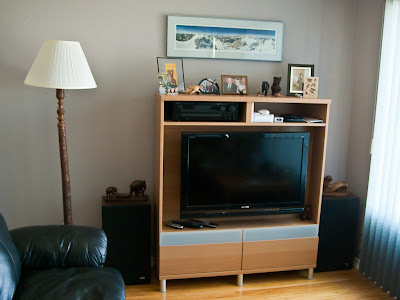
I've been planning on getting a new TV but the holdup was that our entertainment stand pre-dates big screen TV's and wasn't the right size or shape. We shopped for a new stand in town but couldn't find anything we liked. We found one we liked at Ikea in Edmonton, but they didn't have it in the color we wanted. Finally, on the way back from the mountains we stopped at Ikea in Calgary and got one.
The new wall unit wouldn't hold the old TV (not deep enough) so I decided I might as well take the plunge. I did a minimum of research on the internet (trying to avoid the tyranny of choice!) and ended up buying a 37" Sony Bravia XBR6. For movies and TV 720p would have been fine but I wanted full 1080p (1920 x 1080) resolution, partly for "future-proofing" and partly to view my photographs. (almost the same as the 1920 x 1200 resolution of my 24" iMac) And, yes, photographs look great on it :-)
I had my Mac hooked up to the old TV with the DVI to Video adapter. I was using the composite (RCA) video output but it also has S-Video so that's what I used to hook up the new TV. The results were poor. It only went up to 1024 x 768 resolution and it was quite fuzzy. For some reason I had it in my head that S-Video was high resolution and digital, but it's not. It's analog and not much better than composite. (The TV doesn't have DVI input, just HDMI so I couldn't directly hook up DVI.)
I looked at my neighborhood London Drugs but they didn't have anything better. However, my local Apple store (not an official Apple store, just a store that specializes in Apple stuff) had a DVI to HDMI cable. They also sold me an optical audio cable (DVI doesn't have audio) but surprisingly, the Sony doesn't have optical input, only optical output. However one of the HDMI ports is paired with RCA audio inputs so I used that.
The results were much better, I got the full 1920 x 1080, nice and crisp and perfectly readable.
However, the next day I fired it up and the display was "bigger" than the screen so the top menu was no longer visible. Strange. I check the Display preferences and they looked ok. I did notice that "Overscan" was turned on, so I tried turning this off, but then the display was too small - not filling the screen and no longer sharp. Eventually I rebooted and turned Overscan back on and it was back to working properly. I think what happened was that I turned the Mac on before the TV and it didn't recognize the display properly. I guess I'll have to remember to turn the TV on before the Mac. Probably at the same time would work since the Mac takes longer to boot than the TV. No, today I was careful to turn on the TV first, and it still did this. Even a restart didn't fix it. But toggling the overscan off and back on after the restart fixed it. Hopefully this won't be a recurring problem.
Regular DVD's are only 480i (720 x 480) resultion. You need Blu-Ray to get the full 1080p resolution. But I'm using the Mac as a DVD player, and although you can get external add-on Blu-Ray drives, OS X doesn't support Blu-Ray yet. Obviously I could get a separate Blu-Ray player, but I'm trying to reduce the number of boxes, not get more!
You also can't rent HD movies through iTunes on a regular Mac, only on an Apple TV. I'm not sure why they made that choice. To encourage people to buy Apple TV's? But isn't a more expensive actual Mac even better? I like the idea of the Apple TV - simpler and more energy efficient than a Mac. And you can run Boxee on Apple TV so you're not limited to the built-in software. But it can't act as a PVR. And I pretty much refuse to watch regular TV shows without a PVR since commercials drive me crazy.
DVD and regular iTunes movie resolution still looks pretty good scaled up to the higher resolution by the Mac. I assume it's doing similar processing as the "upscaling" that better DVD players and home theater systems do.
One thing I have noticed is that the Mac mini runs a lot hotter driving the new TV. I'm guessing this is due to more processing required for the higher resolution. I wonder if the newer Mac mini's would do better? I have come across people saying Apple TV has trouble driving full 1080 resolution due to the processing requirements.
I also took the plunge and moved my physical cd collection and cd player out of the living room. For a while now, I've had my old 30gb iPod hooked up to the stereo and used that. But Shelley still used the physical cd's. Now I don't even have the iPod hooked up - which means you have to fire up the Mac and TV to listen to music. It may be a little tough convincing Shelley that's an improvement! She still shies away from the Mac as a PVR, although if you ask me, it's no more complicated than the standalone PVR we had.
I was using my iPod instead of playing music via the Mac for a couple of reasons. One is that the iPod is pretty much instant on - no waiting for it to boot. Another issue was reading the screen, although I realize that FrontRow might have solved that. The other problem is how to access my music. My main collection is in iTunes on my iMac. I can share that library, but being energy conscious I turn my iMac off when I'm not using it, and then I can't access it. So I'd have to boot two machines. But I keep a mirror of the music files on my Time Capsule, so I ended up importing all the files into a local iTunes library on the Mac mini. That works well, but I'm not sure how I'm going to keep it up to date. Maybe I should keep a single main library on the Time Capsule. On second thought, the problem with this approach is that currently you have to manually connect the Time Capsule shared drive every time you start up, which is a hassle and won't help with convincing Shelley this is a "better" setup. There are ways to automatically connect it, but then that slows up the boot process. Maybe I should just periodically mirror my iTunes library from my iMac to the Time Capsule and from there to the Mac Mini. I think if I'm careful to keep the paths the same that will work.
I did still hook up the stereo receiver and run audio output from the TV to it, mainly to get better sound for music through the bigger JBL speakers rather than relying on the TV's little built-in ones.
But the receiver is getting dated too - it doesn't even have a remote! Maybe I should upgrade to a "home theater" system? I'm not really that concerned about surround sound for movies. I'd be afraid a set of small low end surround sound home theater speakers won't do as good a job for music as my current setup. I guess I could get a home theater system with an integrated Blu-Ray player. Or maybe there are decent speakers that would connect directly to the Mac that would eliminate the need for a receiver entirely. But what is the sound quality like for listening to music rather than playing games? Maybe I'll hold off on this - enough changes for one time!
The old TV
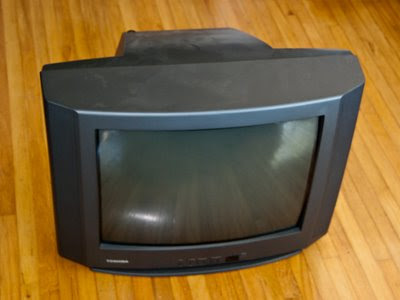
and the new setup:
It hasn't bothered me too much. We don't watch much TV and when we do, most shows hardly warrant high definition. ER in high def? Big deal. Movies maybe. And a wide screen would be nice for movies.
I did have it connected to my old Mac Mini and an EyeTV to play DVD's and use as a PVR and rent movies from iTunes. But the resolution on an old crt TV is pretty awful. It might barely manage 640 x 480, but software these days tends to want at least 1024. I managed by using the handy screen zoom feature of the Mac - it wouldn't have been usable without it.
Shaw (my cable company) has been bugging me to upgrade to digital for a long time. They finally got the price right (free!) so I let them send me a digital terminal. The downside is that the Mac can't change channels on the cable terminal (unless I get an IR blaster) so I still have the EyeTV hooked up to the analog cable. So if I want to use the Mac to record TV or to pause and skip commercials, then I can't use the digital cable. I could get an HD terminal with PVR but that's another expensive box, and I'd rather use my Mac. Oh well, like I said, I'm not really too worried about picture quality for regular TV shows.
I've been planning on getting a new TV but the holdup was that our entertainment stand pre-dates big screen TV's and wasn't the right size or shape. We shopped for a new stand in town but couldn't find anything we liked. We found one we liked at Ikea in Edmonton, but they didn't have it in the color we wanted. Finally, on the way back from the mountains we stopped at Ikea in Calgary and got one.
The new wall unit wouldn't hold the old TV (not deep enough) so I decided I might as well take the plunge. I did a minimum of research on the internet (trying to avoid the tyranny of choice!) and ended up buying a 37" Sony Bravia XBR6. For movies and TV 720p would have been fine but I wanted full 1080p (1920 x 1080) resolution, partly for "future-proofing" and partly to view my photographs. (almost the same as the 1920 x 1200 resolution of my 24" iMac) And, yes, photographs look great on it :-)
I had my Mac hooked up to the old TV with the DVI to Video adapter. I was using the composite (RCA) video output but it also has S-Video so that's what I used to hook up the new TV. The results were poor. It only went up to 1024 x 768 resolution and it was quite fuzzy. For some reason I had it in my head that S-Video was high resolution and digital, but it's not. It's analog and not much better than composite. (The TV doesn't have DVI input, just HDMI so I couldn't directly hook up DVI.)
I looked at my neighborhood London Drugs but they didn't have anything better. However, my local Apple store (not an official Apple store, just a store that specializes in Apple stuff) had a DVI to HDMI cable. They also sold me an optical audio cable (DVI doesn't have audio) but surprisingly, the Sony doesn't have optical input, only optical output. However one of the HDMI ports is paired with RCA audio inputs so I used that.
The results were much better, I got the full 1920 x 1080, nice and crisp and perfectly readable.
However, the next day I fired it up and the display was "bigger" than the screen so the top menu was no longer visible. Strange. I check the Display preferences and they looked ok. I did notice that "Overscan" was turned on, so I tried turning this off, but then the display was too small - not filling the screen and no longer sharp. Eventually I rebooted and turned Overscan back on and it was back to working properly. I think what happened was that I turned the Mac on before the TV and it didn't recognize the display properly. I guess I'll have to remember to turn the TV on before the Mac. Probably at the same time would work since the Mac takes longer to boot than the TV. No, today I was careful to turn on the TV first, and it still did this. Even a restart didn't fix it. But toggling the overscan off and back on after the restart fixed it. Hopefully this won't be a recurring problem.
Regular DVD's are only 480i (720 x 480) resultion. You need Blu-Ray to get the full 1080p resolution. But I'm using the Mac as a DVD player, and although you can get external add-on Blu-Ray drives, OS X doesn't support Blu-Ray yet. Obviously I could get a separate Blu-Ray player, but I'm trying to reduce the number of boxes, not get more!
You also can't rent HD movies through iTunes on a regular Mac, only on an Apple TV. I'm not sure why they made that choice. To encourage people to buy Apple TV's? But isn't a more expensive actual Mac even better? I like the idea of the Apple TV - simpler and more energy efficient than a Mac. And you can run Boxee on Apple TV so you're not limited to the built-in software. But it can't act as a PVR. And I pretty much refuse to watch regular TV shows without a PVR since commercials drive me crazy.
DVD and regular iTunes movie resolution still looks pretty good scaled up to the higher resolution by the Mac. I assume it's doing similar processing as the "upscaling" that better DVD players and home theater systems do.
One thing I have noticed is that the Mac mini runs a lot hotter driving the new TV. I'm guessing this is due to more processing required for the higher resolution. I wonder if the newer Mac mini's would do better? I have come across people saying Apple TV has trouble driving full 1080 resolution due to the processing requirements.
I also took the plunge and moved my physical cd collection and cd player out of the living room. For a while now, I've had my old 30gb iPod hooked up to the stereo and used that. But Shelley still used the physical cd's. Now I don't even have the iPod hooked up - which means you have to fire up the Mac and TV to listen to music. It may be a little tough convincing Shelley that's an improvement! She still shies away from the Mac as a PVR, although if you ask me, it's no more complicated than the standalone PVR we had.
I was using my iPod instead of playing music via the Mac for a couple of reasons. One is that the iPod is pretty much instant on - no waiting for it to boot. Another issue was reading the screen, although I realize that FrontRow might have solved that. The other problem is how to access my music. My main collection is in iTunes on my iMac. I can share that library, but being energy conscious I turn my iMac off when I'm not using it, and then I can't access it. So I'd have to boot two machines. But I keep a mirror of the music files on my Time Capsule, so I ended up importing all the files into a local iTunes library on the Mac mini. That works well, but I'm not sure how I'm going to keep it up to date. Maybe I should keep a single main library on the Time Capsule. On second thought, the problem with this approach is that currently you have to manually connect the Time Capsule shared drive every time you start up, which is a hassle and won't help with convincing Shelley this is a "better" setup. There are ways to automatically connect it, but then that slows up the boot process. Maybe I should just periodically mirror my iTunes library from my iMac to the Time Capsule and from there to the Mac Mini. I think if I'm careful to keep the paths the same that will work.
I did still hook up the stereo receiver and run audio output from the TV to it, mainly to get better sound for music through the bigger JBL speakers rather than relying on the TV's little built-in ones.
But the receiver is getting dated too - it doesn't even have a remote! Maybe I should upgrade to a "home theater" system? I'm not really that concerned about surround sound for movies. I'd be afraid a set of small low end surround sound home theater speakers won't do as good a job for music as my current setup. I guess I could get a home theater system with an integrated Blu-Ray player. Or maybe there are decent speakers that would connect directly to the Mac that would eliminate the need for a receiver entirely. But what is the sound quality like for listening to music rather than playing games? Maybe I'll hold off on this - enough changes for one time!
The old TV

and the new setup:

Thursday, May 14, 2009
One Year of jSuneido Development
Just over a year ago I was trying to make the C++ implementation of Suneido multi-threaded.
I started to wonder if this was the right approach, and whether I might be better off leveraging an existing VM and dreamed up jSuneido
So for the last year I've been working on porting Suneido to Java. I think it's going pretty well, although I wish it would go faster.
jSuneido is currently about 22,000 lines of code. (About 5000 of those are tests.) I've been working on it an average of 3 days a week for a year - that's about 150 days, or about 150 lines per day.
About six weeks after I started I was doing about 100 lines per day. That was calendar days rather than working days, but for the first burst of enthusiasm I worked on it most days.
I also guessed jSuneido might be about 30,000 lines of code. Given the current size and what's left to do, that probably isn't too far off. Another 8000 lines at 150 lines per day is about 50 days, at 3 days per week, that's about 17 weeks or roughly 4 months.
If you'd told me at the start it was going to take me 16 months I would have been either skeptical or depressed or some combination. But where I stand now, 4 more months doesn't seem too bad. It almost feels like maybe I can see the light at the end of the tunnel.
Of course, that's a really crude estimate and it could be way off. Some of the things I've got left to do could take a lot longer. Tracking down obscure bugs could take indefinite amounts of time. And with concurrency issues looming, obscure bugs could be the order of the day.
I'm not much of a believer in software project estimating. But it's fun to play with the numbers, especially since there's no one to hassle me if they're wrong.
I'm still pretty comfortable that this was the right way to go. Maybe I could have got some multi-threading going in the C++ version in less time. But I still would have been stuck with an aging non-portable implementation with issues like poor garbage collection.
In some ways this qualified as rewriting from scratch, seldom a good idea. But because it has to run all the same Suneido code and interoperate with the existing version, it's more of a port than a rewrite. I obviously had to redesign some of the internals to work with Java and the JVM, but hopefully I've retained most of the accumulated wisdom of the existing implementation.
I started to wonder if this was the right approach, and whether I might be better off leveraging an existing VM and dreamed up jSuneido
So for the last year I've been working on porting Suneido to Java. I think it's going pretty well, although I wish it would go faster.
jSuneido is currently about 22,000 lines of code. (About 5000 of those are tests.) I've been working on it an average of 3 days a week for a year - that's about 150 days, or about 150 lines per day.
About six weeks after I started I was doing about 100 lines per day. That was calendar days rather than working days, but for the first burst of enthusiasm I worked on it most days.
I also guessed jSuneido might be about 30,000 lines of code. Given the current size and what's left to do, that probably isn't too far off. Another 8000 lines at 150 lines per day is about 50 days, at 3 days per week, that's about 17 weeks or roughly 4 months.
If you'd told me at the start it was going to take me 16 months I would have been either skeptical or depressed or some combination. But where I stand now, 4 more months doesn't seem too bad. It almost feels like maybe I can see the light at the end of the tunnel.
Of course, that's a really crude estimate and it could be way off. Some of the things I've got left to do could take a lot longer. Tracking down obscure bugs could take indefinite amounts of time. And with concurrency issues looming, obscure bugs could be the order of the day.
I'm not much of a believer in software project estimating. But it's fun to play with the numbers, especially since there's no one to hassle me if they're wrong.
I'm still pretty comfortable that this was the right way to go. Maybe I could have got some multi-threading going in the C++ version in less time. But I still would have been stuck with an aging non-portable implementation with issues like poor garbage collection.
In some ways this qualified as rewriting from scratch, seldom a good idea. But because it has to run all the same Suneido code and interoperate with the existing version, it's more of a port than a rewrite. I obviously had to redesign some of the internals to work with Java and the JVM, but hopefully I've retained most of the accumulated wisdom of the existing implementation.
Tuesday, May 12, 2009
Tuesday, May 05, 2009
Another jSuneido Milestone
The last little while I've been working on getting the standard library to compile to Java bytecode.
I sat down to work on it today, ran the test to see where it would fail next, and it didn't - it compiled everything in stdlib. Sweet!
Of course, I'm not actually running the code, so I can't be sure if it's compiling "correctly", other than it's passing the Java verifier so I know the bytecode is "valid".
The next step is to actually run the stdlib tests, not just compile them.
No ... now that I think about it, the next step is to implement the built-in functions for things like string manipulation and database access that the stdlib tests will require.
Back to the grindstone :-)
I sat down to work on it today, ran the test to see where it would fail next, and it didn't - it compiled everything in stdlib. Sweet!
Of course, I'm not actually running the code, so I can't be sure if it's compiling "correctly", other than it's passing the Java verifier so I know the bytecode is "valid".
The next step is to actually run the stdlib tests, not just compile them.
No ... now that I think about it, the next step is to implement the built-in functions for things like string manipulation and database access that the stdlib tests will require.
Back to the grindstone :-)
Friday, April 24, 2009
Apple Makes a Billion
Apple recently past a billion applications downloaded from their App Store for iPhone and iPod Touch. That's in roughly nine months.
Lots of those apps are free or only a few dollars. Lots are games. Lots probably only get used a few times and then forgotten.
But a billion of anything is pretty impressive.
Lots of those apps are free or only a few dollars. Lots are games. Lots probably only get used a few times and then forgotten.
But a billion of anything is pretty impressive.
Labels:
apple
Sunday, April 19, 2009
No Canadians, Eh
 I guess they didn't consider that Canadians might occasionally visit a US store.
(note: this code has expired)
Blogger Line Spacing Problem
When I viewed my last post, I was annoyed once more by the line spacing changing after a block quote.
I did a quick Google search and found a fix.
It's a simple change to the CSS of the template, moving the line spacing from ".post p" to just ".post"
I should have done this a long time ago!
I did a quick Google search and found a fix.
It's a simple change to the CSS of the template, moving the line spacing from ".post p" to just ".post"
I should have done this a long time ago!
Suneido Exception Handling part 2
It actually didn't take that long to implement the ideas I talked about in my last post.
I ran into some problems with circular dependencies when I made my exceptions derive from SuString, but by splitting the header I got around these.
The hardest part was remembering how C++ exceptions work. A year of programming mostly in Java and already the C++ details are fading!
I remembered something in Effective C++ but it turned out to be in More Effective C++.
The recommended style is:
Of course, this recommendation assumes no garbage collection. With garbage collection, like in Suneido, it's reasonable to just throw and catch pointers, which is what I ended up doing. (Before changing to pointers I ran into problems because I passed the caught exception to the Suneido catch code, forgetting that the caught value is a temporary on the stack.)
It was a good reminder of the extra complexity in C++. In Java you don't have to worry about whether you have a value or a pointer or a reference and whether it's on the stack or the heap. You do have the difference between primitive types and reference types, but especially with auto-boxing and un-boxing it's pretty transparent. And in any case, it doesn't lead to crashes like forgetting a C++ value is on the stack.
Since exceptions are a sub-class of strings, all the existing code that assumes strings works fine.
I added two methods: exception.As(newString) to re-throw an exception with a different string. And exception.Callstack() to retrieve the call stack from an exception (e.g. to log it).
Next, I'll have to go through our libraries and make sure that any re-throws are done properly to preserve the original source of the exception, and that any logging uses the callstack from the exception.
I ran into some problems with circular dependencies when I made my exceptions derive from SuString, but by splitting the header I got around these.
The hardest part was remembering how C++ exceptions work. A year of programming mostly in Java and already the C++ details are fading!
I remembered something in Effective C++ but it turned out to be in More Effective C++.
The recommended style is:
throw MyException(...)At first glance this seems wrong because you're throwing a temporary value, but C++ copies thrown exceptions. And catching by reference avoids a second copy that's done if you catch by value.
...
catch (const MyException& e)
Of course, this recommendation assumes no garbage collection. With garbage collection, like in Suneido, it's reasonable to just throw and catch pointers, which is what I ended up doing. (Before changing to pointers I ran into problems because I passed the caught exception to the Suneido catch code, forgetting that the caught value is a temporary on the stack.)
It was a good reminder of the extra complexity in C++. In Java you don't have to worry about whether you have a value or a pointer or a reference and whether it's on the stack or the heap. You do have the difference between primitive types and reference types, but especially with auto-boxing and un-boxing it's pretty transparent. And in any case, it doesn't lead to crashes like forgetting a C++ value is on the stack.
Since exceptions are a sub-class of strings, all the existing code that assumes strings works fine.
I added two methods: exception.As(newString) to re-throw an exception with a different string. And exception.Callstack() to retrieve the call stack from an exception (e.g. to log it).
Next, I'll have to go through our libraries and make sure that any re-throws are done properly to preserve the original source of the exception, and that any logging uses the callstack from the exception.
Subscribe to:
Posts (Atom)