Jeff Atwood recently posted about using three monitors. He's a big fan of multiple monitors.
Personally, I'm not so sure. A few years ago we upgraded almost everyone at our company to dual monitors. I was one of the few hold outs.
At that point, one of my arguments was that I preferred one large monitor to two smaller ones. Even if the surface area is larger, two monitors isn't so good if you want one large window (e.g. Eclipse or Lightroom). Of course, if money isn't an issue, you could just have two (or three) large monitors.
To be clear, I'm not saying there aren't good, valid uses for multiple monitors. Studies have shown they can increase productivity. But I'm not sure that translates into normal usage. As the saying goes, "In theory, theory and practice are the same. In practice, they are not."
I think the key issue is how people use multiple monitors. I suspect that many people use them in ways that are counter productive, that just add distraction and interruptions to their environment. I think you should be closing your email and chat and Twitter and Facebook - not using multiple monitors to keep them constantly in your face.
Of course, it's virtually impossible to wean people away from keeping email etc. open all the time. It doesn't matter how much you talk about the cost of distractions and interruptions. Regardless of the excuses they give, I think the problem is that a lot of people welcome these distractions. After all, it's hard work to focus on one task for extended periods.
If you're going to focus on one thing at a time, then do you still need multiple monitors? Occasionally, I would like to have documentation or the program I'm working on open as well as my IDE. But I find virtual desktops to work pretty well for this.
I do agree that ending up with one monitor straight ahead is an advantage of three monitors over two.
Wednesday, April 07, 2010
Tuesday, April 06, 2010
Spoke Too Soon
Good think I'm not superstitious or I'd be certain I jinxed myself writing my previous blog post.
Right after posting it I started to test limiting the maximum number of threads and ran into a problem I'd actually seen earlier in the day but written off as nothing because I was still getting my test program working.
For some reason, occasionally one of the clients will get "stuck". The server appears to have completed the request, but the client appears to still be waiting for a response. Eventually the client times out.
And, Murphy's Law, it seems to not happen (or at least nowhere near as often) when the debugger is attached. Which happens to be how I was running the tests all day, just in case I ran into any problems that I would need to inspect. When I resumed testing after writing the blog post, I didn't attach the debugger, since I was just wrapping up.
Of course, not being able to make it happen easily, and not at all when the debugger is attached is going to make it hard to track down. Exactly what I was afraid of. Wish me luck!
Right after posting it I started to test limiting the maximum number of threads and ran into a problem I'd actually seen earlier in the day but written off as nothing because I was still getting my test program working.
For some reason, occasionally one of the clients will get "stuck". The server appears to have completed the request, but the client appears to still be waiting for a response. Eventually the client times out.
And, Murphy's Law, it seems to not happen (or at least nowhere near as often) when the debugger is attached. Which happens to be how I was running the tests all day, just in case I ran into any problems that I would need to inspect. When I resumed testing after writing the blog post, I didn't attach the debugger, since I was just wrapping up.
Of course, not being able to make it happen easily, and not at all when the debugger is attached is going to make it hard to track down. Exactly what I was afraid of. Wish me luck!
Putting jSuneido Through Its Paces
I've spent the day exercising jSuneido. I planned to do more of this sooner, but I kept finding other parts to work on. Partly I'm scared of finding bugs, which at this stage in the game are liable to be obscure and hard to fix. Wimp!
But so far, no new bugs. I've had three computers, each with multiple instances of clients (from 4 to 40), all hammering constantly on the jSuneido server. So far so good - it appears to be solid. I've been using JConsole to monitor it. It's fun to watch the memory grow and then shrink after garbage collection, and threads come and go in the thread pool.
My iMac is just dual core. I also want to run some tests on a quad core machine at the office. More cores is a better test of concurrency since there is more going on literally at the same time, rather than just with context switching. Also, at the office I've got even more machines to run clients on. And of course, I want to see how it scales with more cores, which is to a large degree the point of this whole project.
One thing I'm not sure about is whether I should be limiting the size of the thread pool. Currently I'm just using a standard Executors.newCachedThreadPool which isn't limited. So if I fire up 40 clients making constant requests, I get 40 threads. But 40 threads on 2 cores presumably means a lot of context switching overhead. I'll have to experiment. (Note: in normal operation there wouldn't be one thread per client because the clients wouldn't be making continuous requests. There would only be as many threads as concurrent requests.) The minimum context switching would be to have the same number of threads as cores. But you want to service clients concurrently, i.e. a long request shouldn't block other requests. So you have to sacrifice some context switching overhead to gain more concurrency.
But so far, no new bugs. I've had three computers, each with multiple instances of clients (from 4 to 40), all hammering constantly on the jSuneido server. So far so good - it appears to be solid. I've been using JConsole to monitor it. It's fun to watch the memory grow and then shrink after garbage collection, and threads come and go in the thread pool.
My iMac is just dual core. I also want to run some tests on a quad core machine at the office. More cores is a better test of concurrency since there is more going on literally at the same time, rather than just with context switching. Also, at the office I've got even more machines to run clients on. And of course, I want to see how it scales with more cores, which is to a large degree the point of this whole project.
One thing I'm not sure about is whether I should be limiting the size of the thread pool. Currently I'm just using a standard Executors.newCachedThreadPool which isn't limited. So if I fire up 40 clients making constant requests, I get 40 threads. But 40 threads on 2 cores presumably means a lot of context switching overhead. I'll have to experiment. (Note: in normal operation there wouldn't be one thread per client because the clients wouldn't be making continuous requests. There would only be as many threads as concurrent requests.) The minimum context switching would be to have the same number of threads as cores. But you want to service clients concurrently, i.e. a long request shouldn't block other requests. So you have to sacrifice some context switching overhead to gain more concurrency.
Labels:
concurrency,
java,
suneido

Sunday, April 04, 2010
Slow Gmail on iPhone
Lately Gmail on my iPhone has been really slow. (This is the web version, not the mail app.) The screen pops up right away, but it takes a long time to finish checking for new mail - maybe 30 seconds.
I don't have a lot of messages in my inbox, often none. And it happens with a good wifi connection.
I didn't really think too much about it, but I let my sister check her gmail and it was much faster. Very strange.
I searched on the internet but didn't find too much. Most of what I found was for the mail app.
So I just did the usual "kick the machine" - I cleared the history, cache, and cookies. That seemed to do the trick - it was fast again (less than 5 seconds).
So I wrote this blog post and then went back and tried it again and it was slow!!!
Next, I tried deleting the databases for gmail. Still slow.
Try again, delete the databases and this time also clear the history, caches, and cookies. Log back in and it's fast again. And it seems to be staying fast this time, although I'm not totally confident that it'll stay that way.
If you're having the same problem and want to try this, go to Settings > Safari, scroll down to the bottom. Click on Databases, then Edit, then delete any gmail entries. I always seem to have two entries which appear identical. Then go back to the Safari settings and click on Clear History, Clear Cookies, and Clear Cache (one at a time).

NOTE: Clearing cookies will log you out of sites, so don't do this if you don't have your passwords handy to log back in.
I don't have a lot of messages in my inbox, often none. And it happens with a good wifi connection.
I didn't really think too much about it, but I let my sister check her gmail and it was much faster. Very strange.
I searched on the internet but didn't find too much. Most of what I found was for the mail app.
So I just did the usual "kick the machine" - I cleared the history, cache, and cookies. That seemed to do the trick - it was fast again (less than 5 seconds).
So I wrote this blog post and then went back and tried it again and it was slow!!!
Next, I tried deleting the databases for gmail. Still slow.
Try again, delete the databases and this time also clear the history, caches, and cookies. Log back in and it's fast again. And it seems to be staying fast this time, although I'm not totally confident that it'll stay that way.
If you're having the same problem and want to try this, go to Settings > Safari, scroll down to the bottom. Click on Databases, then Edit, then delete any gmail entries. I always seem to have two entries which appear identical. Then go back to the Safari settings and click on Clear History, Clear Cookies, and Clear Cache (one at a time).

NOTE: Clearing cookies will log you out of sites, so don't do this if you don't have your passwords handy to log back in.
Saturday, April 03, 2010
A Welcome iTunes Feature for the iPhone
For smaller iPod's like the Shuffle, iTunes has for a long time had an option to convert audio to lower quality to fit more on the device. But for some reason this feature was not available on the iPhone until recently.
As I accumulate more music, and at higher quality, and therefore larger files, my iPhone has been getting full, despite being a 32gb model. I have a few apps that take up more space, like Wikipedia and CoPilot Live but the majority of the space is audio.
Recently I noticed that this option had appeared for my iPhone. I think it probably came in the last update, but it may have been there for a while and I just missed it. It freed up over 10gb of space on my phone! Very nice. Audiophiles will no doubt disapprove, but in the places where I listen to music on my iPhone, I doubt I'll notice the difference.


NOTE: Because this requires updating all the music files on your phone, the next sync after setting this will take a while. Don't do it when you're short of time.
As I accumulate more music, and at higher quality, and therefore larger files, my iPhone has been getting full, despite being a 32gb model. I have a few apps that take up more space, like Wikipedia and CoPilot Live but the majority of the space is audio.
Recently I noticed that this option had appeared for my iPhone. I think it probably came in the last update, but it may have been there for a while and I just missed it. It freed up over 10gb of space on my phone! Very nice. Audiophiles will no doubt disapprove, but in the places where I listen to music on my iPhone, I doubt I'll notice the difference.


NOTE: Because this requires updating all the music files on your phone, the next sync after setting this will take a while. Don't do it when you're short of time.
Friday, April 02, 2010
Geek Envy
I was sitting reading my Kindle over lunch the other day at Innovation Place. Someone walking by did a double take and asked "Is that an iPad?!" I said no, it was "just" a Kindle. He was relieved and explained, "My boss is getting the first iPad in Saskatoon and he'd be really upset if someone else got one first." I don't think he saw me shake my head and roll my eyes as he walked away.
Thursday, March 18, 2010
Eclipse Keyboard Shortcuts
I don't tend to use a lot of keyboard shortcuts, but I use these Eclipse ones quite regularly:
Related posts:
Template Shortcuts in Eclipse
Eclipse Tip for Windows and Mac Users
- F3 - Open Declaration
- Shift + Command + G - References
- Alt + Command + M - Refactor - Extract Method
- Alt + Command + R - Refactor - Rename
- Command + F11 - Run
Related posts:
Template Shortcuts in Eclipse
Eclipse Tip for Windows and Mac Users
Thursday, March 04, 2010
Template Shortcuts in Eclipse
One of the features of the Eclipse IDE is that you can define "template" shortcuts. For example, you can expand "main" into the complete method definition. I don't use a lot of these, but they are handy once your fingers learn them.
Eclipse comes with a bunch of pre-defined templates and you can add your own. For example, I added a template that expands "sop" into "System.out.println".
Ctrl+Space brings up the choices. In theory if you select Auto Insert and there is only one matching choice it will automatically fill in the template. In practice there are usually multiple choices so you have to pick from the list. That's usually just a matter of hitting Enter (as long as your choice is the first one).
You can find the templates in Preferences - Java - Editor - Templates.
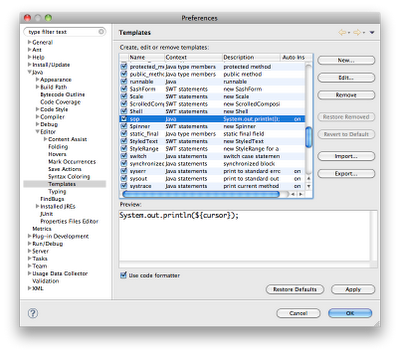
I also edited the "test" template to generate a JUnit 4 test (instead of the older style):
Eclipse comes with a bunch of pre-defined templates and you can add your own. For example, I added a template that expands "sop" into "System.out.println".
Ctrl+Space brings up the choices. In theory if you select Auto Insert and there is only one matching choice it will automatically fill in the template. In practice there are usually multiple choices so you have to pick from the list. That's usually just a matter of hitting Enter (as long as your choice is the first one).
You can find the templates in Preferences - Java - Editor - Templates.

I also edited the "test" template to generate a JUnit 4 test (instead of the older style):
@Test
public void ${name}() {
${cursor}
}
Tuesday, March 02, 2010
A Faster, Cleaner Database Design for Suneido
Current design:
In theory Suneido happily accesses databases bigger than physical memory. In practice, performance drops off rapidly when this happens due to swapping (page faults). You would think there would be a "working set" of data that would be a small portion of the database. But users tend to run things like historical reports or searches that access large portions of the data.
The other issue is that memory mapping the database makes reads fast (once the file is mapped into memory). But writes still have to go to disk (albeit somewhat asynchronously). And the index update writes are essentially random which is the worst case for disk performance. (Maybe SSD drives would help with this?)
Which led me to think, why not just keep the database in memory. But...
This has some nice features:
You could also periodically update the on-disk indexes, presumably during idle time on a background thread.
This seems pretty good, but there's more. Now that index updates are not being written to disk immediately, it becomes feasible to make the indexes persistent immutable data structures.
jSuneido already sort of does this, but in a complicated round-about way. Each transaction maintains an "overlay" of updates to indexes. When the transaction commits, these are merged into the real indexes on disk and other concurrent transactions are given a copy of the old index nodes so they don't see the changes. It works, but it's ugly and error prone.
With this new scheme, each transaction has, in effect, it's own copy of the indexes. Since it's a persistent immutable data structure, updates by transactions have no effect on each other. When a transaction commits, you merge it's indexes with the master. I think this would make the code quite a bit simpler.
It's hard to say how much faster this would be. Updates would be considerably faster, but reading would be much the same. So the overall speedup would depend on the mix of updates and reads. However, in a multi-user scenario (the current target for jSuneido) if you can reduce the load, that benefits everyone, including reads.
I'm not going to drop everything and implement this, but it's an interesting idea. I'll have to mull it over some more - there may be flaws that I haven't thought of yet. It might be something to work on once jSuneido is "finished" and deployed.
As with any "bright idea" like this, I can't help wonder if I'm reinventing the wheel. I wouldn't be surprised if someone was already using this approach. Of course, that doesn't mean that there's any way to reuse their code, or even learn from them. The internet might give us access to the world's knowledge, but it's still hard to find this kind of stuff.
Related posts:
Language Connoisseur
A Java Immutable Persistent Map
A Java Immutable Persistent List
jSuneido Progress
- entire database is kept in a single file
- the database file is accessed via memory mapping
- data records are immutable, updates add new versions
- indexes are mutable
- data records are used like a "log" for crash recovery
- indexes are not recovered, they are rebuilt
In theory Suneido happily accesses databases bigger than physical memory. In practice, performance drops off rapidly when this happens due to swapping (page faults). You would think there would be a "working set" of data that would be a small portion of the database. But users tend to run things like historical reports or searches that access large portions of the data.
The other issue is that memory mapping the database makes reads fast (once the file is mapped into memory). But writes still have to go to disk (albeit somewhat asynchronously). And the index update writes are essentially random which is the worst case for disk performance. (Maybe SSD drives would help with this?)
Which led me to think, why not just keep the database in memory. But...
- Despite the performance issues, I'm not sure it's reasonable to limit database size to physical memory.
- Loading the database into memory on startup and saving it to disk on shutdown would be slow.
- You still need to write something to disk for crash recovery.
This has some nice features:
- Similar start up speed (although slower shutdown)
- Less disk writes (only data, not indexes) - faster
- Disk writes are sequential (index updates were random) - much faster
- Allows databases bigger than memory
You could also periodically update the on-disk indexes, presumably during idle time on a background thread.
This seems pretty good, but there's more. Now that index updates are not being written to disk immediately, it becomes feasible to make the indexes persistent immutable data structures.
jSuneido already sort of does this, but in a complicated round-about way. Each transaction maintains an "overlay" of updates to indexes. When the transaction commits, these are merged into the real indexes on disk and other concurrent transactions are given a copy of the old index nodes so they don't see the changes. It works, but it's ugly and error prone.
With this new scheme, each transaction has, in effect, it's own copy of the indexes. Since it's a persistent immutable data structure, updates by transactions have no effect on each other. When a transaction commits, you merge it's indexes with the master. I think this would make the code quite a bit simpler.
It's hard to say how much faster this would be. Updates would be considerably faster, but reading would be much the same. So the overall speedup would depend on the mix of updates and reads. However, in a multi-user scenario (the current target for jSuneido) if you can reduce the load, that benefits everyone, including reads.
I'm not going to drop everything and implement this, but it's an interesting idea. I'll have to mull it over some more - there may be flaws that I haven't thought of yet. It might be something to work on once jSuneido is "finished" and deployed.
As with any "bright idea" like this, I can't help wonder if I'm reinventing the wheel. I wouldn't be surprised if someone was already using this approach. Of course, that doesn't mean that there's any way to reuse their code, or even learn from them. The internet might give us access to the world's knowledge, but it's still hard to find this kind of stuff.
Related posts:
Language Connoisseur
A Java Immutable Persistent Map
A Java Immutable Persistent List
jSuneido Progress
Labels:
concurrency,
database,
immudb,
suneido
Saturday, February 20, 2010
Blogger + Picasa Tweak
When I reference photos on Picasa from my Blogger blog I use the HTML under "Link to this album" and then "Paste HTML to embed in website" (using the Edit HTML function of Blogger)
However, when people click on the result they get taken to the album page of thumbnails. Some of my less technically savvy friends don't realize or notice that they can get a slideshow so they end up clicking on the photos one at a time to look at them.
You can fix to go directly to the slideshow by changing:
You can see examples in my Sustainable Adventure blog.
Note: Picasa also has an "Embed Slideshow" option under "Link to this Album" but I don't normally use this because it only shows small images and I'd prefer to have people view my photos larger. I do use it when I'm not as concerned about image size. (You can still click on it to go to the Picasa album, but most people won't bother.)
However, when people click on the result they get taken to the album page of thumbnails. Some of my less technically savvy friends don't realize or notice that they can get a slideshow so they end up clicking on the photos one at a time to look at them.
You can fix to go directly to the slideshow by changing:
?feat=embedwebsiteto:
#slideshowin the HTML. There are two occurrences - one for clicking on the photo and one for the caption.
You can see examples in my Sustainable Adventure blog.
Note: Picasa also has an "Embed Slideshow" option under "Link to this Album" but I don't normally use this because it only shows small images and I'd prefer to have people view my photos larger. I do use it when I'm not as concerned about image size. (You can still click on it to go to the Picasa album, but most people won't bother.)
Thursday, February 18, 2010
Visibility

The checking part went quite smoothly and quickly. The rebuilding/recovery part has been slow. I've been working on it for several days and it seems like I've made no progress. The only code I've written is tests and debugging! But whether it feels like it or not, I guess I was making progress because it "suddenly" started working today.
Recovery is hard for a number of reasons. For starters you're assuming the database has been corrupted, so you have to code a lot more defensively. Second, because you're working outside the normal operation of the database, you can't use the normal functionality. You're not doing transactions etc.
One lesson I (re)learned was how important "visibility" is. By that I mean being able to "see" the data you're working on. That's a large part of why debuggers can be valuable - they let you inspect the data. Often, inserting the right "print" statement in the "right" place is all it takes to figure out a bug. Of course, finding that right place is not so easy. In this case visibility meant writing a dump utility so I could see exactly what was inside the database. Obviously, I have a pretty good idea in general how it's structured, but not the details of exactly which types of blocks of data are in which sequence. And dumping to text files meant I could use tools like diff to compare before and after recovery.
PS. In hindsight, yes, it would have made sense to write the database checking much earlier so I could verify that databases weren't getting corrupted by operations. On the other hand, that was usually pretty obvious - it crashed!
Labels:
suneido
Monday, February 15, 2010
Readability
How often do you go to a web site to read an article and find that the page is plastered with distracting ads and other material, the text is too small, and the lines have way too many characters for comfortable reading?
Here's a solution - install the Readability bookmarklet. It will re-format the page you're on for easier reading - less distractions, bigger text, and shorter lines.
Before:

After:

Here's a solution - install the Readability bookmarklet. It will re-format the page you're on for easier reading - less distractions, bigger text, and shorter lines.
Before:

After:

Labels:
web
Friday, February 12, 2010
Buy O'Reilly eBooks Direct
When I wrote my last post - Buy Pragmatic Programmer eBooks Direct - I should have mentioned that O'Reilly has a similar deal for their eBooks - ePub, Mobi, and PDF formats, DRM free, and free updates. Not all of their books are available as eBooks (some are print only) but most of the newer ones are.
They even have a 3 for 2 sale on right now.
They even have a 3 for 2 sale on right now.
Labels:
books
Thursday, February 11, 2010
Buy Pragmatic Programmer eBooks Direct

Buying from Amazon is the path of least resistance since you can buy right from your Kindle.
But if you do that, you'll end up with a proprietary format with DRM that only works with your Kindle. (Although you can read them on your PC or iPhone or iPod Touch with the Kindle app.)
Instead I'd recommend buying direct. That way you can download the book in multiple formats - PDF, ePub (e.g. for iPhone or iPod Touch using apps like Stanza, or for Sony readers), or Mobi (for Kindle). The books are DRM free, and as a bonus, you can download updated copies when they come out.
I've bought a few eBooks from Pragmatic Programmers in the past, either on their own or together with a paper copy. It was very nice to be able to go back and download the Mobi version so I could have them as a reference on my Kindle.
The only very minor hassle is that you have to buy and download the books on a separate computer and transfer them to the Kindle. In Canada that means by USB since emailing to your Kindle is not supported here.
Thanks to Pragmatic Programmers, at least a small part of my eBook library is not locked to the Kindle. I hope more publishers follow their example.
Labels:
books
Tuesday, February 09, 2010
jSuneido Speed Issue Fixed
After some digging, I found the speed issue on Windows.
It didn't turn out to be Parallels - it was just as slow on my Windows machine at work.
It didn't turn out to be anti-virus - it was just as slow with anti-virus turned off.
I thought it might be Nagle problems again, although last time it was the opposite problem - slow on OS X and fast on Windows. But nope, not that either.
I narrowed it down to sending the response. Debugging showed it was fast receiving the request and executing it.
I found I had two methods for sending responses. One was doing selector.wakeup after changing the interestOps (like you're supposed to) and the other wasn't. Of course, the incorrect code was the method being used. I fixed the method being used and got rid of the other one. Problem solved.
Now, the speed is reasonable. 75 seconds to run the test suite with the cSuneido server, 100 seconds with jSuneido. I'm pretty happy with that considering the cSuneido version is C++ code that has been tweaked and optimized for years, whereas jSuneido is my first Java program and has barely been debugged, let alone optimized.
I think jSuneido can probably be faster, but even if it can't, its ability to scale to multiple threads/cores should allow it to outperform cSuneido when there are multiple users. I say "should" because I've barely started testing this. One very preliminary test took about 40 seconds with one client, 50 seconds with two simultaneous clients (on two cores), whereas cSuneido would be pretty much linear i.e. 80 seconds with two clients. Of course, it would be nice to have a quad-core machine to test with, but I haven't quite convinced myself that's excuse enough to buy a new Core i7 iMac :-)
It didn't turn out to be Parallels - it was just as slow on my Windows machine at work.
It didn't turn out to be anti-virus - it was just as slow with anti-virus turned off.
I thought it might be Nagle problems again, although last time it was the opposite problem - slow on OS X and fast on Windows. But nope, not that either.
I narrowed it down to sending the response. Debugging showed it was fast receiving the request and executing it.
I found I had two methods for sending responses. One was doing selector.wakeup after changing the interestOps (like you're supposed to) and the other wasn't. Of course, the incorrect code was the method being used. I fixed the method being used and got rid of the other one. Problem solved.
Now, the speed is reasonable. 75 seconds to run the test suite with the cSuneido server, 100 seconds with jSuneido. I'm pretty happy with that considering the cSuneido version is C++ code that has been tweaked and optimized for years, whereas jSuneido is my first Java program and has barely been debugged, let alone optimized.
I think jSuneido can probably be faster, but even if it can't, its ability to scale to multiple threads/cores should allow it to outperform cSuneido when there are multiple users. I say "should" because I've barely started testing this. One very preliminary test took about 40 seconds with one client, 50 seconds with two simultaneous clients (on two cores), whereas cSuneido would be pretty much linear i.e. 80 seconds with two clients. Of course, it would be nice to have a quad-core machine to test with, but I haven't quite convinced myself that's excuse enough to buy a new Core i7 iMac :-)
Labels:
java,
performance,
suneido
Sunday, February 07, 2010
Removing Borders from Images on Blogger
This may be due to the template I'm using, or maybe even my browser, but in case other people are having the same problem, I thought I'd post my workaround. (Besides, it gives me a handy reference when I forget what to do!)
When I insert images into my blog posts I get a gray border around them. Like this:
 Sometimes that's ok, but often, like with this image, I don't want that border.
NOTE: The border doesn't show up while composing, or in preview, only (annoyingly) after you publish.
To remove it, I edit the HTML and add style="border: none;" to the img tag. (I'm not sure why this is necessary because it already has border="0" - maybe something in the CSS.) The result should be the image without the gray border, like this:
Note: If you're reading this in something like Google Reader you may not see the border.
When I insert images into my blog posts I get a gray border around them. Like this:

NOTE: The border doesn't show up while composing, or in preview, only (annoyingly) after you publish.
To remove it, I edit the HTML and add style="border: none;" to the img tag. (I'm not sure why this is necessary because it already has border="0" - maybe something in the CSS.) The result should be the image without the gray border, like this:
Thursday, February 04, 2010
Back to Work on jSuneido
I fixed a couple of bugs and now all our application tests pass, both standalone on jSuneido, and client-server (with the Windows cSuneido client).
But quite slowly - about 4 times slower running client-server with jSuneido as the server instead of cSuneido. I'm not surprised it's slower, but 4 times seems like a lot. Strangely, when I run the tests under jSuneido standalone (i.e. not client-server) they run about the same speed as cSuneido client-server (which is still about half the speed of cSuneido standalone). So presumably the difference is the client-server networking.
I've been testing with the server running on OS X (since that's where I develop) and the client running under Parallels. Maybe the networking slows down the Java test so I decided to try running the Java server on Windows as well as the client.
First I had to remember how to package up jSuneido as a jar file. I've done this before, but not for a while. In Eclipse you use Export > Runnable Jar File.
Next, I found I didn't have Java on my current Windows 7 Parallels VM. I downloaded and installed the JRE (Java Runtime Environment).
I got some weird errors until I went back and rebuilt my jar file with "Extract required libraries into generated JAR" (instead of "Package required libraries into generated JAR"). I'm not sure exactly what the difference is, or why it makes a difference to running my code. I made a half-hearted attempt to find it in the Eclipse Help but didn't get anywhere.
Finally I got it running, but it was soooooo slow! Instead of the IDE starting more or less instantly, it took more like a minute. Ouch.
I figured it might help to run it with the -server option (that's the default on 64 bit Java, which is what I'm running on OS X). But I discovered the JRE doesn't include the server version. Grrrr. It comes with the JDK (Java Development Kit). That seems odd to me, but that appears to be the way it is.
So I installed the JDK, but the default Java that's on the path is still the JRE one. So now I have two separate installations of Java with the "wrong" one on the path. Sigh.
I ignored that problem and used the absolute path to run the JDK one to get the server version. But it's still just as slow. Argh!
The only thing I can think of is that jar files are zip files and working with zip files (or other compressed archives) has always seemed painfully slow under Parallels. I'm not sure why. Maybe decompression normally takes advantage of CPU features that aren't accessible under Parallels? Or the anti-virus program slowing it down? (I'm using Microsoft's anti-virus.)
The next step is to try it on my Windows machine at work to eliminate the Parallels issue. Or to make a simple Java client so I can try it client-server all on OS X without Windows or Parallels.
And if it's really that slow, then it's time to do some more profiling and see what I can do to speed it up.
But quite slowly - about 4 times slower running client-server with jSuneido as the server instead of cSuneido. I'm not surprised it's slower, but 4 times seems like a lot. Strangely, when I run the tests under jSuneido standalone (i.e. not client-server) they run about the same speed as cSuneido client-server (which is still about half the speed of cSuneido standalone). So presumably the difference is the client-server networking.
I've been testing with the server running on OS X (since that's where I develop) and the client running under Parallels. Maybe the networking slows down the Java test so I decided to try running the Java server on Windows as well as the client.
First I had to remember how to package up jSuneido as a jar file. I've done this before, but not for a while. In Eclipse you use Export > Runnable Jar File.
Next, I found I didn't have Java on my current Windows 7 Parallels VM. I downloaded and installed the JRE (Java Runtime Environment).
I got some weird errors until I went back and rebuilt my jar file with "Extract required libraries into generated JAR" (instead of "Package required libraries into generated JAR"). I'm not sure exactly what the difference is, or why it makes a difference to running my code. I made a half-hearted attempt to find it in the Eclipse Help but didn't get anywhere.
Finally I got it running, but it was soooooo slow! Instead of the IDE starting more or less instantly, it took more like a minute. Ouch.
I figured it might help to run it with the -server option (that's the default on 64 bit Java, which is what I'm running on OS X). But I discovered the JRE doesn't include the server version. Grrrr. It comes with the JDK (Java Development Kit). That seems odd to me, but that appears to be the way it is.
So I installed the JDK, but the default Java that's on the path is still the JRE one. So now I have two separate installations of Java with the "wrong" one on the path. Sigh.
I ignored that problem and used the absolute path to run the JDK one to get the server version. But it's still just as slow. Argh!
The only thing I can think of is that jar files are zip files and working with zip files (or other compressed archives) has always seemed painfully slow under Parallels. I'm not sure why. Maybe decompression normally takes advantage of CPU features that aren't accessible under Parallels? Or the anti-virus program slowing it down? (I'm using Microsoft's anti-virus.)
The next step is to try it on my Windows machine at work to eliminate the Parallels issue. Or to make a simple Java client so I can try it client-server all on OS X without Windows or Parallels.
And if it's really that slow, then it's time to do some more profiling and see what I can do to speed it up.
Labels:
java,
parallels,
subversion
Wednesday, February 03, 2010
Getting Past “Good Enough” eBooks
Getting Past “Good Enough” eBooks: Liza Daly | Digital Book World
Now I have a Kindle I'm noticing the same kind of things, but I have to shake my head - this stuff is so basic!
Another example is that section headings frequently show up at the very bottom of the page. We were fixing this problem in nroff 30 years ago!
Of course, software is no better, people keep making the same mistakes we've known were bad for decades.
Now I have a Kindle I'm noticing the same kind of things, but I have to shake my head - this stuff is so basic!
Another example is that section headings frequently show up at the very bottom of the page. We were fixing this problem in nroff 30 years ago!
Of course, software is no better, people keep making the same mistakes we've known were bad for decades.
Tuesday, February 02, 2010
My New Kindle eBook Reader

Several people have asked why I didn't wait for the Apple iPad. Of course I want an iPad. I love my iPhone and I'd love a similar device with a bigger screen. But ...
- The iPad is supposed to have 10 hours battery life - that's great for a laptop, not so good for an eBook reader. The Kindle, with it's E Ink display will last a couple of weeks. That's critical for travel, especially off the beaten path and away from power (e.g. trekking).
- The iPad isn't available yet, and it's unclear when it will be available in Canada. I could be waiting forever if I keep waiting for the next great thing (I've been waiting a while for the Kindle).
- As far as I can tell, Amazon has the best selection of books. That's what stopped me from buying the Sony eBook reader, which was available sooner in Canada, and in some ways is nicer than the Kindle. Apple hasn't been saying much about their books - how much selection they'll have and what they'll have in Canada.
On top of that, it doesn't seem environmentally friendly to be consuming all those trees and all the resources that go into converting them to physical books.
I've been trying to use the library more, but it's frustrating. Their software sucks. (They just upgraded to a new system and it sucks almost as bad as the old system.) They don't get new books very quickly. They don't get most computer books at all. And you never know when you'll get a book you reserve. It might be tomorrow, it might be next year. And it's no good for books you might want to refer back to. I'll continue to use the library, but mostly for fiction and general non-fiction where I don't care too much when I read it.
Sony has an interesting feature where you can borrow eBooks from your library, but only certain libraries support this (not ours) and there are various limitations. Sony also lets you lend your books to other people with Sony readers - I would really like this feature.
Kindle positives:
- nice display, very easy to read, good for reading outside in bright light
- small, light-weight
- great battery life
- ability to buy books right on the device (don't need to download to your computer and then sync like the Sony)
- ability to create bookmarks and add notes
- ability to read free content in pdf or mobi format
- much more convenient to carry around the Kindle rather than a bunch of books
- free 3G wireless (cell phone) access (but only to buy books from Amazon)
- no back-light (Shelley loves being able to read on her iPod Touch at night)
- slow display - ok for turning pages, but not so good for user interface
- no touch screen (I'm so used to my iPhone I keep trying to tap links on the Kindle)
- no wifi
- no Wikipedia access in Canada
- no web browsing in Canada
- no pictures in magazines in Canada
- no color (black and white display)
- limited memory and no way to expand it (e.g. for an offline copy of Wikipedia)
- you have to buy books from amazon.com (US), but my wish-list and gift cards are on amazon.ca (Canada)
- too easy to buy books ;-)
I debated whether to buy the small or large (DX) Kindle. The large one would be a lot better for reading PDF's that you can't reformat, but I went with the smaller one for ease of carrying.
It's too bad there isn't a better display that combines the battery life and readability of E Ink with the color and speed of a laptop display. The One Laptop Per Child computer had an interesting display with a low power black and white mode (like E Ink) but also a color mode. But no one else seems to be pursuing this kind of display.
The other big negative to all this is that the books you buy are tied to a specific device/company. If I buy books for my Kindle I can't switch to the Sony reader and vice versa. This is mostly because of the DRM copy protection. Imagine if music was tied to a specific player instead of being able to play your mp3's anywhere. (However, Amazon has software that lets you access your Kindle books from your PC, Mac, iPhone, or iPod Touch.)
Labels:
gadgets
Monday, February 01, 2010
Thanks to the Weave Team!
I just installed the 1.0 release of Mozilla Weave and I was excited to see this in the Release Notes:
I had actually disabled Weave on most of my computers because of this. But that was a pain because then my passwords weren't synced. Now I can re-enable it.
Now if only it would just sync my add-ons and work with my iPhone ...(users are never satisfied!)
If you use a master password, Weave Sync will automatically connect after you enter in your master password. Weave Sync will stay disconnected until you enter your master password or you choose to manually connect.It drove me crazy to have the request for the master password come up every time I started Firefox, and it totally baffled anyone else using my computer (you can just cancel, but they would think they couldn't use Firefox without the password)
I had actually disabled Weave on most of my computers because of this. But that was a pain because then my passwords weren't synced. Now I can re-enable it.
Now if only it would just sync my add-ons and work with my iPhone ...(users are never satisfied!)
Labels:
firefox
Subscribe to:
Posts (Atom)