I use an Apple Time Capsule for my home wireless router and backup storage.
Time Capsules have a bad reputation for dying and I've had mine for quite a few years so I was a little nervous about it. If it died I wouldn't have a backup of my iMac. Which would be ok unless it happened to die at the same time. This seems unlikely, but it's surprising how often you do get simultaneous failures. For example, a power surge due to lightning. I can also keep the external drive at work so I have an offsite backup in case the house burns down.
I had a 500gb external drive that I'd used for backups, but it's not big enough to do a complete backup of my 1tb iMac. So I went and bought a Lacie 2tb external drive and used SuperDuper to make a backup. I used the free version, but I'll probably get the paid version so I can update the backup without redoing it.
Then I decided I should also backup my MacBook and my MacMini. I didn't have much critical stuff on them, but a backup would save hassle if I needed to restore. But SuperDuper takes over the whole drive so how could I backup additional machines? The answer seemed to be to partition the drive, but I didn't want to have to redo my iMac backup (600gb takes a while to backup, even with Firewire 800). I searched on the web and found various complicated ways to resize partitions. Finally, I found that with recent OS X you can resize right from the Disk Utility. All the complicated instructions were for older versions of OS X.
The "funny" part of this story is that a few days later I went to use wireless and it wasn't working. I went and checked on the Time Capsule and it was turned off. Strange, because I leave it running all the time. I turned it on and about 10 seconds later it turned itself back off.
My computer was still fine, so I didn't actually need the external backup, but I was glad to have it nonetheless.
I phoned the local Apple dealer (Neural Net). The receptionist wanted me to bring it in and they would look at it in the next few days. I didn't want to be without internet for days so she let me speak to the technician. When I described the symptoms he said the power supply had died. But Apple doesn't let them repair them and doesn't supply any parts. Apple has been promoting their environmentally friendly products, but no matter how they're built, a non-repairable "disposable" product isn't very environmentally friendly.
I would have preferred to give Neural Net the business but they didn't have any Time Capsules in stock so I picked up a 2tb Time Capsule from Future Shop. 10 minutes after opening the box I was back up and running. (Although the initial Time Machine backups took considerably longer.)
One nice thing is that Time Machine backups seem to be a lot less intrusive. Before, when Time Machine kicked in it would really bog down my machine. If I was trying to work I'd often stop it. But now I don't even notice when it runs. I'm not sure how a new external device would change the load on my computer, but it's nice anyway.
My old Time Capsule ran quite hot, even when it wasn't doing anything. I was hoping the new ones would be better, but it seems much the same. I haven't measured it, but I assume heat means power consumption. I'm not sure why it can't go into a low power mode when it's not active. The other reason they run hot is that they have no ventilation or heat sink. Apparently there is an internal fan but all it does is stir the air around inside a small sealed box. You'd think they could come up with some better heat management without compromising their design. I would guess the heat is one of the big reasons they have a reputation for dying. Electronic components tend to have a shorter life at higher temperatures.
Rather than throwing out the old Time Capsule, I passed it on to one of the guys at work that tinkers with hardware. I thought he could at least extract the 1tb drive. But he managed to repair the power supply and is using the whole unit. I guess the hardest part was getting the case open! I'm glad it was saved from the landfill for a while longer.
Now that I have a bigger drive I thought I might as well backup Shelley's Windows machine as well. I have it set up with Mozy for on-line backups but just with the free 2gb account so I'm only backing up selected things. I'd seen Mozy will now backup to external drives so I thought I'd set this up. Unfortunately, it only backs up to directly attached drives (i.e. internal or USB) not to network drives. I'm not sure what the logic is behind that choice. I could use different software, but I think what I'll do (I haven't got round to it yet) is to use the old 500gb external drive.
Wednesday, July 07, 2010
Tuesday, July 06, 2010
iPhone Multi-tasking
A lot of people made a big thing about how the iPhone didn't have multi-tasking. But personally, I never saw any of the reasons as very compelling. Given limited cpu power and memory and a tiny screen, it made perfect sense to single task.
Sure, there are probably a few reasonable uses of multi-tasking. But there are way more potential abuses.
I look at my Windows machine, which is continually thrashing away when I'm not doing anything. Every piece of software I install wants to run stuff in the background. Just to check for updates once a week they want to have a process running constantly. That's not a benefit, that's abuse.
Two days after I installed iOS 4 with its long awaited multi-tasking, I went to use my iPhone in the morning and the battery was totally dead - it wouldn't even turn on. It had plenty of power the evening before. I can't be 100% sure of the culprit, but I assume it must have been some application left running by the new multi-tasking. I suspect it was a mapping app that I'd been playing with, probably running the GPS constantly or something like that.
On the other hand, according to Apple, most apps do not actually run in the background, they just get suspended and resumed. If that's really true in all cases, then I'm not sure what drained my battery overnight.
So now I find myself regularly "killing" all the active apps because I'm paranoid about this kind of scenario. Great, a "feature" has imposed a large manual overhead on me.
Hopefully the situation will improve once apps are updated to work better with the multi-tasking. But there will always be poorly behaving apps.
What I find strange is that Apple went from not allowing multi-tasking, to making it the default, with no way to switch it off. It seems like an option that you had to explicitly turn on (or at least some way to disable it) would have still silenced the critics, but wouldn't have imposed the cost on those of us that didn't want it.
Friday, June 25, 2010
Chromium Embedded continued
Previously I got the Chromium Embedded (CEF) sample application to compile (and run). That was only a tiny step towards what I needed to do.
Suneido has a DLL interface, but it can only handle straightforward interfaces. Although CEF has a DLL with a C interface, it's fairly complicated. So I decided I needed to write a small DLL that Suneido could call that would talk to CEF.
But I wasn't sure what the minimum functionality I'd need. The sample application is actually quite large and complex because it is demonstrating a bunch of features like extensions and plugins. So I started by whittling down the sample to the bare minimum. That process helped me identify the core functions I'd need.
It took me a certain amount of struggling to recall / figure out how to build a Windows DLL. (It's not something I do very often.) Eventually I got to the point where Suneido could see the DLL functions. But calling them didn't work (it gave some weird stack errors). Now what?
Then I remembered the issues with building single-threaded versus multi-threaded. The main version of Suneido we use is built single-threaded (/ML), but CEF is built multi-threaded (/MT). I tried it with a multi-threaded build of Suneido and it worked! (Suneido is still single-threaded, it's just linked with the multi-thread runtime libraries.) Here is Chromium Embedded running in a Suneido window:

Coincidentally, the single/multi-thread version issue has also come up in another area. I'm looking at upgrading my work computer to Windows 7. But before I take the plunge I want to make sure the software I need is going to run under Windows 7. One of the "oldest" packages I use is Visual C++ 2003 (VC7). I would have moved to a more recent version long ago, but VC7 still generates the smallest, fastest executable. I think the main reason for this, is that VC7 was the last version that supported building with the single-threaded libraries. (/ML) I'd prefer to use GCC but it doesn't handle the interface with the Internet Explorer browser component. (It's also a bit slower, but not too bad.) So using CEF instead of IE might also allow switching to GCC.
Thursday, June 24, 2010
Updating ASM
jSuneido uses ASM to generate Java byte code. I was using 3.1 and the current version is 3.3
I wasn't sure if this would be easy or hard. It turned out to be somewhere in between.
First I tried to update my Eclipse plugin. That was a little confusing because I had three update sites showing ASM - eclipse.org, asm.ow2.org, and andrei.gmxhome.de. I'm guessing the eclipse.org one is something internal to Eclipse. I thought asm.ow2.org would be the correct location, but it didn't have the latest version.
Next I downloaded asm-3.3.jar but that didn't work, I needed to download asm-3.3.zip and extract asm-all-3.3.jar This wasn't entirely a surprise because previously I was using multiple asm jar files. I'm not quite sure why the asm-3.3.jar is available as a separate download, but not the asm-all-3.3.jar
Of course, tests failed. The first message was:
java.lang.IndexOutOfBoundsException: Trying to access an inexistant local variable 0
at org.objectweb.asm.tree.analysis.Frame.setLocal(Unknown Source)
at org.objectweb.asm.tree.analysis.Analyzer.analyze(Unknown Source)
at org.objectweb.asm.util.CheckMethodAdapter$1.visitEnd(Unknown Source)
at org.objectweb.asm.util.CheckMethodAdapter.visitEnd(Unknown Source)
at org.objectweb.asm.tree.MethodNode.accept(Unknown Source)
at org.objectweb.asm.commons.TryCatchBlockSorter.visitEnd(Unknown Source)
at org.objectweb.asm.MethodAdapter.visitEnd(Unknown Source)
[I thought "inexistant" was a typo, but it appears to be the French version of nonexistent.]
I searched for other people having this problem and found:
ClassWriter.COMPUTE_FRAMES causes java.lang.ArrayIndexOutOfBoundsExceptionI didn't resolve this. As a workaround I use CheckClass(visitor, false) to turn off the data flow checks. I am probably doing something wrong, but the byte code passes Java's verification and it runs ok, so presumably it's nothing too serious?
The next problem was that you now have to call visitTryCatchBlock before defining any of it's labels. At first I thought that was easy to fix, just move the calls from the end of the try-catch block to the beginning. But one test failed - with nested try-catch blocks. The problem is that the JVM searches the exception table in order. So inner blocks must come before outer ones. By emitting at the end of the blocks I got the right order. But now that I was forced to emit at the beginning of the blocks, the order was wrong.
This stumped me for a while. The problem is that jSuneido (and cSuneido) compiles in a single pass, generating code as it parses. This avoids building a syntax tree. But it doesn't give much flexibility in the order of generating code. I was having scary thoughts of having to make two passes, or switching over to building an intermediate tree. Of course, I could just go back to ASM 3.1, but in the long run I'd probably need to upgrade (e.g. for invoke dynamic support).
Again I searched for other people having this problem and didn't find anything. I was going to post on the ASM Tracker, but before I did I figured I'd better make sure there wasn't an existing post. As it turned out there was: Provide exception table sorting functionality (I'm not sure why my Google searches didn't find it.) Not only had someone else had the same problem, but they'd come up with a solution, and it was now included in ASM. All I had to do was add TryCatchBlockSorter. It's actually quite simple, once you know that the table is accumulated in a way that allows it to be sorted.
Still, I'm not sure why they added this requirement. It seemed to work fine without it in the previous version.
After that, I just had to fix a few tests to take into account the slight differences in the generated try-catch code and I was back in business.
Still, I'm not sure why they added this requirement. It seemed to work fine without it in the previous version.
After that, I just had to fix a few tests to take into account the slight differences in the generated try-catch code and I was back in business.
Friday, June 18, 2010
Chromium Embedded
Our Suneido applications use the Internet Explorer browser component included in Windows.
This works pretty well, but we are running into a few problems:
- people have a wide variety of IE versions
- some people have Javascript turned off
- security settings are getting more and more restrictive
And in the long run I'd like to run on Mac and Linux which don't have IE built in for some reason :-)
So I've been thinking about using another browser component that we can have better control over. Initially I was looking at Gecko (the Mozilla Firefox engine). There's even a Mozilla ActiveX control with the same interface as IE, but it requires registry changes which isn't always feasible for our clients. I tried to find a workaround for the registry issue but couldn't get it working (and no one on Stack Overflow had an answer).
The recent trend seems to be to use WebKit - like in Safari, Chrome, Google Earth, etc. I found the Chromium Embedded project that seems like it would do the trick.
As a first step, I thought I should try to build the example application.Four hours later I think I have achieved this. Since it wasn't easy, I thought I'd recount the saga in case it might help someone else.
First, the standard build environment seems to be Visual Studio C++ 2005. I had various other version installed but not that one. Unfortunately, it's been replaced by VS 2008 which I tried building with, but it gave a lot of errors. (Although maybe the fixes below would have worked?)
A Stack Overflow post led me to someone's page with links to old versions. When I installed, I got compatibility warnings which suggested some updates. I downloaded the updates but when I tried to install it failed, saying the software wasn't installed. (Even though I could run it.) Instead, I was able to get the updates by running Windows Update.
When I tried to build it couldn't find atlbase.h That's because Visual Studio Express (the free version) doesn't come with the Windows SDK. I already had a Windows Server 2003 SDK installed so I updated Tools - Options to point to it.


But I still got errors about shlwapi.lib missing. It turns out this is part of "Microsoft Web Workshop (IE) SDK", an optional part of the SDK. So I tracked down the right SDK installer and installed it.
Next, I had to patch atlbase.h and atlwin.h as explained in a Code Project post. This cleaned up a bunch more errors. But I was still getting errors about _Module which I fixed based on yet another post.
Then I got errors that I was missing opengl32.lib which stumped me for a while till I found someone else with a similar problem, and ended up at instructions for adding the SDK libraries to Visual Studio. Since you don't actually need opengl32.lib, I'm not sure why the project specifies it.
Initially the Debug version built. It ran, but it had a bad tendency to crash. The Release version seems to be fine.
Another issue is that it's big, about 20mb for the required dll's. I guess that's not that big these days, but it's still a fair size to deploy over the internet.
This all seems way harder than it should be. I realize it's Windows and Visual Studio and C++ and open source, but still! Maybe I've been spoiled by working with Java lately. Java does have benefits.
Wednesday, June 16, 2010
Azul's Better GC
InfoQ: Azul Systems To Open Source Significant Technology in Managed Runtime Initiative
Interesting. The more cores you have, the more garbage collection (GC) you need - a result of the shared memory model. So even if you avoid killing your multi-threaded performance with locking overhead, you still have scaling issues with GC.
This may also put pressure on Java to do more to avoid heap allocation (e.g. escape analysis and fixnums).

Tuesday, June 15, 2010
Responsive Web Design
A List Apart: Articles: Responsive Web Design
Nice techniques for handling todays huge variation in screen size - from mobile phones to 30 inch monitors.
Friday, June 11, 2010

Saturday, June 05, 2010
Wednesday, June 02, 2010
Phone Companies Antics
 I had a phone call from Rogers yesterday trying to sell me a "Rocket Stick". I asked if I could use my existing data plan. "Oh, do you have a data plan?" they replied.
I wish these companies would get their act together and use the information they have. They say they're calling me because I'm a "valued customer" but they don't even have my account information. Of course, it's probably a different department or outsourced or one of a dozen other excuses. But it makes them look stupid. One of the first rules of selling is to know your customer.
So they asked me what my plan was ($30 per month for 6gb) and told me "Yes, you can switch to a shared plan". I was pleasantly surprised because I assumed the answer would be "no".
The new plan would be $45 per month for 1gb. Wait a minute, you want me to pay 50% more for 1/6 the service? "Yes, but it would be shared." No thanks, doesn't sound like a good deal to me. (I don't use 6gb and 1gb would probably be fine, but I still don't want to pay more for less! And with 6gb I don't have to worry about my usage, which is a big plus.)
 Actually, what I'm really interested in is the Mobile MiFi Hotspot. Then I could use it with my laptop and Shelley would use it with her iPod Touch or laptop at the same time. (Plus any future wifi devices.) I'd looked this up before, but it just said "Out of Stock". I asked about it and they told me they used to have them, but there was some problem with the batteries. That sounded a little lame to me - they're still selling them in the US.
Note: In theory I can share my data plan by tethering my MacBook to my iPhone but it hasn't worked too well when I tried and I haven't spent the time to figure it out. And I don't think that would help with other devices.
see also: AT&T’s cynical act
Tuesday, June 01, 2010
Impossible Things
"Why, sometimes I've believed as many as six impossible things before breakfast." Alice in Wonderland
I was testing jSuneido on a Windows system and I got:
java.io.IOException
at java.nio.MappedByteBuffer.force0(Native Method)
at java.nio.MappedByteBuffer.force(MappedByteBuffer.java:154)
So I went to add a try-catch to log this error. But Eclipse told me MappedByteBuffer.force doesn't throw IOException
I check the documentation but it didn't mention IOException either.
This is a "checked" exception, meaning you can't throw it without declaring that you throw it, and you can't call something that may throw it without catching it.
But I guess all that goes out the window when you get down to native methods.
I just caught the more general base Exception instead.
PS. I wasn't able to recreate the error, I just hope it won't come back to haunt me.
Sunday, May 30, 2010
Apple Overtakes Microsoft in Market Value
Apple Overtakes Microsoft in Market Value: End of an Era?: "At the close of Wednesday’s trading, Apple was valued at $222 billion, while Microsoft was worth $219 billion. Apple’s shares ended the day at $244.11, while Microsoft’s finished at a seven-month low of $25.01. And it isn’t only Cupertino’s successes, but also Redmond’s failures that are responsible for the new power dynamic between the two companies. Overall, Microsoft stock is down 20 percent compared to 10 years ago, while the value of Apple’s has grown tenfold over the same period."
Saturday, May 15, 2010
Thursday, May 13, 2010
Third Time is the Charm
I decided that for what I needed Netty (or Mina) was overkill.
So I rewrote my server code using thread-per-connection and blocking io. I still used NIO Channels because I wanted to be able to use gathering writes (and because it was closer to the previous code).
And I still had the same problem!
That tells me it probably wasn't a mistake in my NIO non-blocking Selector version.
And the same fix "worked" for this version. (synchronizing the SocketChannel write)
That seems to indicate the problem is really in SocketChannel.write (or ByteBuffer)
I posted a question on the network forum on Sun (or should I say Oracle) but so far no response.
So I rewrote the server code a third time, using just old style java.net Socket, no NIO, no channels.
This time it seems to work!
On the positive side, the blocking, thread-per-connection versions (with channels or sockets) seem to be about 15% faster than the non-blocking Selector version.
Assuming I don't find any problems, and depending on what (if any) response I get to the forum question, I'll probably go ahead with this version.
Labels:
concurrency,
java,
suneido
Tuesday, May 11, 2010
Not Making Sense
Two more days working on my concurrency bug. I'm growing less and less confident that I'll "figure it out". The more I narrow it down, the less frequently it happens, which makes it more and more difficult (and time consuming) to know whether I've "fixed" it.
I'm really reluctant to say it, but I'm starting to wonder if there's a bug in Java. I have it narrowed down to where I check the data on the server immediately before writing it and it's always ok. But every so often the client will receive garbage. (Which usually leads to a timeout because it's waiting for a newline.) I'm pretty sure it's not a problem on the client side because it only happens when the server is multi-threaded.
If this was C or C++ I'd assume I had a bad pointer and was overwriting memory or that I was referencing memory that was prematurely free'd. But that's not supposed to be possible in Java.
There is no concurrent access in my code to the data that is being sent. I don't reuse the buffer or anything like that. I've tried using a read-only buffer, and I've also tried allocating a fresh buffer every time.
I have found a "fix". If I synchronize the channel.write on a global object, so only one thread can write at a time, then it seems to work. At least I've run it for about 10 times as long as it usually takes to get a failure.
But this "fix" makes no sense. First, channel.write is supposed to be thread safe. Second, concurrent writes (when they happen) are to separate channels, channels are not shared by multiple threads.
It could be a concurrency bug in Java or the OS, but why would I be the only one to encounter it?
Of course, this change may not be directly related to the problem. It may just be altering the timing enough to make the bug not happen, or to happen so rarely I'm not seeing it.
I've gone back and re-read all the NIO material I can find on the web. Despite a certain amount of conflicting advice I think I have a pretty good idea how it works, how to use it, and the common errors. I even read the arguments against using NIO (which I'm sympathetic to, given my problems).
Although it seems to be working, I'm not comfortable leaving it as it is. Since I don't know the source of the problem, or why/how the "fix" works, the bug could reappear at any time. But I'm also running out of things to try. It's narrowed down to only a few hundred lines of fairly straightforward code, most of which is identical to examples found on the web.
So my options are to abandon NIO and use a simple thread per connection model. According to some reports, this would be faster for the number of connections I expect (up to several hundred).
Or I could use someone else's framework. The contenders seem to be Apache Mina and JBoss Netty. (see Netty vs Mina)
I think I'll probably give Netty a try and see how it goes. But it's frustrating not being able to figure it out - I hate "giving up"!
Labels:
concurrency,
java,
suneido
Monday, May 10, 2010
Be Precise
I’m sure all of us have used the Help feature on a software program and been frustrated and annoyed because it didn’t make sense or didn’t answer our question.
One of my goals as a technical writer is to develop a good relationship with the customer. I want them to turn to the documentation feeling confident that it will help them complete their task quickly and successfully.
I don’t want to confuse or antagonize them.
Avoid Confusion
I prepare the online documentation for customers of an integrated trucking and accounting software package. I used to use the verb “select” when telling customers to pick the appropriate option on a pull-down menu.
Fortunately, one of the trainers pointed out to me that this was really confusing for the customers because there was a Select button at the bottom of many of the screens. Now, I only use the word “select” if I am referring to this button.
The Help carefully distinguishes between “placing a checkmark in the checkbox” and “generating a check.” And we deliberately use the American spelling of “check” so as not to irritate or confuse American customers.
We consistently refer to “Owner Operators” rather than switching back and forth between “Owner Operators,” “Leased Carriers,” and “Third-Party Contractors.”
Don’t Annoy the Customer
I try and write the Help from the user’s perspective: “you will not be able to invoice your Order until you do this” or “use this report to review outstanding trucking transactions.”
We used to say that the software would “allow” customers to do certain things, but we realized that the word “allow” was really condescending. Now, we use phrases such as “this screen will help you to . . . .”
We also try very hard to avoid jargon because it’s intimidating and makes readers feel stupid. Software programmers talk about “parameters” and “locking down.” The Help talks about “options” and “protecting.”
Writing Tips
Be precise, be consistent, consider your audience – good things to keep in mind whatever we’re writing.
For more tips on business writing, visit my web site.
Penny McKinlay
pennymckinlay.axonsoft.com
www.wanderlustandwords.blogspot.com
twitter.com/PennyMcKinlay
Labels:
guest
enTourage eDGe™
enTourage eDGe™
 Another interesting alternative to the iPad or Kindle. I'm not sure it's ready for prime time though - it sounds like it's slow, heavy, limited battery life, and no apps. Other than that, it looks great :-)
I'd really like to go for something more "open" than the iPad or Kindle, but the problem is the apps and books. No one has all the apps like Apple, or the books like Amazon.
If we can move toward HTML 5 apps and get away from DRM, then we'll have a lot more freedom with hardware.
Which still leaves the question whether anyone can match Apple in terms of design and user experience. Even people who promote Android admit that it's not as polished as Apple. The software might get there eventually - Linux (e.g. the latest Ubuntu) is starting to rival Windows and OS X. But Apple's hardware design and polish is tough to match.
Labels:
gadgets
Saturday, May 08, 2010
iPhone / Touch Apps
I gave my sister Penny an iPod Touch for her birthday and figured I'd better give her some recommendations for apps. Here's some of what I have on my iPhone:
Evernote (free) - save notes, photos, documents, works with web, Windows, and Mac versions
BlogPress ($2.99) - blog post writing tool, you can write offline
Note Taker ($1.99) - hand write notes with your finger (free Lite version)
Kindle (free) - ebook reader, works with Kindle devices or Windows and Mac software
Tripit (free) - trip itinerary, syncs with web site
iKeePass ($0.99) - password manager, works with web, Windows, and Mac versions
Remote (free) - remote for iTunes on Mac computers
Facebook (free)
Echofon for Twitter
Encyclopedia ($8.99) - offline copy of Wikipedia
iBird (free to $29.99) - bird guide (search for iBird)
GoodReader ($0.99) - PDF reader (free Lite version)
Instapaper (free) - save web pages for later offline reading (Pro version $4.99)
Outliner ($4.99) - syncs with web site
Google Earth (free)
oMaps ($1.99) - open maps
Fugawi iMap ($4.99) - topo maps of Canada and USA, can download maps for offline
Copilot Live Directions (free) - offline street maps of Canada and USA
Stanza (free) - ebook reader
Eucalyptus ($9.99) - ebook reader, access to 20,000 free books
Dropbox (free) - works with Windows and Mac software and web site
Gnu Go (free)
Thursday, May 06, 2010
Perseverance
Another day working on my bug but at least I've made some progress, at least as far as narrowing it down.
I managed to simplify my test to just repeating the same request over and over (instead of the semi-realistic mix of operations in the original test) This greatly reduces the amount of code where the bug could be.
Next I wrote a test client in Java to do that same request. But it succeeded. (Of course, you never know if one more run would run into the bug.)
Doing more testing with the cSuneido client I realized that the bug occurred more often (or only) when the client and the server were on separate machines. So I tried running my Java client on a separate machine. And now it failed too.
So now I know the problem isn't with cSuneido, or Parallels, or Windows.
I narrowed it down even further by commenting out all the real work of the request (the database querying stuff) leaving only the framework of request handling. It still fails. This reduces the amount of code where the bug could be even more.
But I'm still puzzled. My simple test client plus test server has yet to fail, even running on separate machines. But the test client plus the real server does fail, even though the real server is cut down to where it's doing little more than the test server. There must be some difference. Or else it's just that the probability of the error is less and I haven't run it enough times.
Just to give an idea, when it's failing, it fails about once every million requests. Gotta love that kind of bug!
So I still haven't found the problem, but I might be getting closer.
Labels:
concurrency,
java,
suneido
Tuesday, May 04, 2010
This is what I was afraid of!
I just spent another day trying to find my jSuneido concurrency bug, with no concrete progress. That makes four days I think, definitely the trickiest bug on this project (so far). It's this kind of bug that makes me afraid of concurrency in the first place.
I made a test server and test client and at first I thought I had recreated the problem, but the fix I found only worked for the test program, not jSuneido :-( Since then my test server and client have worked perfectly, despite extending them to be more like the real jSuneido code.
I've tried synchronizing here and there and making defensive copies of this and that but the bug still happens. I've read and re-read the code. I've drawn diagrams of the sequence of events.
I start to wonder if the bug is in the cSuneido client rather than the jSuneido server. But that doesn't really make sense because we have thousands of people using the cSuneido client and we don't see this problem.
My next step is to write a simple Java client for the jSuneido server. That will eliminate the cSuneido client. I think the best bet is to try to gradually narrow down the problem and isolate it.
I don't doubt I'll find the problem eventually. The question is how many days I'll need to bang my head against the wall. Hopefully the wall crumbles before my head!
Labels:
concurrency,
java,
suneido
Saturday, May 01, 2010
People Hate Change
My company sells specialized software for trucking companies. Often companies that we sell to have been using QuickBooks. And the people in those companies are very reluctant to leave QuickBooks and switch to using our software. And even after they do switch they continue to complain that our software does not work like QuickBooks.
QuickBooks is a good program and no question there are QuickBook features that are our software lacks. But for trucking companies our software does a lot more than QuickBooks ever will. QuickBooks doesn't handle the specialized needs of trucking companies, our software does. But to the people being faced with change, none of that matters, they want the familiar.
This was brought home recently by a long time customer of ours. They're not a trucking company and the software they have is very old. (It's DOS text mode software!) Recently they wanted to set up another company and wanted another copy of this ancient software. We suggested they just use QuickBooks. They came back and said they hated QuickBooks and that their current software is much better! This is so obviously not true that it was funny. It was a good reminder of how strongly biased people are to what they are used to.
Friday, April 30, 2010
jSuneido Concurrency Bug
I spent all day yesterday working on my concurrency bug in jSuneido. (see previous post)
It didn't seem like I made any progress, but I guess that's not true - I eliminated a few possibilities.
Originally I assumed it was a deadlock since it was "freezing". So I managed to make the problem happen (that takes a while), connected JConsole, and ran the deadlock detector. It didn't find any deadlocks. Thinking about it, that makes sense since it's really only the client that gets "stuck" - the server thinks everything is fine. There are no worker threads running for that client.
So much for that assumption. I tried to narrow it down, without much success. I added a bunch of assertions, which failed, but I found it was my assumptions that were wrong, not the code.
The client appears to be waiting for a response to a request. But the server is not in the process of handling a request - it either didn't get the request, or it thinks it finished it. The read and write buffers for that client are empty.
Sometimes you have to run test for a long time before the problem shows up. So you try something, and the longer the tests run successfully, the more you think you've got it fixed. But eventually it has always shown up. I guess I should be thankfully this is on the order of minutes rather than hours! Even so, it's reminiscent of the "old" days when you had to have something to read while you waited for compiles. (And no internet to browse back then.)
On the positive side, the handling for inactive transactions and clients seems to be working well - when the client gets stuck, the server eventually aborts its transactions and if it stays stuck, closes the connection.
My current hypothesis is that it's related to a potentially overlap between handling requests. As an optimization, worker threads first attempt to directly write their response. This is in non-blocking mode so it may or may not write everything. Any remaining data is sent by the select thread when the socket becomes write ready. But if the worker does successfully write the entire response, and then there is a context switch back to the "select" thread, the next request can be read and another worker started, before the previous worker has a chance to finish. I'm not sure why this would be a problem, but my assumption when I was writing the code was that workers for the same client would not overlap, so I didn't worry about making the data structures thread safe. That's the next area I want to look at.
Labels:
concurrency,
java,
suneido
Thursday, April 29, 2010
Dig Deep
In the last few days I've questioned a number of changes that I saw going through version control. None of them was "incorrect". The recurring theme was that they were fixing problems at too "shallow" a level.
For instance a dialog was using a feature to save its size after being changed by the user. This wasn't working properly, so the feature was disabled. There's a couple of problems with this. One is that we lose a feature from that dialog that we presumably wanted. But more importantly, that feature is used in many places and if there's a bug in it, it's going to show up elsewhere. Are we going to disable it everywhere? How much time are we going to spend dealing with each new instance that turns up?
Of course, sometimes you have to fix a bug the most immediate way. That's fine as long as you go back and look for the real problem.
Here's another example: we got an error about a missing database table. This was after wiping out all the data so the initial thought might be to ignore it. But this table is supposed to be created automatically. So we dug a bit deeper and we found one place where it didn't create it when necessary and fixed that. But access to this table is supposed to be encapsulated in one class. This class handled creating the table if necessary. The spot we fixed was accessing the table directly. So we moved this access into the class to restore encapsulation. But then we realized that it shouldn't even need to use this class/table. It turns out we had used it to work around yet another bug. So we removed the use of the class/table and fixed the original, previous bug. The end result was less code and simpler.
This process of digging deeper into a problem can take time. It can take orders of magnitude more time than a quick fix to the immediate problem. Which is why we often apply the quick fix and move on. But the long term result of that approach is technical debt - your code gets more complex, less understandable, less consistent, hard to change. And in the long run the quick fix ends up costing your more time than if you had fixed it properly in the first case.
This is a bit like the "lean" idea of finding and fixing "root causes". One of the techniques is to ask five (more or less) "whys". Why did we get a missing table error? Because the code wasn't creating it on demand. Why? Because it was bypassing the access class. Why? Because it was doing something non-standard. Why? To work around another bug.
Tuesday, April 27, 2010
Is It All About Sales?
It always bugs me when people (usually sales people) say "It's all about sales. Everyone in the company needs to be selling all the time, not just the sales and marketing department."
Before anyone gets the wrong idea and starts jumping on me - I am not disagreeing with this. But I don't think it's the whole picture, and I don't think it's the most useful way to think about it.
Take my company - we have sales and marketing, product development, and customer support. To me, they're like three legs of a stool. Does it make sense for one leg to say it's all about that leg? All three legs are essential. Take away any one and the stool will fall over.
Part of the reason sales is seen as primary is that they bring in the money. It's pretty obvious that's an important role. They have the most direct link to the success of the company. But just because the other roles have a less direct link to success doesn't make them less important.
Think of fighting a fire. The fireman holding the nozzle of the hose has the most direct link to spraying water on the fire. But without the rest of the hose, and the source of water, he would be out of business.
Take Apple for example, obviously great at sales and marketing. But are they "all" about sales? Where would they be without great products?
A good marketing and sales group sometimes think it can sell anything. (And there is some truth to that.) But when my company has tried to sell third-party products it has become pretty clear that if the product doesn't have good development and good support then in the long run, it's pretty hard to sell.
You don't usually hear "it's all about customer support" or "it's all about product development". To me, those views would be just as incomplete. For example, 37 Signals claims they have no marketing people. That may be true in the sense that they don't have anyone whose only job is marketing. But get real, those guys do more marketing than most marketing departments. They're certainly not "just" programmers.
Perhaps another reason you hear "everyone needs to sell" more often is that non-sales people tend to avoid selling. Whereas sales and support are usually more than happy to talk about where the product should be developed. Another weak spot is that programmers tend to avoid customer support (I know I did!).
While equally incomplete, I think there's value in the idea that everyone needs to do customer support and everyone needs to do product development, just like there is value in the idea that everyone needs to sell.
I think what it boils down to is that everyone needs to keep the big picture in mind, not just any one particular role. That's easier and more obvious in a small company. Most of the time I think my company does fairly well at this. Sales and support contribute to product development, programmers and sales help with customer support, and yes, hopefully everyone helps sell.
Saturday, April 24, 2010
Cultures and Attitudes
You would think that peoples' attitudes and behaviour would be an individual thing with a range of variation in any organization.
But attitudes and behaviours are greatly affected by the culture of an organization, biasing people within the organization to act a certain way. There is still variation, and you can find good people in a bad organization (or vice versa). But even this is reduced by a tendancy for good people to leave a bad organization, and bad people to be removed from a good organization.
Amtrak (US passenger rail) seems to have a culture of small minded bureaucracy.
On the way to Portland there were only a handful of people in our car. So one person moved to a seat with more room. No big deal, until the steward came along: Is this your seat? You must remain in your designated seat. It is not possible to switch seats. The passenger wisely kept quiet. Eventually the steward wound down his littany of pronouncements. The passenger looked at him. Then the steward said "Ok, here's what we can do. I can let you stay in this seat as long as you agree to move if someone else is assigned this seat.". I had to shake my head. This was exactly what the passenger had said he would do right from the start. "But you must leave your seat assignment card on your assigned seat."
But that wasn't the end of it. A bit later a second steward came around: Is this your assigned seat? No, but the other steward said I could sit there. You could tell he was frustrated at having his exercise of power cut short and looked for another outlet. "Ok, but you must have your seat assignment card on the seat you are sitting in, not the seat you were assigned." (The exact opposite of the first steward.)
This kind of bureaucratic attitude is often exemplified by people saying "you must" or "you cannot" or "I cannot", even (or especially) when this is obviously untrue.
For example, when I went to get tea I was told "I cannot put hot water in your cup.". Obviously he "could", presumably what he meant was that he wasn't supposed to. So why not say that? It would be a lot less frustrating if he said "sorry, I'm not allowed to do that". Or just bend the rules. The previous time, the person had put the hot water in a paper cup, as he was required to do, and then poured it into my cup. This satisfied his requirement, while at the same time fulfilling my desire to not waste a cup.
I think creatively interpreting (bending) the rules (and not being punished for it) is a sign of a good organizational culture. Whereas, presenting the rules as "cannot's" is a sign of a bad one.
The problem is that saying "you cannot" makes you feel more powerful. While saying "I'm not allowed" makes you feel less powerful. And of course, most people would prefer to feel more powerful.
I worry about where my own company's culture fits. I hope it's clear that people should understand the reason for "rules" and use their judgement in interpreting them. And at the very least be truthful and say "I'm not allowed to do that" rather than "you cannot".
Thursday, April 22, 2010
Building the Wrong Thing
"The biggest cause of failure in software-intensive systems is not technical failure; it's building the wrong thing." - Leading Lean Software Development
(Presumably that assumes a certain minimal level of technical expertise.)
I spend a lot of time thinking about how to reduce the errors (bugs) in our software. We spend a big percentage of development time on fixing errors. Just to be clear, most of these errors are small internal issues that aren't even noticed by the majority of users. I think as far as our users are concerned, our quality control is good.
But if we could reduce those errors, we would have more time to get stuff done.
But ... if the biggest cause of failure is building the wrong thing, then having more time won't necessarily help. Or at least it's not the best way to improve. By this line of thinking, we'd be better off working on building the right thing, rather than less errors. (Of course, you still want to reduce errors as well.)
It reminds me of the old saying "if it doesn't have to work, you can make it as small/fast/etc. as you like", if you interpret "work" as "building the right thing".
Of course the trick is how to do better at building the right thing. In many ways that's tougher than reducing errors, and that's tough enough.
If you're not involved in the software business at this level, this talk of "building the right thing" may strike you as strange. Why wouldn't you build the right thing? The problem is that no one knows what the "right thing" is. And no, the customers don't know either. As Ford said, "If I'd asked my customers what they wanted, they'd have said a faster horse."
None of this is really new, but it's good to be reminded. Definitely food for thought.
Labels:
quote
Tuesday, April 20, 2010
Books and More Books
If you like books and you're in Portland, don't miss Powells. And if you like technical books (eg. computer stuff) don't miss their technical book store a few blocks away.
The technical store even has a display of old computer hardware - an Apple II, an Osborne, an original Mac, etc. I can remember quite clearly when those machines were the hot new thing. That's dating myself, but there's something to be said for perspective.
One of the nice things about Powells is that they mix new and used books. That means you see older books and books that are out of print. They had several copies of Software Tools by Kernighan and Plauger. I remember how excited I was about that book. It came out in 1976, when I was 16. A few years later, a friend and I wrote versions of some of those tools (in C, compiled with Whitesmiths compiler) and sold them. Not that we made any money at it.
That's the exception though. Most computer books don't age very well. They become useless a few years after they're published. I should know, I have piles of them!
Between the two Powells stores, and a Borders I visited on the way there, and between computer, science, environment, and science fiction, I made note (on Evernote) of 30 books I wanted to read. I didn't buy any, which in a way was easier - it would have been tough to choose! (I've already bought one on my Kindle).
Oh well, I guess there's worse things to be addicted to!
Hands on the iPad
I got to touch an iPad today at the Apple store in Portland.
As others have mentioned, it is heavier than you expect. I'm not sure why that is when you've never felt one before. Maybe because the ads make it look so thin. You expect it to be as thin and light as an iPod Touch but it's thicker and heavier like an iPhone.
Beyond that it was like a bigger, faster, fancier iPhone. Cool, but nothing earth shaking.
Do I want one? Sure. Am I desperate to buy one this minute? Not really. My current iPhone plus Kindle combo works pretty well for me.
It was interesting to listen to people's reactions to the iPad. People still aren't quite sure where it fits.
As usual, the Apple store was packed. There always seems to be an undercurrent of excitement.
I fondled the new MacBooks, but externally they haven't changed much. It's that i7 heart I lust after. And I gazed longingly at the 26" iMac with quad core i7. Someday. It's not like there's anything wrong with my current MacBook or iMac. Just seductive marketing.
Location:SW Naito Pkwy,Portland,United States
Wednesday, April 14, 2010
A Plea to Evernote
Evernote is a popular app for the iPhone and iPod Touch. (There are also PC and Mac versions.)
You can write notes and record photos from the iPhone camera. Notes are synced to Evernotes servers and to all your devices. You can organize and search your notes. Evernote even does OCR (optical character recognition) on images so you can search for text in images.
It's a great product and many people swear by it.
But ...
The software is buggy. It freezes. It crashes. You have to reinstall it periodically to get it working again. Check out the problem reports on GetSatisfaction for more examples.
A tool like this is only worthwhile if it's dependable. I put all my travel information in it and it died almost as soon as I left home. That doesn't make a happy customer. (thankfully reinstalling got me going again)
I'm not the only one with a love hate relationship with Evernote. People give up on it, come back thinking it's fixed, only to discover some time later (after entering a bunch more notes) that it's still got bugs, just a different set from before.
I'm not sure where the problem lies. But if they want to be successful in the long run they have to do better.
Quit adding new features until it's more stable. Add more automated tests. Set up alpha and beta testing progroms. Review the code. Refactor the code. Throw out problem code and rewrite it. Whatever it takes. I can't see anything more important.
It's a good product but it doesn't matter how many great features it has if it's not reliable.
Wednesday, April 07, 2010
Not Sold on Multiple Monitors
Jeff Atwood recently posted about using three monitors. He's a big fan of multiple monitors.
Personally, I'm not so sure. A few years ago we upgraded almost everyone at our company to dual monitors. I was one of the few hold outs.
At that point, one of my arguments was that I preferred one large monitor to two smaller ones. Even if the surface area is larger, two monitors isn't so good if you want one large window (e.g. Eclipse or Lightroom). Of course, if money isn't an issue, you could just have two (or three) large monitors.
To be clear, I'm not saying there aren't good, valid uses for multiple monitors. Studies have shown they can increase productivity. But I'm not sure that translates into normal usage. As the saying goes, "In theory, theory and practice are the same. In practice, they are not."
I think the key issue is how people use multiple monitors. I suspect that many people use them in ways that are counter productive, that just add distraction and interruptions to their environment. I think you should be closing your email and chat and Twitter and Facebook - not using multiple monitors to keep them constantly in your face.
Of course, it's virtually impossible to wean people away from keeping email etc. open all the time. It doesn't matter how much you talk about the cost of distractions and interruptions. Regardless of the excuses they give, I think the problem is that a lot of people welcome these distractions. After all, it's hard work to focus on one task for extended periods.
If you're going to focus on one thing at a time, then do you still need multiple monitors? Occasionally, I would like to have documentation or the program I'm working on open as well as my IDE. But I find virtual desktops to work pretty well for this.
I do agree that ending up with one monitor straight ahead is an advantage of three monitors over two.
Labels:
hardware
Tuesday, April 06, 2010
Spoke Too Soon
Good think I'm not superstitious or I'd be certain I jinxed myself writing my previous blog post.
Right after posting it I started to test limiting the maximum number of threads and ran into a problem I'd actually seen earlier in the day but written off as nothing because I was still getting my test program working.
For some reason, occasionally one of the clients will get "stuck". The server appears to have completed the request, but the client appears to still be waiting for a response. Eventually the client times out.
And, Murphy's Law, it seems to not happen (or at least nowhere near as often) when the debugger is attached. Which happens to be how I was running the tests all day, just in case I ran into any problems that I would need to inspect. When I resumed testing after writing the blog post, I didn't attach the debugger, since I was just wrapping up.
Of course, not being able to make it happen easily, and not at all when the debugger is attached is going to make it hard to track down. Exactly what I was afraid of. Wish me luck!
Putting jSuneido Through Its Paces
I've spent the day exercising jSuneido. I planned to do more of this sooner, but I kept finding other parts to work on. Partly I'm scared of finding bugs, which at this stage in the game are liable to be obscure and hard to fix. Wimp!
But so far, no new bugs. I've had three computers, each with multiple instances of clients (from 4 to 40), all hammering constantly on the jSuneido server. So far so good - it appears to be solid. I've been using JConsole to monitor it. It's fun to watch the memory grow and then shrink after garbage collection, and threads come and go in the thread pool.
My iMac is just dual core. I also want to run some tests on a quad core machine at the office. More cores is a better test of concurrency since there is more going on literally at the same time, rather than just with context switching. Also, at the office I've got even more machines to run clients on. And of course, I want to see how it scales with more cores, which is to a large degree the point of this whole project.
One thing I'm not sure about is whether I should be limiting the size of the thread pool. Currently I'm just using a standard Executors.newCachedThreadPool which isn't limited. So if I fire up 40 clients making constant requests, I get 40 threads. But 40 threads on 2 cores presumably means a lot of context switching overhead. I'll have to experiment. (Note: in normal operation there wouldn't be one thread per client because the clients wouldn't be making continuous requests. There would only be as many threads as concurrent requests.) The minimum context switching would be to have the same number of threads as cores. But you want to service clients concurrently, i.e. a long request shouldn't block other requests. So you have to sacrifice some context switching overhead to gain more concurrency.
Labels:
concurrency,
java,
suneido
Sunday, April 04, 2010
Slow Gmail on iPhone
Lately Gmail on my iPhone has been really slow. (This is the web version, not the mail app.) The screen pops up right away, but it takes a long time to finish checking for new mail - maybe 30 seconds.
I don't have a lot of messages in my inbox, often none. And it happens with a good wifi connection.
I didn't really think too much about it, but I let my sister check her gmail and it was much faster. Very strange.
I searched on the internet but didn't find too much. Most of what I found was for the mail app.
So I just did the usual "kick the machine" - I cleared the history, cache, and cookies. That seemed to do the trick - it was fast again (less than 5 seconds).
So I wrote this blog post and then went back and tried it again and it was slow!!!
Next, I tried deleting the databases for gmail. Still slow.
Try again, delete the databases and this time also clear the history, caches, and cookies. Log back in and it's fast again. And it seems to be staying fast this time, although I'm not totally confident that it'll stay that way.
If you're having the same problem and want to try this, go to Settings > Safari, scroll down to the bottom. Click on Databases, then Edit, then delete any gmail entries. I always seem to have two entries which appear identical. Then go back to the Safari settings and click on Clear History, Clear Cookies, and Clear Cache (one at a time).

NOTE: Clearing cookies will log you out of sites, so don't do this if you don't have your passwords handy to log back in.
Saturday, April 03, 2010
A Welcome iTunes Feature for the iPhone
For smaller iPod's like the Shuffle, iTunes has for a long time had an option to convert audio to lower quality to fit more on the device. But for some reason this feature was not available on the iPhone until recently.
As I accumulate more music, and at higher quality, and therefore larger files, my iPhone has been getting full, despite being a 32gb model. I have a few apps that take up more space, like Wikipedia and CoPilot Live but the majority of the space is audio.
Recently I noticed that this option had appeared for my iPhone. I think it probably came in the last update, but it may have been there for a while and I just missed it. It freed up over 10gb of space on my phone! Very nice. Audiophiles will no doubt disapprove, but in the places where I listen to music on my iPhone, I doubt I'll notice the difference.


NOTE: Because this requires updating all the music files on your phone, the next sync after setting this will take a while. Don't do it when you're short of time.
Friday, April 02, 2010
Geek Envy
I was sitting reading my Kindle over lunch the other day at Innovation Place. Someone walking by did a double take and asked "Is that an iPad?!" I said no, it was "just" a Kindle. He was relieved and explained, "My boss is getting the first iPad in Saskatoon and he'd be really upset if someone else got one first." I don't think he saw me shake my head and roll my eyes as he walked away.
Thursday, March 18, 2010
Eclipse Keyboard Shortcuts
I don't tend to use a lot of keyboard shortcuts, but I use these Eclipse ones quite regularly:
Related posts:
Template Shortcuts in Eclipse
Eclipse Tip for Windows and Mac Users
- F3 - Open Declaration
- Shift + Command + G - References
- Alt + Command + M - Refactor - Extract Method
- Alt + Command + R - Refactor - Rename
- Command + F11 - Run
Related posts:
Template Shortcuts in Eclipse
Eclipse Tip for Windows and Mac Users
Thursday, March 04, 2010
Template Shortcuts in Eclipse
One of the features of the Eclipse IDE is that you can define "template" shortcuts. For example, you can expand "main" into the complete method definition. I don't use a lot of these, but they are handy once your fingers learn them.
Eclipse comes with a bunch of pre-defined templates and you can add your own. For example, I added a template that expands "sop" into "System.out.println".
Ctrl+Space brings up the choices. In theory if you select Auto Insert and there is only one matching choice it will automatically fill in the template. In practice there are usually multiple choices so you have to pick from the list. That's usually just a matter of hitting Enter (as long as your choice is the first one).
You can find the templates in Preferences - Java - Editor - Templates.
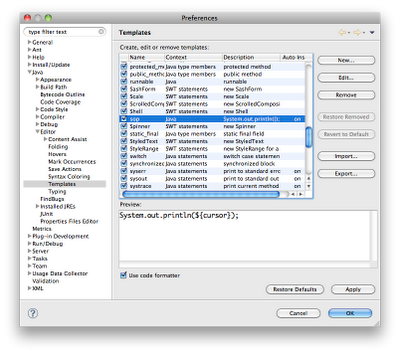
I also edited the "test" template to generate a JUnit 4 test (instead of the older style):
Eclipse comes with a bunch of pre-defined templates and you can add your own. For example, I added a template that expands "sop" into "System.out.println".
Ctrl+Space brings up the choices. In theory if you select Auto Insert and there is only one matching choice it will automatically fill in the template. In practice there are usually multiple choices so you have to pick from the list. That's usually just a matter of hitting Enter (as long as your choice is the first one).
You can find the templates in Preferences - Java - Editor - Templates.

I also edited the "test" template to generate a JUnit 4 test (instead of the older style):
@Test
public void ${name}() {
${cursor}
}
Tuesday, March 02, 2010
A Faster, Cleaner Database Design for Suneido
Current design:
In theory Suneido happily accesses databases bigger than physical memory. In practice, performance drops off rapidly when this happens due to swapping (page faults). You would think there would be a "working set" of data that would be a small portion of the database. But users tend to run things like historical reports or searches that access large portions of the data.
The other issue is that memory mapping the database makes reads fast (once the file is mapped into memory). But writes still have to go to disk (albeit somewhat asynchronously). And the index update writes are essentially random which is the worst case for disk performance. (Maybe SSD drives would help with this?)
Which led me to think, why not just keep the database in memory. But...
This has some nice features:
You could also periodically update the on-disk indexes, presumably during idle time on a background thread.
This seems pretty good, but there's more. Now that index updates are not being written to disk immediately, it becomes feasible to make the indexes persistent immutable data structures.
jSuneido already sort of does this, but in a complicated round-about way. Each transaction maintains an "overlay" of updates to indexes. When the transaction commits, these are merged into the real indexes on disk and other concurrent transactions are given a copy of the old index nodes so they don't see the changes. It works, but it's ugly and error prone.
With this new scheme, each transaction has, in effect, it's own copy of the indexes. Since it's a persistent immutable data structure, updates by transactions have no effect on each other. When a transaction commits, you merge it's indexes with the master. I think this would make the code quite a bit simpler.
It's hard to say how much faster this would be. Updates would be considerably faster, but reading would be much the same. So the overall speedup would depend on the mix of updates and reads. However, in a multi-user scenario (the current target for jSuneido) if you can reduce the load, that benefits everyone, including reads.
I'm not going to drop everything and implement this, but it's an interesting idea. I'll have to mull it over some more - there may be flaws that I haven't thought of yet. It might be something to work on once jSuneido is "finished" and deployed.
As with any "bright idea" like this, I can't help wonder if I'm reinventing the wheel. I wouldn't be surprised if someone was already using this approach. Of course, that doesn't mean that there's any way to reuse their code, or even learn from them. The internet might give us access to the world's knowledge, but it's still hard to find this kind of stuff.
Related posts:
Language Connoisseur
A Java Immutable Persistent Map
A Java Immutable Persistent List
jSuneido Progress
- entire database is kept in a single file
- the database file is accessed via memory mapping
- data records are immutable, updates add new versions
- indexes are mutable
- data records are used like a "log" for crash recovery
- indexes are not recovered, they are rebuilt
In theory Suneido happily accesses databases bigger than physical memory. In practice, performance drops off rapidly when this happens due to swapping (page faults). You would think there would be a "working set" of data that would be a small portion of the database. But users tend to run things like historical reports or searches that access large portions of the data.
The other issue is that memory mapping the database makes reads fast (once the file is mapped into memory). But writes still have to go to disk (albeit somewhat asynchronously). And the index update writes are essentially random which is the worst case for disk performance. (Maybe SSD drives would help with this?)
Which led me to think, why not just keep the database in memory. But...
- Despite the performance issues, I'm not sure it's reasonable to limit database size to physical memory.
- Loading the database into memory on startup and saving it to disk on shutdown would be slow.
- You still need to write something to disk for crash recovery.
This has some nice features:
- Similar start up speed (although slower shutdown)
- Less disk writes (only data, not indexes) - faster
- Disk writes are sequential (index updates were random) - much faster
- Allows databases bigger than memory
You could also periodically update the on-disk indexes, presumably during idle time on a background thread.
This seems pretty good, but there's more. Now that index updates are not being written to disk immediately, it becomes feasible to make the indexes persistent immutable data structures.
jSuneido already sort of does this, but in a complicated round-about way. Each transaction maintains an "overlay" of updates to indexes. When the transaction commits, these are merged into the real indexes on disk and other concurrent transactions are given a copy of the old index nodes so they don't see the changes. It works, but it's ugly and error prone.
With this new scheme, each transaction has, in effect, it's own copy of the indexes. Since it's a persistent immutable data structure, updates by transactions have no effect on each other. When a transaction commits, you merge it's indexes with the master. I think this would make the code quite a bit simpler.
It's hard to say how much faster this would be. Updates would be considerably faster, but reading would be much the same. So the overall speedup would depend on the mix of updates and reads. However, in a multi-user scenario (the current target for jSuneido) if you can reduce the load, that benefits everyone, including reads.
I'm not going to drop everything and implement this, but it's an interesting idea. I'll have to mull it over some more - there may be flaws that I haven't thought of yet. It might be something to work on once jSuneido is "finished" and deployed.
As with any "bright idea" like this, I can't help wonder if I'm reinventing the wheel. I wouldn't be surprised if someone was already using this approach. Of course, that doesn't mean that there's any way to reuse their code, or even learn from them. The internet might give us access to the world's knowledge, but it's still hard to find this kind of stuff.
Related posts:
Language Connoisseur
A Java Immutable Persistent Map
A Java Immutable Persistent List
jSuneido Progress
Labels:
concurrency,
database,
immudb,
suneido
Saturday, February 20, 2010
Blogger + Picasa Tweak
When I reference photos on Picasa from my Blogger blog I use the HTML under "Link to this album" and then "Paste HTML to embed in website" (using the Edit HTML function of Blogger)
However, when people click on the result they get taken to the album page of thumbnails. Some of my less technically savvy friends don't realize or notice that they can get a slideshow so they end up clicking on the photos one at a time to look at them.
You can fix to go directly to the slideshow by changing:
You can see examples in my Sustainable Adventure blog.
Note: Picasa also has an "Embed Slideshow" option under "Link to this Album" but I don't normally use this because it only shows small images and I'd prefer to have people view my photos larger. I do use it when I'm not as concerned about image size. (You can still click on it to go to the Picasa album, but most people won't bother.)
However, when people click on the result they get taken to the album page of thumbnails. Some of my less technically savvy friends don't realize or notice that they can get a slideshow so they end up clicking on the photos one at a time to look at them.
You can fix to go directly to the slideshow by changing:
?feat=embedwebsiteto:
#slideshowin the HTML. There are two occurrences - one for clicking on the photo and one for the caption.
You can see examples in my Sustainable Adventure blog.
Note: Picasa also has an "Embed Slideshow" option under "Link to this Album" but I don't normally use this because it only shows small images and I'd prefer to have people view my photos larger. I do use it when I'm not as concerned about image size. (You can still click on it to go to the Picasa album, but most people won't bother.)
Thursday, February 18, 2010
Visibility

The checking part went quite smoothly and quickly. The rebuilding/recovery part has been slow. I've been working on it for several days and it seems like I've made no progress. The only code I've written is tests and debugging! But whether it feels like it or not, I guess I was making progress because it "suddenly" started working today.
Recovery is hard for a number of reasons. For starters you're assuming the database has been corrupted, so you have to code a lot more defensively. Second, because you're working outside the normal operation of the database, you can't use the normal functionality. You're not doing transactions etc.
One lesson I (re)learned was how important "visibility" is. By that I mean being able to "see" the data you're working on. That's a large part of why debuggers can be valuable - they let you inspect the data. Often, inserting the right "print" statement in the "right" place is all it takes to figure out a bug. Of course, finding that right place is not so easy. In this case visibility meant writing a dump utility so I could see exactly what was inside the database. Obviously, I have a pretty good idea in general how it's structured, but not the details of exactly which types of blocks of data are in which sequence. And dumping to text files meant I could use tools like diff to compare before and after recovery.
PS. In hindsight, yes, it would have made sense to write the database checking much earlier so I could verify that databases weren't getting corrupted by operations. On the other hand, that was usually pretty obvious - it crashed!
Labels:
suneido
Monday, February 15, 2010
Readability
How often do you go to a web site to read an article and find that the page is plastered with distracting ads and other material, the text is too small, and the lines have way too many characters for comfortable reading?
Here's a solution - install the Readability bookmarklet. It will re-format the page you're on for easier reading - less distractions, bigger text, and shorter lines.
Before:

After:

Here's a solution - install the Readability bookmarklet. It will re-format the page you're on for easier reading - less distractions, bigger text, and shorter lines.
Before:

After:

Labels:
web
Friday, February 12, 2010
Buy O'Reilly eBooks Direct
When I wrote my last post - Buy Pragmatic Programmer eBooks Direct - I should have mentioned that O'Reilly has a similar deal for their eBooks - ePub, Mobi, and PDF formats, DRM free, and free updates. Not all of their books are available as eBooks (some are print only) but most of the newer ones are.
They even have a 3 for 2 sale on right now.
They even have a 3 for 2 sale on right now.
Labels:
books
Thursday, February 11, 2010
Buy Pragmatic Programmer eBooks Direct

Buying from Amazon is the path of least resistance since you can buy right from your Kindle.
But if you do that, you'll end up with a proprietary format with DRM that only works with your Kindle. (Although you can read them on your PC or iPhone or iPod Touch with the Kindle app.)
Instead I'd recommend buying direct. That way you can download the book in multiple formats - PDF, ePub (e.g. for iPhone or iPod Touch using apps like Stanza, or for Sony readers), or Mobi (for Kindle). The books are DRM free, and as a bonus, you can download updated copies when they come out.
I've bought a few eBooks from Pragmatic Programmers in the past, either on their own or together with a paper copy. It was very nice to be able to go back and download the Mobi version so I could have them as a reference on my Kindle.
The only very minor hassle is that you have to buy and download the books on a separate computer and transfer them to the Kindle. In Canada that means by USB since emailing to your Kindle is not supported here.
Thanks to Pragmatic Programmers, at least a small part of my eBook library is not locked to the Kindle. I hope more publishers follow their example.
Labels:
books
Tuesday, February 09, 2010
jSuneido Speed Issue Fixed
After some digging, I found the speed issue on Windows.
It didn't turn out to be Parallels - it was just as slow on my Windows machine at work.
It didn't turn out to be anti-virus - it was just as slow with anti-virus turned off.
I thought it might be Nagle problems again, although last time it was the opposite problem - slow on OS X and fast on Windows. But nope, not that either.
I narrowed it down to sending the response. Debugging showed it was fast receiving the request and executing it.
I found I had two methods for sending responses. One was doing selector.wakeup after changing the interestOps (like you're supposed to) and the other wasn't. Of course, the incorrect code was the method being used. I fixed the method being used and got rid of the other one. Problem solved.
Now, the speed is reasonable. 75 seconds to run the test suite with the cSuneido server, 100 seconds with jSuneido. I'm pretty happy with that considering the cSuneido version is C++ code that has been tweaked and optimized for years, whereas jSuneido is my first Java program and has barely been debugged, let alone optimized.
I think jSuneido can probably be faster, but even if it can't, its ability to scale to multiple threads/cores should allow it to outperform cSuneido when there are multiple users. I say "should" because I've barely started testing this. One very preliminary test took about 40 seconds with one client, 50 seconds with two simultaneous clients (on two cores), whereas cSuneido would be pretty much linear i.e. 80 seconds with two clients. Of course, it would be nice to have a quad-core machine to test with, but I haven't quite convinced myself that's excuse enough to buy a new Core i7 iMac :-)
Labels:
java,
performance,
suneido
Sunday, February 07, 2010
Removing Borders from Images on Blogger
This may be due to the template I'm using, or maybe even my browser, but in case other people are having the same problem, I thought I'd post my workaround. (Besides, it gives me a handy reference when I forget what to do!)
When I insert images into my blog posts I get a gray border around them. Like this:
 Sometimes that's ok, but often, like with this image, I don't want that border.
NOTE: The border doesn't show up while composing, or in preview, only (annoyingly) after you publish.
To remove it, I edit the HTML and add style="border: none;" to the img tag. (I'm not sure why this is necessary because it already has border="0" - maybe something in the CSS.) The result should be the image without the gray border, like this:
Note: If you're reading this in something like Google Reader you may not see the border.
When I insert images into my blog posts I get a gray border around them. Like this:

NOTE: The border doesn't show up while composing, or in preview, only (annoyingly) after you publish.
To remove it, I edit the HTML and add style="border: none;" to the img tag. (I'm not sure why this is necessary because it already has border="0" - maybe something in the CSS.) The result should be the image without the gray border, like this:
Thursday, February 04, 2010
Back to Work on jSuneido
I fixed a couple of bugs and now all our application tests pass, both standalone on jSuneido, and client-server (with the Windows cSuneido client).
But quite slowly - about 4 times slower running client-server with jSuneido as the server instead of cSuneido. I'm not surprised it's slower, but 4 times seems like a lot. Strangely, when I run the tests under jSuneido standalone (i.e. not client-server) they run about the same speed as cSuneido client-server (which is still about half the speed of cSuneido standalone). So presumably the difference is the client-server networking.
I've been testing with the server running on OS X (since that's where I develop) and the client running under Parallels. Maybe the networking slows down the Java test so I decided to try running the Java server on Windows as well as the client.
First I had to remember how to package up jSuneido as a jar file. I've done this before, but not for a while. In Eclipse you use Export > Runnable Jar File.
Next, I found I didn't have Java on my current Windows 7 Parallels VM. I downloaded and installed the JRE (Java Runtime Environment).
I got some weird errors until I went back and rebuilt my jar file with "Extract required libraries into generated JAR" (instead of "Package required libraries into generated JAR"). I'm not sure exactly what the difference is, or why it makes a difference to running my code. I made a half-hearted attempt to find it in the Eclipse Help but didn't get anywhere.
Finally I got it running, but it was soooooo slow! Instead of the IDE starting more or less instantly, it took more like a minute. Ouch.
I figured it might help to run it with the -server option (that's the default on 64 bit Java, which is what I'm running on OS X). But I discovered the JRE doesn't include the server version. Grrrr. It comes with the JDK (Java Development Kit). That seems odd to me, but that appears to be the way it is.
So I installed the JDK, but the default Java that's on the path is still the JRE one. So now I have two separate installations of Java with the "wrong" one on the path. Sigh.
I ignored that problem and used the absolute path to run the JDK one to get the server version. But it's still just as slow. Argh!
The only thing I can think of is that jar files are zip files and working with zip files (or other compressed archives) has always seemed painfully slow under Parallels. I'm not sure why. Maybe decompression normally takes advantage of CPU features that aren't accessible under Parallels? Or the anti-virus program slowing it down? (I'm using Microsoft's anti-virus.)
The next step is to try it on my Windows machine at work to eliminate the Parallels issue. Or to make a simple Java client so I can try it client-server all on OS X without Windows or Parallels.
And if it's really that slow, then it's time to do some more profiling and see what I can do to speed it up.
Labels:
java,
parallels,
subversion
Wednesday, February 03, 2010
Getting Past “Good Enough” eBooks
Getting Past “Good Enough” eBooks: Liza Daly | Digital Book World
Now I have a Kindle I'm noticing the same kind of things, but I have to shake my head - this stuff is so basic!
Another example is that section headings frequently show up at the very bottom of the page. We were fixing this problem in nroff 30 years ago!
Of course, software is no better, people keep making the same mistakes we've known were bad for decades.
Tuesday, February 02, 2010
My New Kindle eBook Reader

Several people have asked why I didn't wait for the Apple iPad. Of course I want an iPad. I love my iPhone and I'd love a similar device with a bigger screen. But ...
- The iPad is supposed to have 10 hours battery life - that's great for a laptop, not so good for an eBook reader. The Kindle, with it's E Ink display will last a couple of weeks. That's critical for travel, especially off the beaten path and away from power (e.g. trekking).
- The iPad isn't available yet, and it's unclear when it will be available in Canada. I could be waiting forever if I keep waiting for the next great thing (I've been waiting a while for the Kindle).
- As far as I can tell, Amazon has the best selection of books. That's what stopped me from buying the Sony eBook reader, which was available sooner in Canada, and in some ways is nicer than the Kindle. Apple hasn't been saying much about their books - how much selection they'll have and what they'll have in Canada.
On top of that, it doesn't seem environmentally friendly to be consuming all those trees and all the resources that go into converting them to physical books.
I've been trying to use the library more, but it's frustrating. Their software sucks. (They just upgraded to a new system and it sucks almost as bad as the old system.) They don't get new books very quickly. They don't get most computer books at all. And you never know when you'll get a book you reserve. It might be tomorrow, it might be next year. And it's no good for books you might want to refer back to. I'll continue to use the library, but mostly for fiction and general non-fiction where I don't care too much when I read it.
Sony has an interesting feature where you can borrow eBooks from your library, but only certain libraries support this (not ours) and there are various limitations. Sony also lets you lend your books to other people with Sony readers - I would really like this feature.
Kindle positives:
- nice display, very easy to read, good for reading outside in bright light
- small, light-weight
- great battery life
- ability to buy books right on the device (don't need to download to your computer and then sync like the Sony)
- ability to create bookmarks and add notes
- ability to read free content in pdf or mobi format
- much more convenient to carry around the Kindle rather than a bunch of books
- free 3G wireless (cell phone) access (but only to buy books from Amazon)
- no back-light (Shelley loves being able to read on her iPod Touch at night)
- slow display - ok for turning pages, but not so good for user interface
- no touch screen (I'm so used to my iPhone I keep trying to tap links on the Kindle)
- no wifi
- no Wikipedia access in Canada
- no web browsing in Canada
- no pictures in magazines in Canada
- no color (black and white display)
- limited memory and no way to expand it (e.g. for an offline copy of Wikipedia)
- you have to buy books from amazon.com (US), but my wish-list and gift cards are on amazon.ca (Canada)
- too easy to buy books ;-)
I debated whether to buy the small or large (DX) Kindle. The large one would be a lot better for reading PDF's that you can't reformat, but I went with the smaller one for ease of carrying.
It's too bad there isn't a better display that combines the battery life and readability of E Ink with the color and speed of a laptop display. The One Laptop Per Child computer had an interesting display with a low power black and white mode (like E Ink) but also a color mode. But no one else seems to be pursuing this kind of display.
The other big negative to all this is that the books you buy are tied to a specific device/company. If I buy books for my Kindle I can't switch to the Sony reader and vice versa. This is mostly because of the DRM copy protection. Imagine if music was tied to a specific player instead of being able to play your mp3's anywhere. (However, Amazon has software that lets you access your Kindle books from your PC, Mac, iPhone, or iPod Touch.)
Labels:
gadgets
Monday, February 01, 2010
Thanks to the Weave Team!
I just installed the 1.0 release of Mozilla Weave and I was excited to see this in the Release Notes:
I had actually disabled Weave on most of my computers because of this. But that was a pain because then my passwords weren't synced. Now I can re-enable it.
Now if only it would just sync my add-ons and work with my iPhone ...(users are never satisfied!)
If you use a master password, Weave Sync will automatically connect after you enter in your master password. Weave Sync will stay disconnected until you enter your master password or you choose to manually connect.It drove me crazy to have the request for the master password come up every time I started Firefox, and it totally baffled anyone else using my computer (you can just cancel, but they would think they couldn't use Firefox without the password)
I had actually disabled Weave on most of my computers because of this. But that was a pain because then my passwords weren't synced. Now I can re-enable it.
Now if only it would just sync my add-ons and work with my iPhone ...(users are never satisfied!)
Labels:
firefox
Subscribe to:
Posts (Atom)